 NewsAina Ring Explained: The AI Smart Ring That Lets You Control Apps Without Your Phone
How to Delete Data From Oura to Clean Up Your Profile & Ensure Privacy?
Delete your Oura data safely and ensure privacy. Step-by-step guide to remove personal information from your smart ring and app.
Independently tested. We never accept payment for reviews.How we test
What’s inside5 sections · 7 min read
Not long ago, after finishing my review of the Oura Ring, I had to pass it on to a colleague for another project. But before I handed it over, I realized I needed to clear all my personal data from it. At first, I didn’t know how to delete data from Oura, but after a little research, I found the way.
I discovered there are two main ways to delete data from Oura. The first option is to completely delete my account, which wipes out all my data from Oura’s servers. The second is to perform a factory reset on the ring itself, which erases all the data stored on the ring. I weighed my options and chose the one that suited my needs best.
If you’re in the same boat, I’m here to help. Whether you want to start fresh with your health tracking or you’re giving your ring to someone else, I’ll guide you through the process.
How to Erase Oura Ring’s Data?#
The Oura Ring adheres to strict privacy protocols that comply with the General Data Protection Regulation (GDPR) and the California Consumer Privacy Act (CCPA). These regulations assist you in requesting the erasure of your personal data from your Oura Account anytime, any day.
Join me to explore the two methods for deleting your Oura data:
01Factory Reset Oura Ring#
Since a factory reset only wipes data from the ring itself and not my Oura account, I learned that a factory reset was just what I needed. It clears all the data from the ring itself but leaves everything in my Oura account untouched. It’s a simple process, and I’ll make sure you can follow along easily.
But before I list the steps, make sure your internet connection is stable for a hassle-free factory reset. Also, charge your Oura Ring to at least 50% to avoid any mid-process errors.
Now, here’s how to perform a factory reset on your Oura Ring:
- Place your Oura ring on a flat surface. I remember feeling the urge to touch it when I was formatting my own ring, but unfortunately, formatting failed. So, it’s crucial to keep it untouched and on a flat surface.
- Open the Oura app and tap the ring icon at the top right corner of the home screen.

- Give the screen a left swipe to access the second slide of the page.
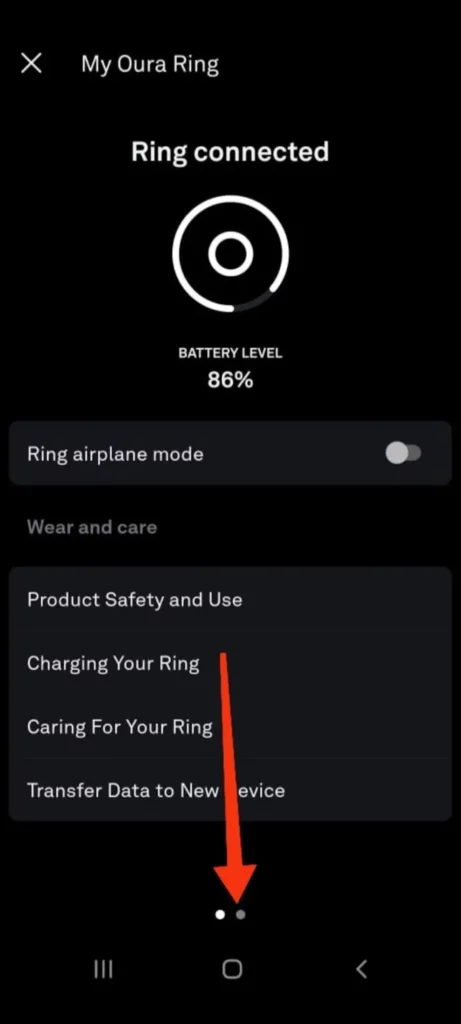
- Choose Factory Reset, confirm the action by tapping OK, and wait for the ring to reset.
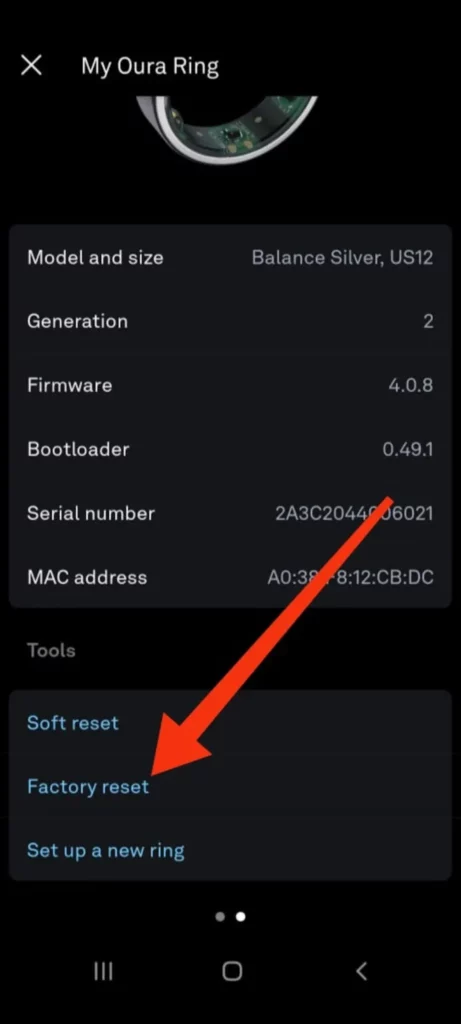
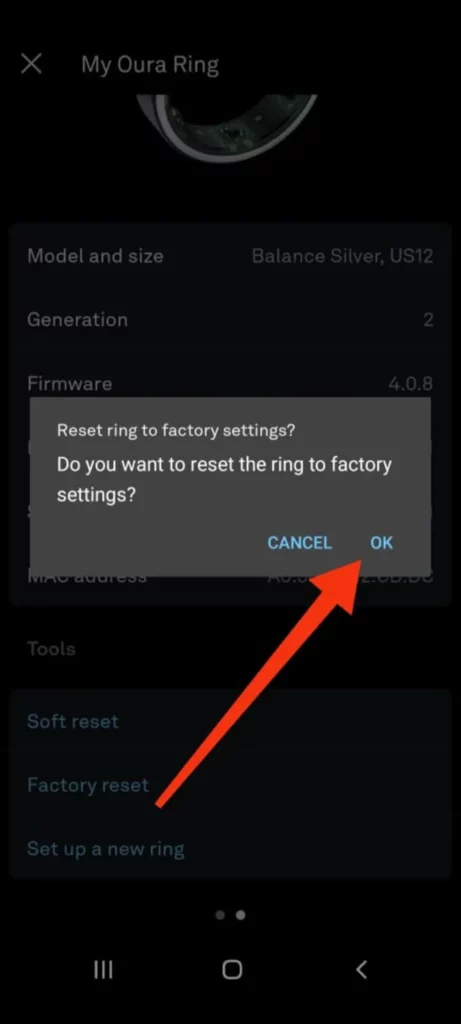
- Ensure the ring stays untouched on a flat surface for at least 2 minutes.
Great job! You’ve cleared the data from your ring. Since I wasn’t planning to use the ring again, I went ahead and removed it from my phone’s Bluetooth settings. If you’re in the same situation, you might want to do the same. Just head to your phone’s Bluetooth settings and remove your Oura Ring from the list of connected devices. Remember, this step isn’t a must, so it’s totally your call!
02Completely Deleting Data from Oura#
Just so you know, before you go ahead, deleting data from Oura is permanent. All your personal details will be permanently removed from your Oura account. It’s wise to back up your Oura Ring data beforehand in case you need it later. Additionally, deleting your data means you’ll lose access to Oura’s web services, API, Health Risk Management platform, and Oura Teams.
There are two ways to delete your Oura account: through the app or the Oura website. I’ve mentioned a breakdown of both methods below:
1. Delete Data from Oura App
Deleting your account from the app is convenient. You can do it right from your phone. Here are the steps to delete your data and the account:
- Open the Oura App and tap the hamburger icon in the top left corner.

- Select Settings from the menu.

- Scroll down until you see Delete Account and All Data, and tap on it.

- You’ll see a confirmation message asking you to confirm deletion. Tap the Delete button.
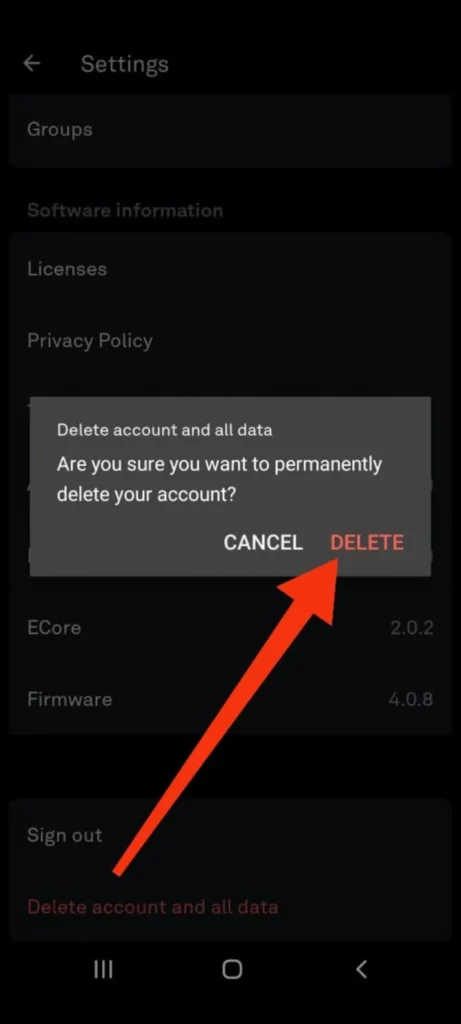
- Oura will ask you one last time to be sure. Tap Yes, Delete My Oura Account to finalize.

2. Delete Data from Oura Web
If you don’t have your phone handy or prefer using a computer. Here is how to delete your account and data from the Oura web:
- Go to Oura Ring’s official website and log in to your Oura account using your email address and password.

- Click on the profile icon in the top right corner.
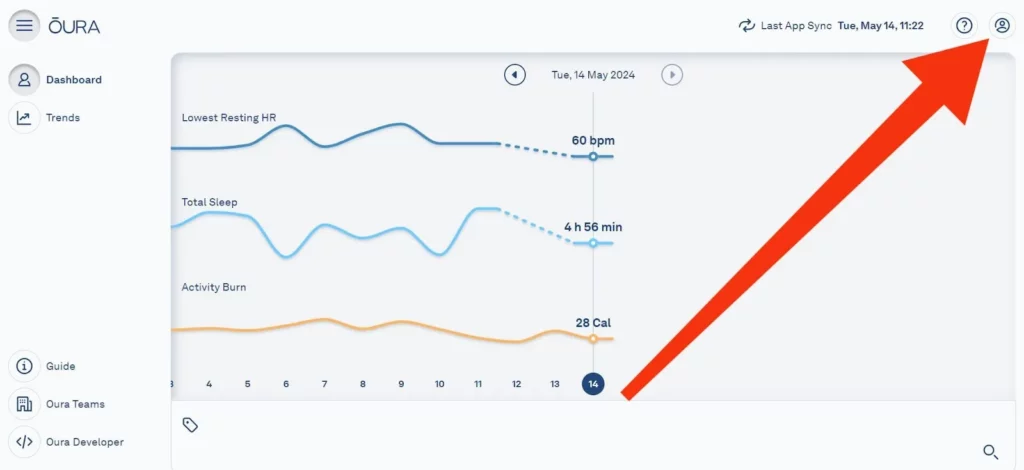
- Click on the My Account option from the menu.

- Scroll all the way down the page and click on Delete Account.
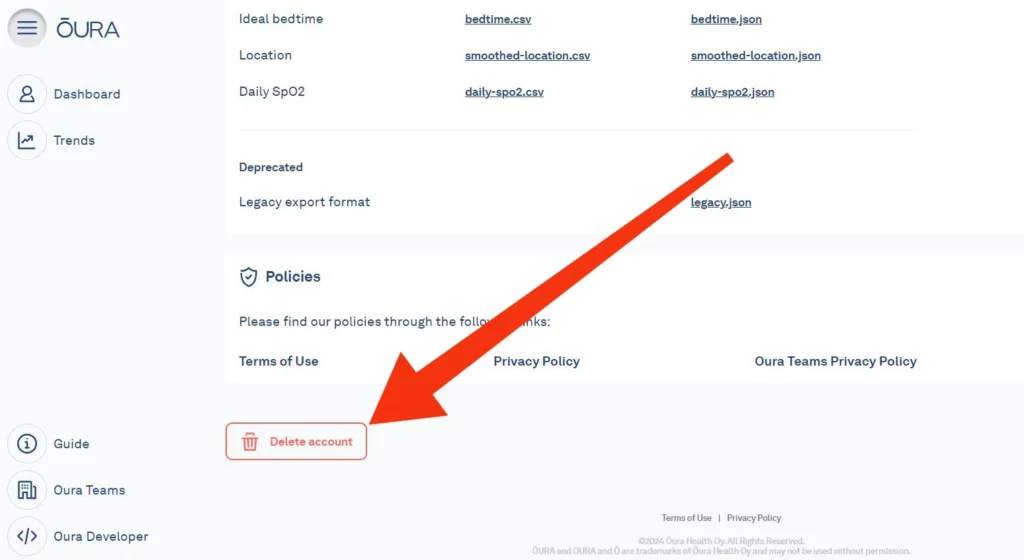
- A box will pop up asking you to confirm your email address. Type your email in it.

- Now, click Delete to finish the process.

Note:
Canceling your Oura membership doesn’t automatically delete your account data. But deleting your account will also cancel your Oura membership (if you had one) and delete your data from its servers.
Deleting Women’s Health Data from Oura#
When managing my menstrual cycle data, I have detailed options for deleting or wiping out data. Here’s how I delete my entire women’s health data or specific period entries:
Deleting Entire Women’s Health Data#
If I wipe out all my Women’s Health data from Oura to start fresh, it removes all period entries, predictions, and menstrual cycle info and disables all Women’s Health features. Here’s how I do it:
- Begin by tapping the menu icon located in the top-left corner of your Oura app’s home screen.
- From the menu options, select Settings.
- Scroll down and find the section labeled Women’s Health.
- Tap the option labeled Remove Women’s Health Data. Confirm your selection when prompted to ensure you intend to erase this data permanently.
Deleting a Period Entry#
Unlike wiping out all my data, Oura gives me the flexibility to delete individual period entries. This way, I can keep track of my overall cycle data while removing any inaccurate or unwanted entries. Here’s how I do it:
1. Tap the Cycle Insights home card on your Oura app’s home screen. This will display a detailed view of your cycle data.

2. Locate and tap the Calendar option positioned at the bottom below the graph representing your cycle trends.

3. Identify the specific date marked with a red circle, which indicates the period entry you wish to remove. Tap on that date.
4. Scroll down to the bottom of the Period screen and tap the option labeled Delete period. This will permanently remove that specific entry from your cycle data.
By following these steps, you can effectively take charge of your women’s health data within the Oura app. This means you can keep only the information that you find relevant and truly useful.
Can I Delete One Night’s Data from My Oura Ring?#
I found out the hard way that you can’t just delete a single night’s data from your Oura Ring. There was this one time I only wore it for part of the night, and the data was all over the place. I was worried it would mess up my stats, but it turns out Oura’s pretty smart. It looks at your data over several days to give you your averages, so one-off night isn’t going to throw everything off.
So, if you’re stressing about a bit of inaccurate data, don’t. I learned that Oura’s long-term insights remain reliable because they’re based on the bigger picture, not just a single night. It’s a relief to know that overall trends won’t be affected by one night’s slip-up. Just keep wearing your ring, and Oura will take care of the rest.
Frequently Asked Questions#
01Can I Delete a Workout on Oura?
Yes! Oura actually lets you review workouts detected by the ring before they’re added to your data. You can confirm the details (time, duration, type, intensity) or dismiss them entirely if they’re incorrect.
02Can You Reset Your Oura Data?
There are two ways to “reset” your Oura data, depending on what you want to achieve:
1. Factory Reset Your Ring: This clears data stored on the ring itself, but your Oura account information remains intact.
2. Delete Your Oura Account: This completely removes all your data from Oura’s system, including your account and any synced data from the ring. It also cancels your Oura membership.
03How Do I Clean My Oura Ring?
For optimal performance, it’s recommended to clean the infrared LED sensors on the inside of your ring once a week. Simply wipe them with a soft cloth or rinse the ring with mild dish soap and water.
04How Can I Delete Sleep Data from Oura?
You have the option to delete all data, as I explained in this article. However, there’s no way to remove or exclude specific sleep data, whether accurate or mistakenly listed.
Wrap Up#
That’s all you need to know about deleting data from your Oura Ring! I’ve helped you understand both how to factory reset the ring, which only removes data stored on the device itself, and how to completely delete your Oura account, which wipes all your information from Oura’s system.
Remember, Oura prioritizes user privacy. However, if I’ve misplaced my ring, lost it, or am transferring ownership to someone else, I always delete my data to ensure my personal health information stays protected. You should do the same to keep your data secure.
 SP
Written by
Review Specialist
With an eye for detail and a particular interest in FemTech, Shradha at WearableXP oversees editorial direction and publishing standards. Her focus on Smart Rings and compact wearables centers on how they integrate health insights, sleep tracking, and recovery metrics into day-to-day lives, making data feel more practical and relatable.
More from Shradha 298 storiesKeep readingmore from Smart Rings
All storiesNewsAina Ring Explained: The AI Smart Ring That Lets You Control Apps Without Your Phone Screenless BandsFitbit Air vs Ultrahuman Air: Which Screenless Wearable Is Right for You?
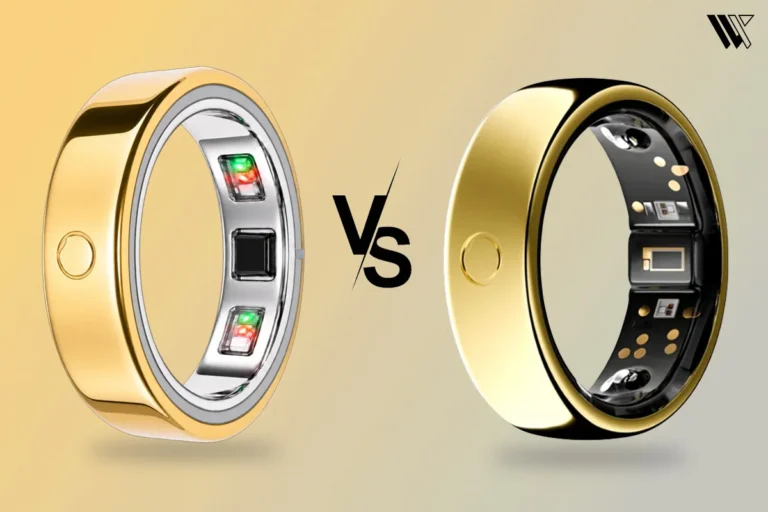 Smart RingsCircular Ring 2 vs Circular Ring 3: What Changed and Should You Upgrade?
What’s inside