

Tapping your wrist to pay still feels slightly futuristic, but in 2026, it’s just practical. Whether you’re rushing through the subway, finishing a post-workout coffee run or traveling without wanting to pull out your phone, an NFC-enabled smartwatch can quietly replace your wallet.

But here’s what most people don’t realise: just because a watch has NFC doesn’t mean payments will work for you. Yes, you read that right! Bank support varies, wallet ecosystems are locked and iPhone and Android compatibility is not interchangeable.
So instead of giving you a shallow list of “smartwatches for payments,” this guide breaks down the smartwatches that actually make contactless payments reliable. So, if you’re buying a smartwatch in 2026 and payments matter to you, this is what you need to know first.
Quick Verdict
Best Overall for Payments: Samsung Galaxy Watch 8
Decode the Decor
The Smart Jewelry Revolution — a practical guide to wearable tech.
Best overall Google Wallet and Samsung Wallet Android integration and app support.
Best for iPhone Users: Apple Watch Series 11
Apple Pay is still the most seamless wearable payment system and is available on the entire line of Apple Watch models.
Best for Android Purists: Google Pixel Watch 3
It has a great Google Wallet integration.
Best Budget NFC Watch: TicWatch Atlas
It offers affordable Google Wallet support with great battery life options.
Best Fitness + Long Battery + Payment: Garmin Venu 3
It has a 14-day battery life with Garmin Pay, if your bank allows it.
Specifications Table
| Model | Payment Platform | NFC | iOS Support | Android Support | Bank Support Strength | Battery | Price |
|---|---|---|---|---|---|---|---|
| Apple Watch Series 11 | Apple Pay | Yes | Yes | No | Excellent | ~2 days | $299–$430 |
| Apple Watch SE (3rd Gen) | Apple Pay | Yes | Yes | No | Excellent | ~1 day | ~$249 |
| Samsung Galaxy Watch 8 | Samsung Wallet + Google Wallet | Yes | No | Yes | Excellent | ~2 days | $349–$549 |
| Google Pixel Watch 4 | Google Wallet | Yes | No | Yes | Very Good | ~1.5 days | ~$300 |
| OnePlus Watch 3 | Google Wallet | Yes | No | Yes | Very Good | ~5 days | ~$325 |
| Garmin Venu 3 | Garmin Pay | Yes | Yes | Yes | Moderate | Up to 14 days | ~$435 |
| Fitbit Versa 4 | Fitbit Pay | Yes | Yes | Yes | Limited | ~6 days | ~$230 |
| TicWatch Atlas | Google Wallet | Yes | No | Yes | Very Good | 4–45 days | ~$216 |
How Contactless Payments Work on Smartwatches
Before we dive in, let’s simplify the tech.
NFC Explained
NFC (Near Field Communication) is a short-range wireless tech. When you tap your watch near a payment terminal, the NFC chip communicates with the terminal to process payment.
It works offline and does not require LTE. Neither does it require your phone to be nearby after it is set up. Think of it as a debit or credit card just in your device instead!
Tokenization
When you add your card, your real card number is not stored. Instead, a unique digital token is created, which is stored securely in the watch. Even if someone intercepted it, they wouldn’t get your actual card number.
Security Element
Most premium watches use a secure element chip, which is a hardware-level protected area that stores payment credentials separately from the operating system. That’s why payments still work even if your watch has no internet, the phone isn’t nearby and even when your watch is in airplane mode.
Wallet Platforms Explained
Apple Pay
- Works only on iPhone
- Has the widest bank support in the world
- Very good public transit support
- Most seamless setup process
But if you ever switch to an Android, your watch will be rendered useless.
Google Wallet
- Wear OS only works on Android phones
- Very good global support
- Good public transit support
- Peer-to-peer payments in some countries
Samsung Wallet
- Works only on Samsung devices
- Works in conjunction with Google Wallet on Galaxy Watches
- Very good in Samsung-dominant regions
Garmin Pay
- Works on select Garmin watches
- Less flexible bank support
- Excellent for runners
Fitbit Pay
- Limited country support
- Fewer banks
- Works on both iPhone and Android devices
Important tip: In many countries, there are digital wallets such as Curve that can be used as a bridge card.
Best Smartwatches for Payments: Our Detailed Picks
Apple Watch Series 11

If you’re all about the Apple ecosystem, first of all, i dont blame you! It is seamless. Therefore, the Apple Watch Series 11 remains the undisputed gold standard for contactless payments on a wearable and in 2026, it’s better than ever.
Apple Pay on the Series 11 isn’t just “supported”, it’s deeply integrated. You add your cards through the Wallet app on your paired iPhone, and they automatically sync to the watch. Once that’s done, payments work at virtually any NFC terminal worldwide, without needing Wi-Fi, an internet connection or even your iPhone nearby.
Here’s what makes the Series 11 stand out for NFC payments:
- Seamless Setup & Sync- Adding cards is one of the simplest processes in wearables. Open the Wallet app on your iPhone, tap “Add Card,” follow the prompts and within seconds, your Apple Watch has the same cards ready to tap.
- Works Everywhere, Offline- Once set up, Apple Pay on the Series 11 works offline. Meaning if you walk into a Starbucks with no Wi-Fi or mobile signal, you can still tap and pay without hesitation. That’s because the secure token is stored locally on the watch’s Secure Element, which is a protected chip that keeps payment credentials out of reach from malware or OS-level breaches.
- Best Global Merchant Support- Apple Pay has one of the widest acceptances of any wearable wallet worldwide. In many countries, transit systems (subways, buses and train gates) directly support Apple Pay. That’s a big advantage over some competitors whose wallet support can be patchy depending on the region.
- Security First- Every time you put the Series 11 on your wrist, it needs wrist detection and a passcode before payments work. If someone steals your watch, you can instantly use Find My to lock it and remove cards remotely via iCloud, disabling payments altogether.
The battery has always been my only complaint with the Apple Watch series, but it has improved in the Series 11, delivering around ~2 days in typical use, even with NFC active and notifications firing at my wrist. Not the best battery life, but still solid given how much the watch can do beyond payments, be it health sensors, always-on display, GPS, streaming and much more.
Samsung Galaxy Watch 8

For Android users looking for a smartwatch that actually makes contactless payments easy and reliable, the Samsung Galaxy Watch 8 is one of the strongest picks in the smartwatches for payments category in 2026!
Unlike some watches that tack on NFC as an afterthought, the Galaxy Watch 8 treats contactless pay as a core feature and it offers flexibility that many Android smartwatches don’t.
Why, you ask? Let me tell you:
- Dual Wallet Support: One of the Galaxy Watch 8’s biggest advantages is that it supports both Google Wallet and Samsung Wallet on the same device.
- Setup is Quick and Intuitive: Adding cards is as simple as opening the Wallet section in the Galaxy Wearable app, scanning the card, and verifying with your bank. Once that’s done, you can tap and pay at any contactless terminal without even unlocking your phone.
- Works Without Your Phone Nearby: Speaking of phones, after setup, the Watch 8 can pay independently. Your phone doesn’t need to be in your pocket and you don’t need an active data connection. The tokenized payment credentials live safely in the watch’s Secure Element, so payments work reliably offline.
- Broad Merchant & Transit Acceptance: Google Wallet has strong global merchant support. Between Google Wallet and Samsung Wallet, the Watch 8 is accepted at many retail contactless terminals, vending machines and pay terminals supporting tap-to-pay.
- Strong Security Protections: The Galaxy Watch 8 requires a secure unlock method involving PIN, pattern or biometric lock on your phone companion app before payments are enabled. And because tokens are stored in a hardware-level secure component, your real card details are never shared with merchants, only a tokenized secure version is.
If your watch is lost or stolen, you can remotely lock or erase it via Samsung’s Find My Mobile service. You can also remove cards remotely from your Samsung account and the payments instantly stop working.
The downside? The watch works only with Android phones and are not compatible with iPhones. The battery also won’t last as long as basic fitness watches, but for smartwatch and payment use, it’s very competitive.
Google Pixel Watch 4
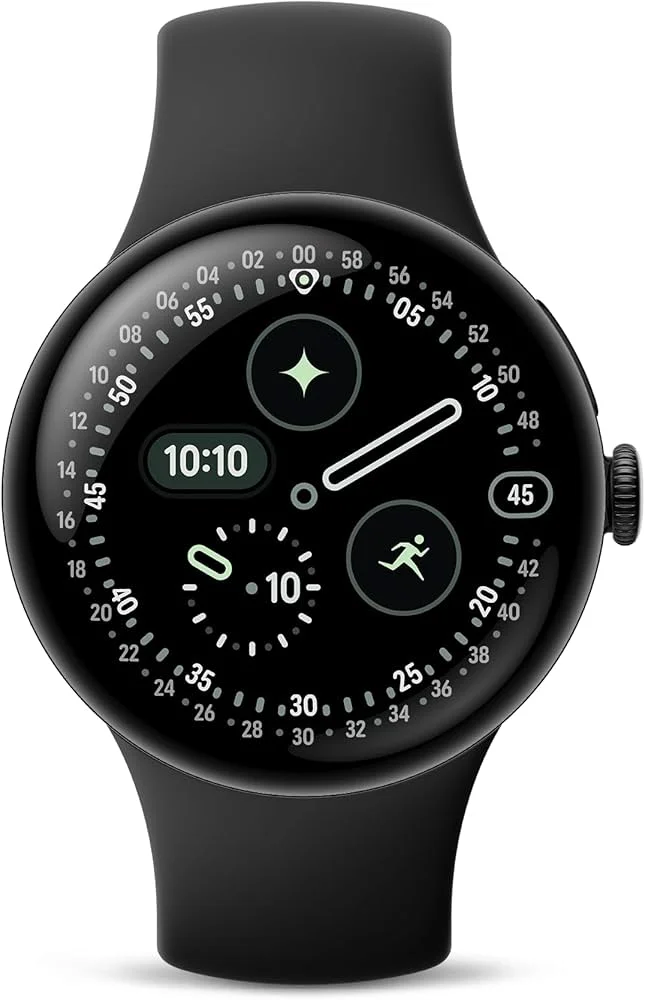
If you’re after a Wear OS device that feels modern, polished and genuinely ready for contactless payments, the Google Pixel Watch 4 delivers one of the most refined Google Wallet experiences available on a smartwatch in 2026.
Unlike earlier Pixel watches, where NFC payments sometimes felt like an afterthought, Google has made tap-to-pay a core part of how this watch functions with Wear OS and the Pixel Watch 4’s hardware and software show it.
- Deep Google Wallet Integration: Google Wallet is the payment platform that drives NFC transactions on the Pixel Watch 4. Add your debit or credit cards in the Wallet app on your paired Android phone and they sync over to the watch for instant use at contactless terminals.
- Works Without Your Phone Nearby: Once you’ve set up Google Wallet and added cards, the watch can pay independently at NFC terminals even with no phone in your pocket and no mobile data.
- Security & Ease of Use: Before you pay, the watch needs to be unlocked via wrist detection and your chosen unlock method (PIN or pattern). After that, a simple tap near the NFC reader processes the payment, just like on a phone. The tokenization system works the same and doesn’t reveal your card number.
The Pixel Watch 4 carries competitive battery life for a full-featured AMOLED smartwatch, which is around ~30-40 hours depending on size and settings, with a Battery Saver mode that can extend it further. However, like all Pixel watches, it doesn’t pair with iPhones.
Google Wallet’s regional availability, including bank support for contactless payments, can vary across the U.S., so always confirm that both Google Wallet and your specific bank support NFC payments on Wear OS in your state before buying. You may also need to align the watch face very close to the reader with your Pixel watch because contactless doesn’t register from far away.
Garmin Venu X1

If you want a smartwatch that blends premium design, long battery life, serious fitness tracking and contactless payments, the Garmin Venu X1 is one of the most capable all-around Wearables in 2026, especially for users who want NFC pay without sacrificing core smartwatch features.
Garmin doesn’t use Apple Pay or Google Wallet. Instead, the Venu X1 leverages Garmin Pay, Garmin’s built-in contactless payment system. The good news? The hardware does include NFC specifically to support Garmin Pay, so you can tap to pay at terminals once everything is set up correctly.
Garmin Pay uses your watch’s NFC chip to handle contactless payments at any terminal that accepts wide-market NFC tap-to-pay. You add your card via the Garmin Connect app on your phone and Garmin Pay turns your real card into a secure token stored safely on the watch. When you tap to pay, the terminal sees the token, not your actual card number, keeping your payment secure.
- Works With iPhone & Android: One of Garmin’s biggest perks is cross-platform support and the Venu X1 works with both iPhones and Android phones. So whether you switch phone ecosystems or share devices within a household, Garmin gives you more flexibility.
- Security: Before making a payment, Garmin Pay requires that you enter a passcode on the watch and it stays active only while you’re wearing it. If your watch is lost or stolen, you can disable Garmin Pay from your Garmin account and cards can be removed remotely from Garmin Connect.
The only catch? While the Venu X1 does have NFC and Garmin Pay, the list of supported banks and cards isn’t as broad as with Apple Pay or Google Wallet. Depending on your region, you may find that fewer banks work with Garmin Pay.
But the Garmin Venu X1 has impeccable battery life. Garmin’s PowerMode efficiency and AMOLED display mean you’ll get multi-day battery life even with NFC payments, fitness tracking, GPS, notifications and health metrics running.
TicWatch Atlas

If you’re hunting for an affordable Wear OS smartwatch with solid NFC payment support, the TicWatch Atlas deserves a spot on your shortlist of best smartwatches for payments in 2026. It doesn’t have all the bells and whistles of flagship models, but its payment experience, powered by Google Wallet, is surprisingly reliable for the price.
The TicWatch Atlas has the following features:
- Google Wallet: While some budget smartwatches may promise NFC, they lack the functionality of a wallet. The TicWatch Atlas has full functionality with Google Wallet.
- Operates Independently After Setup: After you have set up your cards and completed the initial setup on your phone the TicWatch Atlas operates independently at contactless payment terminals without needing your phone present.
- Security: Google Wallet operates with tokenization and secure storage of your card information.
- Real World Payment Experience: While the overall experience with NFC tap payments is smooth you may need to position the watch face closer to the payment terminal than you would with a more expensive watch.
However, it supports Android-only and won’t pair with an iPhone. The NFC range also isn’t as strong as premium watches, so expect to tap a little closer.
OnePlus Watch 3

If you’re after an NFC-ready Wear OS smartwatch that balances clean design, reliable payments and great battery life, the OnePlus Watch 3 is a compelling choice in 2026, especially for Android users who want dependable contactless pay without premium flagship pricing.
Unlike Garmin or Fitbit, which use their own payment platforms, the OnePlus Watch 3 leans on Google Wallet, Wear OS’s native contactless payment system. That means once you add your cards to your Android phone, payments with a tap from your wrist just work.
- Full Google Wallet Support: Adding your debit or credit cards is simple. You open Google Wallet on your Android phone, add your cards there and they automatically sync to the OnePlus Watch 3. This makes everyday purchases quick and friction-free.
- Works Independently After Setup: Once your cards are on the watch, Google Wallet stores a tokenized version of each card securely in the device.
- Security: Google Wallet uses tokenization, so your real card numbers are never shared with merchants.
- Battery Advantage: OnePlus is known for squeezing extra life out of Wear OS hardware and the Watch 3 is no exception.
It is Android only, just like all Google Wallet watches, it doesn’t support iPhone pairing. The NFC range can vary depending on terminal design and sometimes closer alignment is needed.
Fitbit Versa 4

If you want an NFC-enabled watch that’s lightweight, fitness-focused and works with both iPhone and Android, the Fitbit Versa 4 is one of the more practical choices in 2026. Unlike Apple Watch or Wear OS devices that rely on Apple Pay or Google Wallet, the Versa 4 uses Fitbit Pay to handle contactless payments.
Fitbit Pay won’t have as broad support as the bigger wallet players, but where it is supported, it’s quick and convenient.
- Fitbit Pay Integration: Fitbit Pay lets you add supported debit or credit cards directly through the Fitbit app on your phone. Once your cards are onboarded, the Versa 4 stores secure payment tokens that can be used at any NFC contactless terminals.
- iPhone and Android Support: One of the Versa 4’s biggest advantages is cross-platform compatibility. Unlike Wear OS watches (Android only) or Apple Watch (iPhone only), the Versa 4 pairs with both iOS and Android devices. That makes it a good choice if you switch devices or share a Fitbit family account.
- Fitbit Pay Security: Fitbit Pay uses tokenization to keep your payment info safe, meaning your actual card numbers aren’t transmitted during a transaction. The watch also requires you to unlock it via PIN before you can tap to pay.
A real limitation with the Versa 4 is that Fitbit Pay’s bank support is more limited than Apple Pay or Google Wallet. In the U.S. and many major regions, many of the big banks are supported but you’ll want to double-check Fitbit’s official list before buying if contactless pay is your primary reason for getting a watch.
Apple Watch SE 3

If you want many of the conveniences of Apple’s wearable ecosystem without the high end price tag, the Apple Watch SE 3rd Gen is a standout choice, especially for contactless payments with Apple Pay.
It doesn’t have all the bells and whistles of the Series 11 or Ultra lineup, but when it comes to NFC payments, the SE 3 delivers the core experience cleanly and reliably.
- Apple Pay Works Seamlessly: Like every modern Apple Watch, the SE 3 includes an NFC chip specifically to power Apple Pay. The setup is straightforward, you just add your debit/credit cards in the Wallet app on your iPhone and they sync to the watch for instant tap-to-pay access.
- Same Secure Token System as Flagship Apple Watches: Apple Pay on the SE 3 uses secure tokenization, wherein your real card number isn’t shared with merchants. The encrypted payment token is stored in the watch’s secure hardware component, locked down and separate from the rest of the operating system. Before you can pay, the watch must be unlocked, typically via wrist detection and a passcode, which adds a layer of safety.
However, the Apple Watch SE 3 only pairs with iOS devices and has no Android compatibility. It also lacks advanced health sensors like ECG and some high-end metrics, but that doesn’t affect NFC payments.
Security & Privacy Considerations
- Biometrics or passcode is mandatory for watches such as the Apple Watch, in addition to wrist detection. Wear OS requires unlocking before payment, while Garmin requires passcode entry before tap.
- Lost your watch? Disable it remotely using Find My on Apple, remove cards from Google Account or lock using Samsung Account. Payments will cease immediately.
- The risk of payment in a store is also very low since the NFC range is a few centimeters and requires a tap to make a payment.
Real-World Examples
- Commuting– Apple Pay and Google Wallet have the best transit support.
- Running or Hiking– Garmin is best for runners and hikers because it does not require a phone and has great activity tracking.
- Traveling– Apple Pay has the best international support.
- Gym and Coffee Runs– Any Wear OS watch works fine for running errands.
Who Should Buy Smartwatches for Payments
- Daily commuters
- People who forget their wallets
- Runners
- Minimalists
- Travelers
Who Should Avoid NFC Payment Watches
You should avoid smartwatches for payments if:
- Your bank isn’t supported
- You use an iPhone but want a Wear OS watch
- You prefer 5+ days AMOLED always-on battery
- You rarely use contactless
Wrap Up
Smartwatches for payments are genuinely useful in 2026, but ecosystem matters more than hardware. If you use an iPhone, simply get an Apple Watch. For Android users, stick with a Wear OS watch.
If you want multi-day battery life, then Garmin is your best bet. And if you’re on a budget, the TicWatch or Galaxy Watch 7 make strong payment-ready options.
But before buying, always check three things: if your bank supports the wallet, the wallet works in your region and that the watch is compatible with your phone. Happy shopping!
FAQs
Decode the Decor
The Smart Jewelry Revolution
A practical guide to wearable tech's future — delivered straight to your inbox.
Author
