

Before I started using Fitness+, my workouts were a little boring. But after using Fitness+ with Apple Watch, my experience shifted from tracking a workout to living a healthy life.
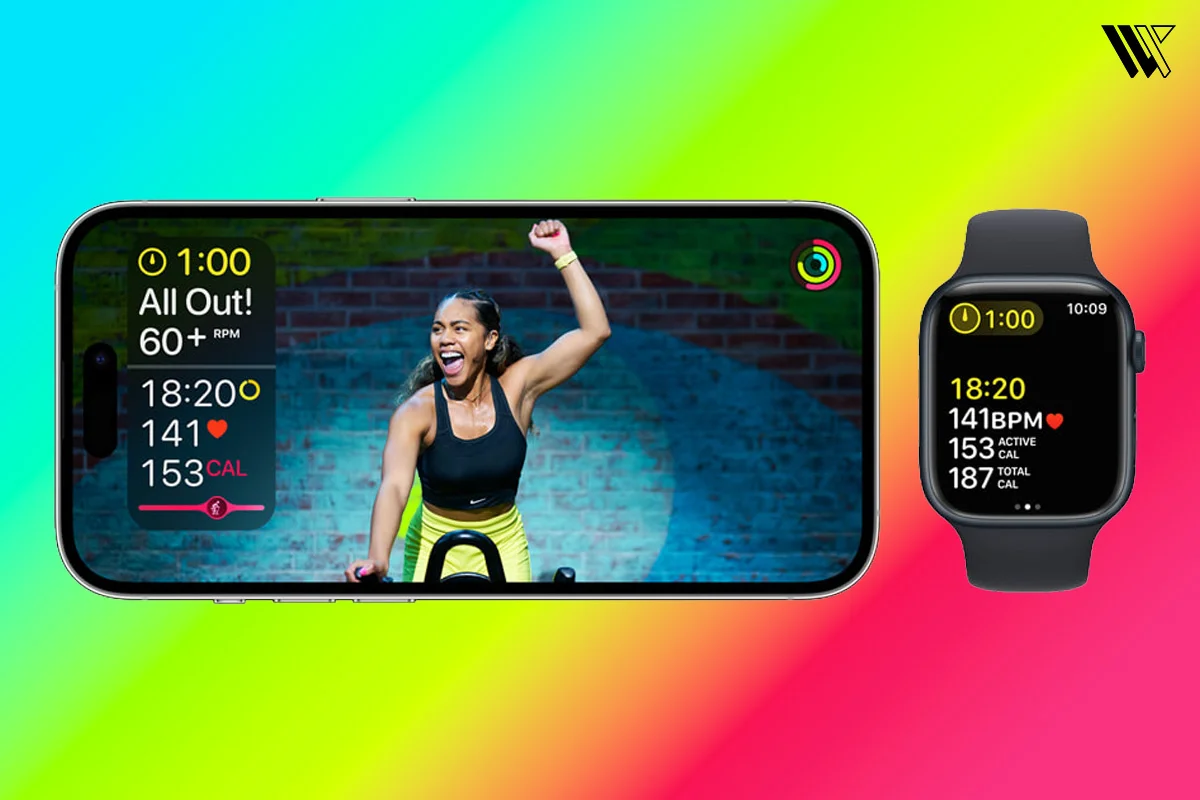
The main thing is the real-time connection. I love the real-time feedback. When the trainer tells you to push harder, it feels like you are in a live workout session where a team of expert personal trainers is in your pocket, that are ready to guide you with different types of exercise whenever you’re ready. You can also see your heart rate spike on a paired device, which displays live heart rate on-screen and in the Fitness app.
For me, the Fitness+ Apple Watch integration turned my 10-minute lazy day stretches into 30-minute power sessions because I didn’t want to stop until I saw those rings close.
Devices and Requirements to Use Fitness+
Setting up Apple Fitness+ with Apple Watch is simpler than most people think, but you do need the right device.
Decode the Decor
The Smart Jewelry Revolution — a practical guide to wearable tech.
- Apple Watch: You’ll need an Apple Watch Series 3 or later with WatchOS 7.2. I personally use a Series 11, but even the SE models work perfectly.
- iPhone: You will need an iPhone 6s or later with iOS 14.3
- iPad: To use Fitness+, you will need iPad Pro, iPad (5th generation or later), iPad mini 4 or later, iPad Air (3rd generation or later), or iPad Air 2.
- Apple TV: Apple Fitness+ is available on Apple TV 4K and on Apple TV HD.
- Software: Make sure your devices are updated. In 2026, you’ll want the latest iOS and watchOS to access the newest features.
I always tell my friends that if you have an iPhone and an Apple Watch, you’re already 90% there. You just need the subscription, which often comes with a free trial for new watch owners.
How to Set Up Apple Fitness+ on Your Apple Watch
Setting this up for the first time is a one-time process.
- On your iPhone, open the Fitness app.
- Tap the Fitness+ tab at the bottom of the screen.
- Tap the offer or follow prompts to subscribe, then sign in with your Apple ID.
- Select activities you like and provide details like your birthday, sex, height, and weight for accurate tracking.
- Once subscribed, open the Fitness app on your Apple Watch or iPhone, select a workout (like Yoga, HIIT, Strength) and tap to start.
If it is your first time using Apple Fitness+, make sure you have put on your watch in a snug fit, not too tight, not too loose. Because the Apple Watch wouldn’t be able to detect your heart rate and will show a grey heart icon.
How to Start a Workout on Apple Fitness+
Once you’ve picked out a workout that looks fun and challenging, getting it started is incredibly smooth:
- Open the Apple Fitness app on your iPhone, iPad or Apple TV and head to the Fitness tab.
- Tap on the workout you want, and you’ll see a big Let’s Go button.
- As soon as you hit that button, look at your wrist. Your Apple Watch will automatically wake up and show a green Play button.
- Tap the Play button on your Watch. You’ll get a 3-2-1 countdown and then the trainer starts the music kick in and your live heart rate begins streaming straight to the screen.
If you’re using Apple TV, you’ll see a prompt on the television asking you to connect your watch. Just look at your wrist, tap Connect on the watch face and you are ready to roll.
How Fitness+ Metrics Appear on Apple Watch During Workouts
This is where the magic happens. Whether you’re jumping or lifting, your Apple Watch Fitness+ sensors are working overtime to feed data to your paired screen.

- Heart Rate: This sits at the top, which is great for knowing when to push harder.
- Calories: You see your active calories adding up in real-time.
- The Burn Bar: This is my favourite part, as it shows how your effort compares to everyone else who has done that same workout.
- Rings: Your exercises and stand rings are visible, so you know exactly how close you are to your daily goal.
Seeing my heart rate hit the red zone on my TV during a HIIT session is the only thing that keeps me from quitting my workouts in between.
Best Workout Types on Fitness+
If you’re staring at the library wondering where to begin, try following my personal starter pack.
HIIT (High-Intensity Interval Training)

If you are short on time. These will give you high energy. In 2026, the Back-to-Back Strength and HIIT program is a standout thing. It pairs 10 minutes of strength with 10 minutes of HIIT in one continuous 20-minute flow. It is designed to build power and endurance simultaneously, with zero rest, which really pushes your cardiovascular activity.
Strength

These use dumbbells or just bodyweight. If you’re just starting, the Strength Basics in 3 Weeks course is a lifesaver. It focuses on one body area per session. It’s not just about lifting; it uses advanced motion sensors on your Apple Watch to help you practice the fundamentals of common moves, which is perfect for beginners.
Yoga

It is great for Sunday mornings or rest days. It comes with Slow Flows and Energetic Flows. The new build a yoga habit in 4 weeks plan is brilliant because it specifically targets flexibility and stress relief. You get two 10-minute sessions a week, one to relax and one to move, which makes it super easy to actually stick to the habit.
Mindful Cooldown
It comes with 5 minutes of stretching and meditation that will make you feel calmer. It’s the perfect way to lower your stress and heart rate safely after a high-intensity workout session.
Time to Walk
In this, you just need to put on your AirPods and pick a guest from the Workout app. I’ve been loving the 2026 stories from Penn Badgley and KAROL G as they share personal stories and their favourite music.
Your watch automatically syncs photos to your screen that match what they are talking about, which makes my walk much less boring and feels like you are actually walking right beside them.
Using Fitness+ With iPhone, iPad, and Apple TV
The beauty of Fitness+ is that it follows you everywhere you go, transforming any space into a private studio. When I am at home, I use my Apple TV because the 4K Ultra HD metrics are huge, which makes the full experience feel premium.
In the morning, when the living room is occupied, I grab my iPad, which is perfect for tucking into a corner of the garage or a guest room. Even when I am on the go, I set up my iPhone on my treadmill and it is a lifesaver to let my Fitness+ Apple Watch sync my data instantly when I run.
Tips for Better Tracking in Apple Watch
To get the accurate Fitness+ data, your Apple Watch needs help. Here are the three best ways to keep your data as accurate as possible:
- One of the best hacks I’ve learned is the Two-finger rule, which is to always wear your watch about two finger widths above your wrist bone during a workout session.
This placement ensures that the optical heart sensors maintain consistent skin contact, which is vital for the HIIT sessions where your arm is moving consistently.
- Sweat and dust are the enemies of accuracy. So, I have made it a habit to give the back of the watch a quick wipe with a lint-free cloth after every few days to keep the readings sharp and consistent.
- If you ever feel like your calorie burn or treadmill distances aren’t matching up, head outside for a 20-minute calibration outdoor walk or run at your normal pace. This allows the watch to use GPS to learn your unique moment pattern, making your indoor Fitness+ Apple Watch’s data much more accurate.
Apple Fitness+ Subscription
Apple offers a 3-month free Fitness+ subscription when you buy a new Apple Watch, which is a perfect way to try whether it is suitable for you or not.
Once the trial ends, the pricing is straightforward:
- Monthly: $9.99 USD
- Annual: $ 79.99 USD ( which saves you about 30% over the year)
The best part is that one subscription can be shared with up to 5 family members at no extra cost through iCloud Family Sharing.
Wrap Up
If I had to choose between Fitness+ and a standard gym membership, honestly, I’d choose Fitness+ every single time.
It really comes down to the prices. A decent gym membership can easily cost you $30-$50 a month and that’s before you even think about a personal trainer, which can cost that much for just one day. In comparison, Fitness+ gives you a team of coaches for about $9.99 per month or $79.99 per year. Plus, you can even share that single subscription with up to five members, which a gym would never allow.
Beyond the savings. It’s about freedom. I’m a person who hates driving to the gym just to wait for a treadmill. Having my coach on my wrist means that I can work out in my shorts at 6:00 AM if I want to. All thanks to the Apple ecosystem, my watch, phone and TV all sync to each other, making the whole experience feel a bit futuristic and seamless.
At the end of the day, Apple Watch is a powerful device that doesn’t just tell you the time. Give Fitness+ a try, close those rings and trust me, your new year fitness goals will be easier to achieve.
FAQs
Decode the Decor
The Smart Jewelry Revolution
A practical guide to wearable tech's future — delivered straight to your inbox.
Author
