 Smart WatchesWithings ScanWatch 2 vs Apple Watch: Which Is Better for Health Tracking?
Why Does My Apple Watch Keep Vibrating Without Any Reason?
Stop your Apple Watch from constant vibrations. Follow these steps to adjust notifications, haptics, and enjoy a distraction-free experience.
Independently tested. We never accept payment for reviews.How we test

What’s inside4 sections · 4 min read
Recently, my Apple Watch acted as if it had been possessed or taken over by a cult. I observed that it started vibrating without any reason. Spooky, right? For me, it was.
After being prey to this situation for over a month, I took matters into my own hands. Now, I know all the possible reasons and ways to fix this situation without overthinking. Also, no, my watch was not possessed, which was a big relief for me.
Why Does My Apple Watch Keep Vibrating?#
Case 1: Notifications#
A common situation where the Apple Watch keeps vibrating is when you receive notifications, whether from social media apps, messages, or any apps you have logged in to. Turns out having a big digital footprint was one of the major reasons why my Apple Watch kept vibrating for most of the time.
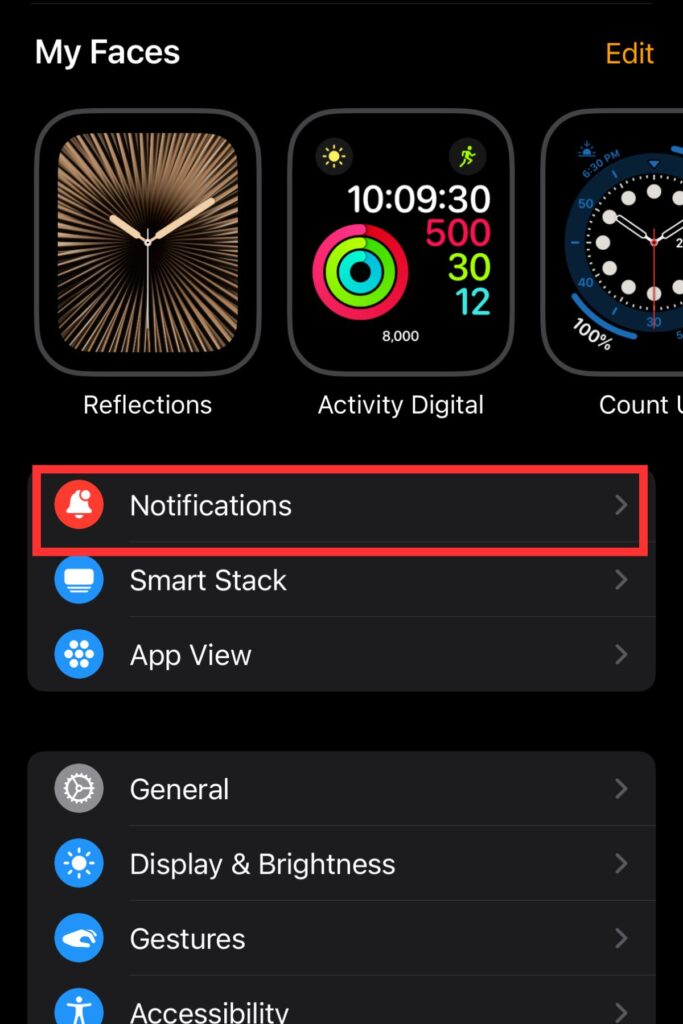

- Go to the Watch App on your iPhone.
- Then the Notifications option.
- Scroll down to ‘mirror iPhone alerts from.’
- Toggle them off.
Case 2: Alarms#
With a busy schedule, I heavily rely on my alarms and reminders. If you are similar, then you should know that when you set an alarm or reminder, your Apple Watch will vibrate.

- An easy way to fix this problem is by heading to the Watch App.
- Then go to Clock.
- Click on the Toggle off push alerts from iPhone.
Case 3: iPhone Connectivity Issues#
One time, my Apple Watch started vibrating because it faced connection issues with my iPhone. This can also happen if the Bluetooth connection is not strong. I observed that every time the connection was lost or restored, my Apple Watch started vibrating.
How to Fix It: After being troubled with this situation, I looked for a steady connection. To my surprise, once the connection was smooth, the vibration stopped on its own.
Case 4: Haptic Alerts#
When I got my first Apple Watch, I really admired its haptic features. This unique feature allows one to stay in the loop, but it comes with its own drawbacks. This feature creates vibrations using a Taptic engine. However, it is purely customized, as the Apple Watch can vibrate based on touch, sound, or visual signals.
How to Fix It: Haptic alerts can cause your Apple Watch to vibrate for various reasons. An easy fix is to turn off the settings.


- To do this, I go to my Watch tab in the Watch app on my iPhone.
- Then, click on Sounds And Haptics.
- Go to Haptics.
- Finally, I turn it off.
Case 5: Software Bugs#
Finally, this can also happen due to software bugs. If your watch or iPhone does not obey you, then it may be due to software bugs. My Apple Watch also starts vibrating when I have not updated the software for a long time. For a quick fix, I disconnect the watch from the iPhone and reconnect it.
How to Fix It: To solve this problem, you can also switch off the Apple Watch and connect it again. If your Apple Watch needs new updates, then go for it to ensure smooth performance.
Vibration Pattern For Your Apple Watch#
| Vibration Pattern | Likely Cause | Description / Clues | How to Confirm / Fix |
|---|---|---|---|
| Short single buzz (once) | Notification alert | Incoming message, app alert, calendar event, etc. | Check in the Watch app under Activity > Notifications. |
| Two short buzzes | iPhone Disconnected | Watch lost connection to iPhone. | Look for the red iPhone icon on the Watch face. Move closer to the iPhone. |
| Three soft taps | Stand Reminder / Activity Alert | Hourly reminder to stand or move. | Check the Timer app. Tap to stop the vibration. |
| Taps every few seconds for 1 min | Timer Finished | Timer has completed. | Light tap followed by a pause |
| Steady rhythmic tapping (5-6 times) | Alarm | Alarm going off. | Check the Alarm app. Tap the screen to stop. |
| Vibration at 15 or 30 min intervals | Chimes (Accessibility Feature) | Regular haptic feedback to mark time. | Settings > Accessibility > Chimes. Turn off if unwanted. |
| Light tap followed by pause | Taptic Time (Accessibility Feature) | Tells the time via haptic taps. | Settings > Clock > Taptic Time. Toggle off. |
| Quick buzz after wrist raise | Wake-on-Wrist-Raise (with notification) | Notification received just before or during wrist raise. | Happens with pending notification. Check Notification Center. |
| Buzz during workouts | Goal Progress or Heart Rate Alerts | Achieved move goal, heart rate alert, or pace update. | Watch app > Workout or Heart settings. |
Wrapping Up#
These are all the major reasons why your Apple Watch misbehaves and vibrates. Now that I have mentioned the causes and how to fix them, you do not need to break a leg anymore.
I know how stressful it can be if your expensive Apple Watch starts being disobedient. Hopefully, you can now fix it on your own in a jiffy. However, if the situation persists, make sure that you visit the Apple Store to find a reliable and permanent solution.
Frequently Asked Questions#
01Can having a loose Apple Band cause your Apple Watch to vibrate?
Yes, if your Apple Band is loose, then it can make your Apple Watch vibrate. Try tightening it to fix this issue.
02Why does your Apple Watch have short vibrations at one time and long vibrations at another time?
Apple Watch usually vibrates with a single tap for standard notifications. The long vibrations are for urgent notifications.
03Why is my Apple Watch vibrating without any notifications?
If you do not receive any notifications from Apple Watch but it is still vibrating, it can be due to settings, software updates, or glitches. Restart and connect your Apple Watch again to fix this issue.
04Why does your Apple Watch vibrate while it is on the charger?
Your Apple Watch will vibrate while on the charger to indicate that charging is complete. To fix this situation, users can change the settings for Apple Watch while it is on charge.
 RK
Written by
With a focus on real-world usability, Rahul at WearableXP covers smartwatches and wearable fitness tech. He evaluates how devices combine activity tracking, health metrics, battery life and connectivity. His work helps readers understand how smartwatches fit into everyday routines through practical performance and software-driven features.
More from Rahul 340 storiesKeep readingmore from Smart Watches
All storiesSmart WatchesWithings ScanWatch 2 vs Apple Watch: Which Is Better for Health Tracking? Screenless BandsFitbit Air vs Samsung Galaxy Watch Ultra 2: Which Wearable Fits Your Health Goals?
 Screenless BandsFitbit Air vs Apple Watch: Which Wearable Is Better for Health Tracking?