 Smart WatchesWithings ScanWatch 2 vs Apple Watch: Which Is Better for Health Tracking?
7 Best Apple Watch Running Apps for Every Type of Runner
Discover the 7 best Apple Watch running apps which are designed for beginners, pros, and everyone in between to elevate your running game.
Independently tested. We never accept payment for reviews.How we test

What’s inside5 sections · 7 min read
I have been running for a few years now, and one thing that I have learned is that having the right tools makes all the difference. When I first started out, I had no idea how much easier and more motivating it could be with the Apple Watch on my wrist.
At first, I just used to check the time and maybe glance at my heart rate. But once I really started exploring what I could do, especially with the right app, my running routine changed. I could track my pace, distance, splits, heart rate zones, et cetera. It was like having a personal coach with me on every run.
But here’s the thing: you don’t necessarily need a third-party app to get a lot out of your Apple Watch. Apple’s built-in Workout app already tracks pace, distance, heart rate, heart rate zones, splits and several running-form metrics.
I have tested a ton of running apps along the way. Some were decent, a few were terrible, and a couple of them? Game changes. So if you are trying to build a running habit, hit a new PR, or just make your runs more enjoyable, I’ve got a list you’ll want to check out.
At a glance
The shortlist7 picks, tap one to jump to it.
What To Look For In a Running App#
Before I get into the actual list, there are a few things I always tell people to look for when picking a running app for the Apple Watch, just so you don’t waste time downloading five different ones like I did.
- Accurate GPS tracking is a must. There is nothing more frustrating than finishing a run and realizing the app logged half a mile less than you actually ran.
- Heart rate monitoring– If you are like me and try to pay attention to your effort levels, or if you are training based on your heart rate zones, it’s super helpful to have that data right on your wrist in real time.
- Training plans or audio coaching– I always look for apps that offer training plans or audio coaching. Not everyone needs this, but if you like structure or having someone in your ear guiding you through intervals or long runs, it makes a huge difference.
- Standalone Apple Watch functionality (no iPhone needed)- Some apps still require your iPhone to be nearby, but I prefer the ones that let me leave my phone at home completely. Just the watch, my shoes, and the open road.
- Recovery insights If you exercise on a regular basis, I also consider those apps which will allow me to learn when to go hard and when not to. HRV-based recovery and readiness metrics might come in handy for people who want more than just running data.
- Pricing- There are apps which do not cost a penny, some charge monthly subscription and WorkOutDoors follows a one-time buying policy. Thus, I make sure I know what I am paying for.
At the end of the day, the best app really comes down to what you want out of your runs. Maybe you are looking for structured training, or maybe you love diving into that data afterward. Whatever it is, there is an app that fits, and I think you’ll find a few solid ones in this list. Ready?
The Best Apple Watch Running Apps#
| App | GPS | Coaching | Music | Price | Ideal For |
|---|---|---|---|---|---|
| Strava | Yes | No | Yes | Free | Competitive Runners |
| Nike Run Club | Yes | Yes | Yes | Free | Beginners |
| Runkeeper | Yes | Yes | Yes | Free | Casual Runners |
| Workoutdoors | Yes | No | No | No | Data-Focused Runners |
| Adidas Running | Yes | Yes | Yes | Free | Intermediate Runners |
| Runna | Yes | Yes | Yes | Free | Entertainment Seekers |
| Apple Workout | Yes | No | Yes | Free | Simplicity Seekers |
01Apple Workout App#

Overview: This is the built-in Apple workout app and offers seamless integration with the Apple ecosystem.
Key Features:
- Distance, pace, and heart rate tracking.
- Syncs with Apple Fitness+ and Health.
- Clean, minimal interface.
- Voice feedback.
Why It’s Great:
It is simple, reliable, and ready to use without any additional downloads.
PriceFree (pre-installed on Apple Watch)
02Strava#

Overview: Strava is a popular app among runners and cyclists and is known for its social features and performance tracking.
Key Features:
- GPS route tracking.
- Segments and leaderboards.
- Heart rate and pace tracking.
- Apple Watch standalone mode.
- Integration with Apple Fitness+.
Why It’s Great:
It is ideal for competitive runners who enjoy tracking progress and comparing results with others
PriceFree with optional premium subscription
03Nike Run Club (NRC)#

Overview: Nike Run Club (NRC) offers a user-friendly interface with guided runs and community challenges.
Key Features:
- Audio coaching.
- Training plans (availability may vary).
- Apple Music integration.
- Personalized coaching plans.
Why It’s Great:
This app is perfect for beginners and casual runners seeking structure and motivation.
PriceFree
04Runkeeper#

Overview: This app is developed by ASICS and provides comprehensive tracking and coaching features.
Key Features:
- Custom training plans.
- Audio cues and voice coaching.
- Automatic syncing with Apple Health.
Why It’s Great:
This app is suitable for runners of all levels, especially those looking for progress tracking over time.
PriceFree with premium subscription options
05Workoutdoors#

Overview: Workoutdoors is a highly customizable app and is ideal for serious runners and outdoor enthusiasts.
Key Features:
- Offline vector maps.
- Customizable data screens.
- Route import and navigation are available.
- Integration with various sensors.
Why It’s Great: This app is perfect for data-driven runners and those who require detailed metrics and mapping capabilities.
PriceOne-time purchase (approximately $6 to $8)
06Adidas Running (formerly Runtastic)#

Overview: Adidas running offers a feature-rich experience with solid integration for both fitness and social elements.
Key Features:
- Real-time stats and feedback.
- Global and local challenges.
- Workout summaries and goals.
- Apple Watch native support.
Why It’s Great:
It is a well-rounded app, and it’s great for runners looking to stay motivated through challenges and social features.
PriceFree with premium option
07Runna#
© Runna
© Runna
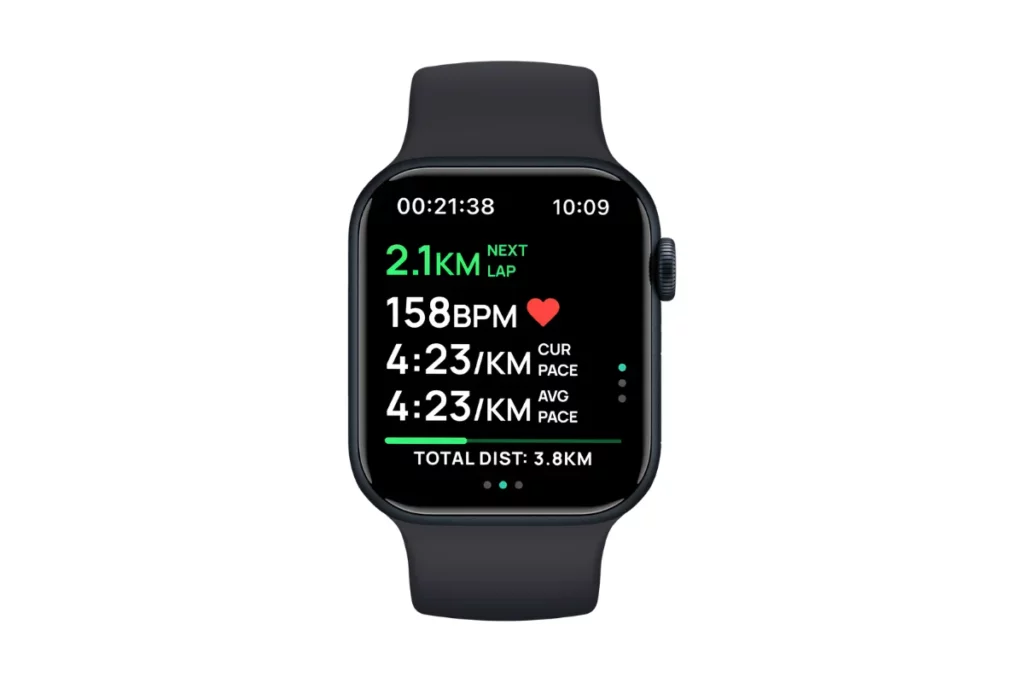
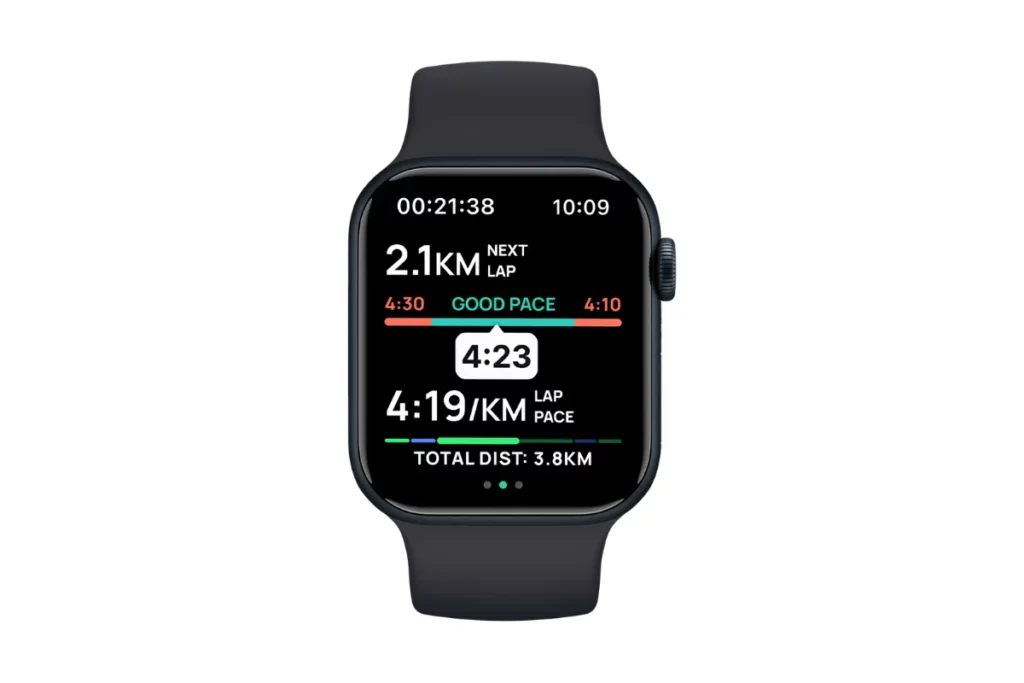
Overview: Runna is built around personalized running plans and coaching rather than simply recording your runs.
Key Features:
- Personalized training plans.
- Race preparation.
- Structured workouts.
- Coaching approach.
- Apple Watch integration.
- Training for 5K, 10K, half marathon and marathon goals.
Runna has been acquired by Strava; however, it is still available as an independent application that works on the Apple Watch.
Why It’s Great:
The Runna app would be ideal for runners who seek to be disciplined and have race goals in mind. As opposed to simply informing you of the distance covered, Runna provides a structured plan of how you should run next.
PriceThe app is free to download and paid to subscribe to the premium planBest ForRunners preparing for a marathon or other races
Which Apple Watch Running App Is Best for You?#
If you are still not sure which one to download, this is how I would break it down:
- Beginner: Nike Run Club
- Casual runners: Runkeeper
- Marathon training: Runna
- Social running: Strava
- Advanced metrics and maps: WorkOutDoors
- Intermediate runners: Adidas Running
- Simple, free run tracking: Apple Workout
And honestly, if you are just starting out, I would not download five apps at once. Start with Apple Workout or Nike Run Club and see what you actually feel is missing. Then add another app if you need more coaching, recovery data or mapping.
Wrap Up#
In the end, I will conclude by saying that your perfect running sidekick must be hiding in the App Store, waiting for its moment to shine.
The Apple Watch already does a lot, but pair it with the right app and boom! You essentially have a tiny coach and cheerleader, and a data nerd, all strapped to your wrist.
The truth is, there is no one-size-fits-all. Some apps will hype you up, others will nerd out on your stats, and a few will just quietly do their job without making a fuss.
All you need to do is try a couple, swipe left on the ones that don’t vibe, and stick with the one that makes you want to lace up and head out.
In the end, it’s your run, your rules. Find the app that makes you feel like a running rockstar.
You might also be interested in:
- How To Check Blood Pressure With An Apple Watch
- Use Your Apple Watch Like A Pro With These Hand Gestures
- Delete Any Apple Watch App | Step by Step Guide
- Walkie-Talkie On Apple Watch Not Working | 9 Fixes
- How To Use Walkie-Talkie On Apple Watch? A Step By Step Guide
FAQs#
01Do you need your iPhone with you to use running apps on your Apple Watch?
Not necessarily! Many running apps now offer standalone Apple Watch functionality, which means you can leave your phone at home and still track your run using the watch’s built-in GPS and sensors.
02Can you listen to music while using a running app on your Apple Watch?
Yes. Most apps play nicely with Apple Music, Spotify, or downloaded playlists. You can pair Bluetooth headphones directly with your watch and run phone-free with your favourite hype songs in your ears.
03Will the running apps drain your Apple Watch battery quickly?
Using GPS and heart rate monitoring uses more battery, but more Apple watches can easily handle a standard run for even a longer session. If you are going out for hours, for example, say marathon training, consider turning off cellular or tweaking settings to save juice.
04Do these apps sync with other platforms?
Yes, most running apps for Apple Watch can sync your workout data with other platforms.
 RK
Written by
With a focus on real-world usability, Rahul at WearableXP covers smartwatches and wearable fitness tech. He evaluates how devices combine activity tracking, health metrics, battery life and connectivity. His work helps readers understand how smartwatches fit into everyday routines through practical performance and software-driven features.
More from Rahul 340 storiesKeep readingmore from Smart Watches
All storiesSmart WatchesWithings ScanWatch 2 vs Apple Watch: Which Is Better for Health Tracking? Screenless BandsFitbit Air vs Samsung Galaxy Watch Ultra 2: Which Wearable Fits Your Health Goals?
 Screenless BandsFitbit Air vs Apple Watch: Which Wearable Is Better for Health Tracking?