 Smart AudioOpen-Ear vs Bone Conduction vs Earbuds vs Over-Ear: Which Fitness Headphones Should You Choose?
Why Do Your AirPods Keep Disconnecting from Your iPhone?
Find out why your AirPods keep disconnecting from your iPhone and learn how to fix common issues with this quick troubleshooting guide.
Independently tested. We never accept payment for reviews.How we test

What’s inside6 sections · 6 min read
You must be aware of how annoying it is to have your AirPods randomly disconnect, right in the middle of a jam session or an important phone call. Yeah, same here. It irks me so much, especially when my phone is well within my range.
Let me assure you that you are definitely not the only one dealing with this. A lot of people like you and me run into the same issue time and again. The good news is that there are some pretty straightforward fixes for this issue.
Let me walk you through why your AirPods might be acting up and what you can do to get them back on track. It’s easier than you think. Let’s get into it.
Common Reasons AirPods Disconnect From Your iPhone#
Bluetooth interference#
You would be surprised, knowing how many things can mess with your AirPods connection. Wi-Fi routers, microwaves, and even other Bluetooth devices nearby, especially in busy places, can interfere with the signal and cause those random dropouts.
Low battery#
If either your AirPods or your iPhone is running low on battery, they might not hold a solid connection. It is a simple thing, but it can make a big difference.
Outdated software#
Sometimes the problem is just outdated firmware. If your iPhone or your AirPods have not been updated for a while, it could be a software bug causing the disconnection. Yes, your AirPods also regularly update their firmware automatically while charging in their case in the range of their connected device.
Dirty or damaged AirPods#
Yes, gross, but dirt, dust, or even a bit of water damage can mess with how your AirPods function. Cleaning them carefully can actually help more than you would think.
Automatic ear detection#
This feature is meant to pause audio when you take an AirPod out, but sometimes it gets confused with too much movement and thinks you have removed one when you actually haven’t. That can cause unexpected pauses or disconnections.
Audio routing or auto-switching conflicts#
If you are using multiple Apple devices with the same Apple ID (like a MacBook, iPad, and iPhone), your AirPods might keep switching between them automatically. Super handy when it works right, but really annoying when it doesn’t.
How to Fix AirPods Disconnection Issues#
Here are some ways that you can fix this AirPods disconnection issue on your own:
Charge everything#
Always make sure that both your AirPods and your iPhone are fully charged. I know it sounds basic, but a low battery is honestly one of the most common reasons they start acting up.
Turn Bluetooth off and back on.#
Sometimes all it takes is a quick reset. Just go to Settings > Bluetooth, switch it off and wait for a few seconds, and then turn it back on. It is very simple, but it works more often than you’d think.
Forget and re-pair AirPods#
This one is a bit more involved, but super helpful:


- Go to Settings.
- Click on Bluetooth.
- Tap the little “i” next to your AirPods.
- Choose Forget This Device.
- Put your AirPods back in the case, open the lid, and press the small button at the back of the case until the light flashes white.
- Now, just reconnect them, like you did when you first got them.
Reset your AirPods#
If re-pairing didn’t do the trick, try a full reset:
- Put your AirPods in their charging case
- Press and hold the Set Up button on the back for about 15 seconds until the light flashes amber and then white
This resets everything and gives you a clean slate.
Update your iPhone and AirPods#
Make sure your iPhone is running the latest iOS. For that:


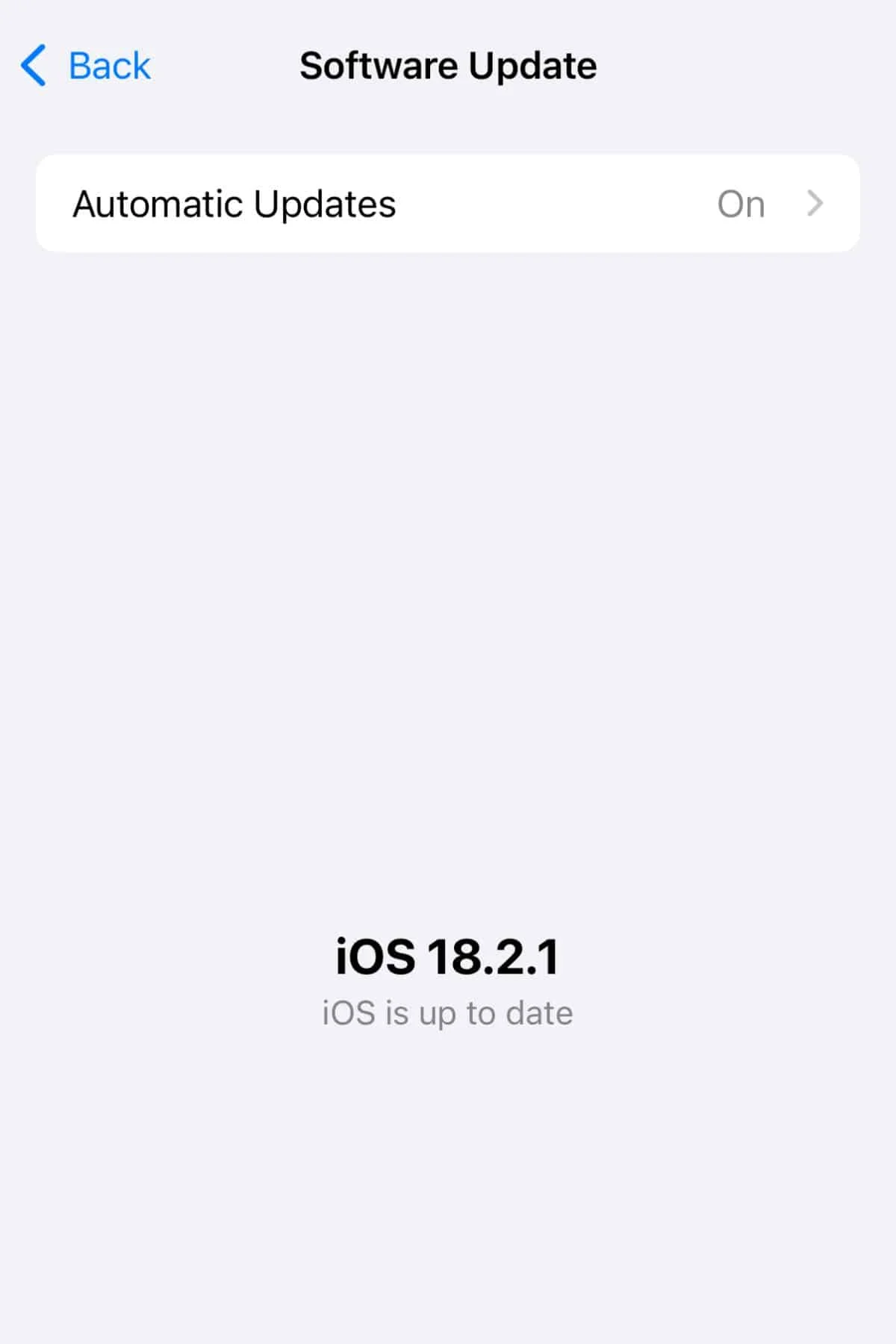
- Go to Settings
- Click on General
- Click on Software Update to check
As for your AirPods, they update automatically when they are in the case, charging, and near your iPhone. So just make sure they are set up like that every now and then.
Turn off automatic ear detection#
If your AirPods keep pausing randomly, this setting might be to blame. To turn it off:

- Go to Settings
- Click on Bluetooth
- Tap on your AirPods
- Toggle off Automatic Ear Detection
Disable Auto-Switching (optional)#
If your AirPods keep jumping between your Apple devices, try this:


- Go to Settings
- Click on Bluetooth
- Tap on your AirPods
- Tap on Connect to This iPhone
- Choose When Last Connected to This iPhone
This way, your AirPods will only connect to the device where they were last used, and you will have to manually connect them to any other device you want to use them with.
When to Contact Apple Support#
Now, if you have gone through all these steps, and your AirPods are still disconnecting, it might be something deeper.
It could be that AirPods are physically damaged, or there is a hardware issue going on that we just cannot fix with settings or resets.
Sometimes it’s a rare glitch or defect that only Apple can sort out.
At that point, your best bet is to head over to the Apple support website or swing by your nearest Apple Store. They will be able to run some diagnostics and let you know what’s really going on.
Preventive Tips#
Also, let me share just a few quick tips to help prevent these issues in the future:
Clean your AirPods regularly#
Just give them a quick wipe with a dry, soft cloth every now and then. It helps more than you think when it comes to keeping them working right.
Avoid using them in heavy interference zones#
Places with a lot of Wi-Fi signals or Bluetooth devices, like crowded cafes or AirPods, can mess with the connection. If you notice issues in those spots, that might be why.
Keep your software and firmware updated#
I know updates can be annoying, but they really do fix bugs and improve stability, so it’s worth keeping everything up to date.
Store your AirPods in the case when you’re not using them#
Not only does it keep them charged, but it also protects them from dust and damage.
All you have to do is just a little maintenance, and it will go a long way in keeping your AirPods running smoothly.
Wrap Up#
AirPods keep disconnecting is basically their way of throwing a tiny tech tantrum. I know it’s totally annoying, but the good news is that most of the time, you can calm them down with a few little steps.
And hey, if they are still being dramatic after all that, no shame in calling in the pros. Apple support is like the AirPods whisperer; they have seen it all. In some cases, they will also not disconnect while in the case!
So, don’t worry. With a few fixes, you will be back to your playlist, podcast, and guilty pleasure true crime podcast binges in no time.
FAQs#
01Why do your AirPods disconnect when you move too far from your iPhone?
AirPods use Bluetooth, which has a limited range-usually around 30-60 feet, depending on interference. If you walk into another room or have walls in the way, they might disconnect. Try keeping your phone nearby when possible.
02Why do your AirPods only disconnect from one specific app?
That could be a bug with the app itself. Try closing and reopening the app, updating it, or even reinstalling it. If it keeps happening across multiple apps, the issue is likely with the AirPods or iOS settings.
03What does automatic ear detection do?
It tells your AirPods when they are in your ears and pauses audio when you take one out. But if it misfires, it can cause random pauses or disconnections, so turning it off and sometimes help.
04Do you need to clean the AirPods case too?
Yes. The case can collect dust and pocket lint that might affect charging or sensor contact. Use a soft, dry brush or cloth to gently clean it, especially around the charging ports.
05What is the difference between “Forget This Device” and just disconnecting?
Disconnecting is temporary; your iPhone still remembers your AirPods and will connect automatically when in range. On the other hand, “Forget This Device” completely removes your AirPods from the iPhone’s memory, which can help if a fresh setup is needed.
 LJ
Written by
With a practical, real-world approach to testing, Lokesh focused on smart audio wearables at WearableXP. He covers wireless earbuds, open-ear headphones and audio-enabled devices, evaluating how sound quality, comfort, battery life and connectivity come together to fit naturally into everyday routines like commuting, workouts and remote work.
More from Lokesh 93 storiesKeep readingmore from Smart Audio
All storiesSmart AudioOpen-Ear vs Bone Conduction vs Earbuds vs Over-Ear: Which Fitness Headphones Should You Choose? Smart AudioSoundcore Sleep Earbuds 4 Pro Explained: The Growing Battle for Better Sleep Wearables
 Smart AudioAirPods 5 vs AirPods 4: What’s New and Should You Upgrade?