 Smart WatchesGoogle Pixel Watch 5 Review: Are Its New Health Features Worth It?
Pixel Watch 4 vs Garmin Venu 3: Smartwatch Convenience vs Fitness Depth
From daily notifications to marathon training insights, Pixel Watch 4 vs Garmin Venu 3 serve different users. Find out which fits your lifestyle.
Independently tested. We never accept payment for reviews.How we test

What’s inside9 sections · 6 min read
Choosing a watch is easy, you either want to look sharp or track a run. Now, looking at the Pixel Watch 4 vs Garmin Venu 3, it feels like choosing between a tiny smartphone on your wrist or a dedicated sports coach that refuses to quit.
The other day, I was rushing to a meeting while my watch buzzed with an office notification, only to realize I’d forgotten to charge it overnight. That’s the charging anxiety a lot of us live with. Then, there’s the other side wearing a watch that lasts so long you actually forget where you put the charger.
I’ve spent the last few months switching between these two. I’ve used them while in the gym, in meetings and even when sleeping. If you’re wondering whether you need a watch that does everything or a watch that focuses on fitness insanely well, I’ve got the real-world answers for you.
Specifications#
| Specifications | Pixel Watch 4 | Garmin Venu 3 |
|---|---|---|
| Display | Actua 360 AMOLED (Up to 3000 nits) | 1.4” AMOLED (Venu 3) / 1.2″ (Venu 3S) |
| Glass Protection | Custom 3D Corning Gorilla Glass 5 | Corning Gorilla Glass 3 |
| Case Material | Recycled Aluminum | Stainless Steel Bezel & Fibre-reinforced Polymer |
| Battery Life | 30-40 Hours | Up to 14 Days |
| GPS | Dual-frequency | All-Systems GNSS |
| Resolution | 456 x 456 (320 ppi) | 454 x 454 (459 ppi) |
| Storage | 32 GB | 8 GB |
| Water Resistance | 5 ATM + IP68 | 5 ATM |
| Connectivity | Bluetooth 6.0, Wi-Fi, NFC, UWB, LTE | Bluetooth 5.3, Wi-Fi, NFC, ANT+ |
| Smart AI | Google Gemini | Basic Phone Voice Assistant Bridge |
| Price | Starts at $349.99 USD | Starts at $398 USD |
Design and Comfort#
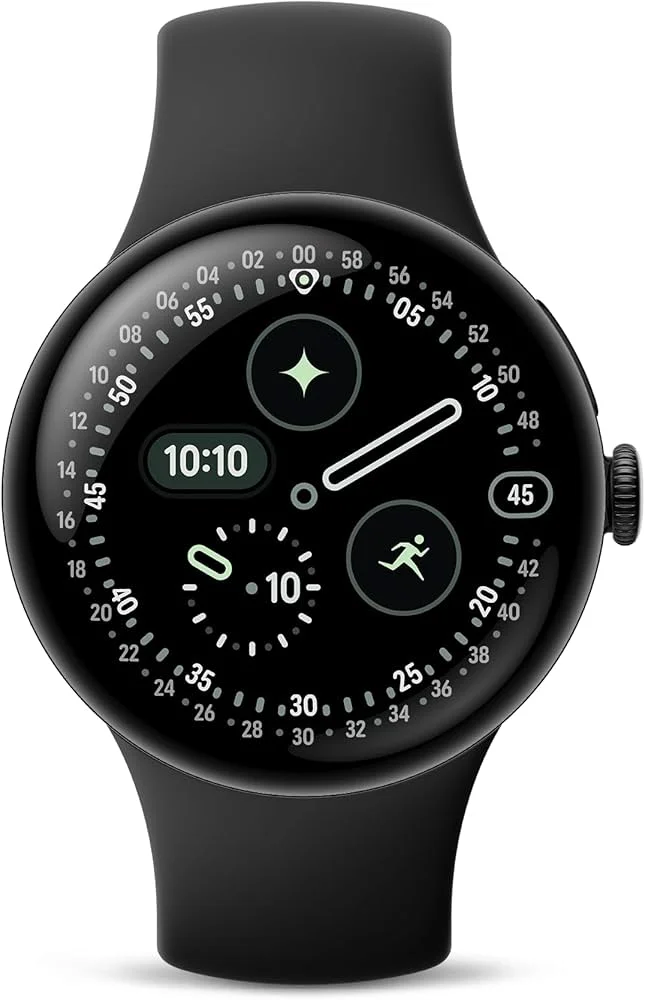

When I wear the Pixel Watch 4, I barely notice it’s there. It has a curved Actua 360 display. It’s the kind of watch that looks perfect with every outfit.
The Garmin Venu 3 is a bit different. It’s light and uses a fibre-reinforced polymer, which sounds fancy, but basically it means that it is tough. In the Pixel Watch 4 vs Garmin Venu 3 design comparison, the Pixel wins for style, but the Garmin wins for its toughness.
If you’re someone who hates a heavy watch, then both of these are winners. The Pixel Watch 4 weighs about 31 grams for 41mm and 36.7 grams for 45 mm without the band. It looks like a round pebble shape. There are no sharp edges and the haptic crown is so well-integrated in the watch.
The Garmin Venu 3 is slightly heavier at 47 grams with the straps for the 45 mm model, but because the weight is spread across a wider, flatter base, it feels incredibly balanced. The case design is more like a traditional watch as it features a stainless steel bezel that acts as a protective ring for the screen, which is something that the Pixel Watch lacks.
Display#
The Pixel Watch 4 features Google’s new Actua 360 AMOLED LTPO display. The big story here is the brightness, as it comes with 3,000 nits of peak brightness. It also uses an LTPO display, which allows the refresh rate to drop as low as 1Hz to save the battery when you aren’t looking at it, or it can increase it up to 60 Hz for buttery smooth animations when you are using it.
The Garmin Venu 3 uses a beautiful 1.4-inch AMOLED panel (on the 45mm variant) with a 454×454 resolution. While it doesn’t hit the 3000-nit peak brightness, it is incredibly crisp and optimised for outdoor clarity.
Battery and Training#
| Watch Variant | Always-On Display | Battery Saver Mode |
|---|---|---|
| Pixel Watch 4 (41mm) | Up to 30 Hours | Up to 48 Hours |
| Pixel Watch 4 (45mm) | Up to 40 Hours | Up to 72 Hours |
| Garmin Venu 3S (41mm) | Up to 10 Days | Up to 20 Days |
| Garmin Venu 3 (45mm) | Up to 14 Days | Up to 26 Days |
The Pixel Watch 4 comes with a daily charging mindset. For the 41 mm variant, it gives battery life up to 30 hours of Always-On Display, while in Power Saver mode, it gives a battery life of 48 hours.
The 45mm Pixel Watch 4 variant gives battery life up to 40 hours of Always-On Display, while in Power Saver mode, it gives a battery life of 72 hours.
While with the Garmin Venu 3s 41mm variant, the Always On Display gives a battery life of 10 days, while in Battery Saver mode, it gives a battery life of 20 days.
In the 45mm variant with Always On Display, it gives a battery life of 14 days, while in Battery Saver mode, it gives a battery life of 26 days.
GPS and Sports Feature#
| Features | Pixel Watch 4 | Garmin Venu 3 |
|---|---|---|
| GPS Type | Dual-Band (L1 + L5) | All-Systems GNSS |
| Custom Data Screens | Limited | High (up to 4 fields per screen) |
| Gym Features | Basic Tracking | Auto-Rep Counting & Muscle Maps |
| Navigation | Google Maps (Needs Phone/LTE) | Breadcrumb Mapping |
If you are a runner, the Pixel Watch 4 vs Garmin Venu 3 choice gets interesting. The Pixel Watch 4 comes with dual-band (L1+L5) GPS, which means it uses two satellite signals to stay accurate even when you’re running under heavy tree cover.


While in Garmin Venu 3, instead of just using the American GPS satellite, it talks to everything, GLONASS (Russia), Galileo (Europe), BeiDou (China) and QZSS (Japan) all at once. This means the watch can see way more satellites in the sky at any given moment, making it incredibly hard to lose a signal even in deep woods or remote mountains.
Health Features#
| Health Features | Pixel Watch 4 | Garmin Venu 3 |
|---|---|---|
| Sleep Tracking | High Accuracy (Fitbit) | Advanced + Nap Detection |
| FDA-cleared ECG | Yes (Fitbit ECG App) | Yes (Garmin ECG App) |
| Stress Monitoring | cEDA Sensor (Real-time) | HRV-based (All-day) |
| Recovery Metric | Daily Readiness | Body Battery |
| Safety Features | Loss of Pulse & Fall Detection | Incident Detection & Assistance |
When it comes to the health feature, both watches have reached the gold standard for their customers.

In Pixel Watch 4, the Fitbit ECG app is FDA-cleared to detect the signs of Atrial Fibrillation (AFib). Google also introduced Loss of Pulse Detection on this model, which uses AI to monitor for sudden cardiac events, though this specific feature is marketed for safety rather than as a diagnostic tool.
The Garmin Venu 3 also comes with an FDA-cleared ECG app. By holding your fingers to the metal bezel, you can take a 30-second recording that checks for AFib. This feature is currently available in the US, EU and Australia.
The Pixel Watch 4 is built on the Fitbit ecosystem, which is famous for taking complex medical data and turning it into simple, actionable scores. It also features a Morning Brief that will summarise your sleep, readiness and even the weather before you get out of bed.
To see the long-term trends, detailed sleep profiles and daily readiness scores, you often need a Fitbit Premium subscription.
The Garmin Venu 3 is designed for people who want to own their data without a monthly fee. Once you buy the watch, every metric in the Garmin Connect app is free. It includes a Sleep Coach that tells you exactly how much sleep you need, after analysing your activity level.

It has a unique Wheelchair mode, which tracks pushes instead of steps and offers specific features for wheelchair users.
Price and Availability#
The price for the Pixel Watch 4 for the 41mm variant starts at $349.99 USD, while the 45mm variant starts at $399 USD. You can purchase this watch from Google’s official website, Best Buy and Amazon.
Whereas the price for the Garmin Venu 3 for the standard 45mm variant starts at $398 USD, while the Venu 3S 41mm variant starts at $409 USD. You can purchase this watch from Garmin’s official website, Best Buy, Walmart and Amazon.
Final Verdict#
If I have to choose one, I would choose the Garmin Venu 3. I know, the Pixel Watch 4 has more features than Garmin, but for me, the charging anxiety is a deal breaker. I love that I can go for a week-long trip, track workouts and still have battery left when I get back home.
I prefer a watch that supports my lifestyle rather than one I have to charge every single day.
You can choose the Pixel Watch 4 if you love having the latest AI and Google apps on your wrist and if you don’t mind the nightly charge routine of the watch.
You can choose the Garmin Venu 3 if you are serious about your fitness and want deep data that is free on the Garmin App or if you hate the idea of your watch dying in the middle of a long day.
FAQs#
01Can I make phone calls on the Pixel Watch 4?
Yes, you can make calls through the Pixel Watch 4 only if you have the LTE version and a cellular plan. You can leave your phone at home and still make calls, send texts and use Google Maps.
02Does the Google Pixel Watch 4 work with an iPhone?
No, the Pixel Watch 4 is only compatible with Android phones.
03What is Loss of Pulse Detection on the Pixel Watch 4?
This is a first-of-its-kind safety feature. It uses AI and sensors to detect if your heart suddenly stops beating. If it detects a loss of pulse and you are unresponsive, it can automatically call emergency services and provide your GPS location.
 RK
RKWritten by
With a focus on real-world usability, Rahul at WearableXP covers smartwatches and wearable fitness tech. He evaluates how devices combine activity tracking, health metrics, battery life and connectivity. His work helps readers understand how smartwatches fit into everyday routines through practical performance and software-driven features.
More from Rahul 334 storiesKeep readingmore from Smart Watches
All storiesSmart WatchesGoogle Pixel Watch 5 Review: Are Its New Health Features Worth It? Smart WatchesXiaomi Watch 5 Muscle Sensing Explained and What It Can Actually Tell You
 Smart WatchesApple Watch Series 12 Packs Some Surprises You Might Not Expect