 Smart WatchesPixel Watch 5 vs Galaxy Watch 9: Which Android Watch Is Better for Health?
How to Know Which Apple Watch You Have (All Models Explained)
Wondering what Apple Watch series you have? Discover 5 easy ways to identify your model, from settings and serial numbers to design features.
Independently tested. We never accept payment for reviews.How we test

What’s inside7 sections · 4 min read
If you’ve had an Apple Watch for a really long time and people come up to ask you what model you are wearing, you’re bound to lose track.
The same goes for knowing which Apple Watch series you have in order to troubleshoot or resell the watch. Here are six ways to know exactly which Apple Watch series you have.
1. Look at the back of your watch#

Turn your watch around and look closely at the base of the watch. The round part that’s bulging out a little will have the series number printed around it. This info, along with the series, also contains the material, size of the Apple Watch, and glass type.
2. From your iPhone#
On your iPhone, you can check the watch app for info on which series of the Apple Watch you have.
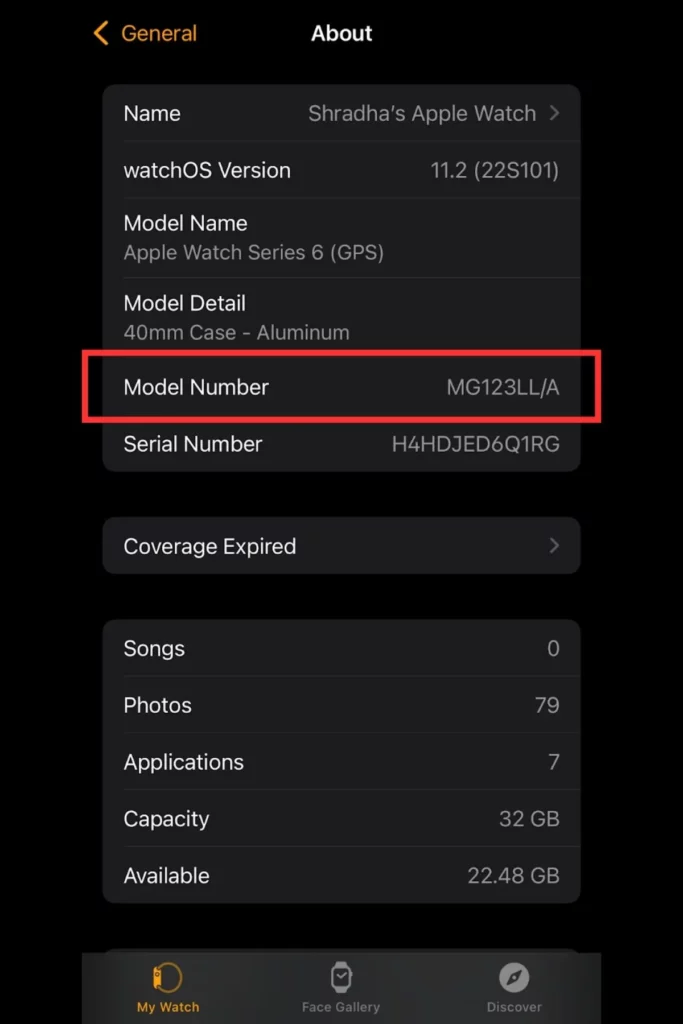

Watch app > General > About > Model Name and Model Detail
You can also find the series of Apple Watch you have by finding its model number on your iPhone and checking which series that model number corresponds to. To check this, tap ‘Model Number’ to reveal a five-digit number that begins with “A”.
The model number field will show a number starting from ‘M’, tapping on this will reveal the model number, which starts from ‘A’. Identify this model number from the list provided by Apple to see which model it corresponds to.
| Model | Case Size | Model Number | Material |
|---|---|---|---|
| Apple Watch Series 10 (GPS) | 42 mm | A2997 (North America, Europe, Asia Pacific); A2998 (China mainland, Indonesia) | Aluminum (Jet Black, Rose Gold, Silver) |
| 46 mm | A2999 (North America, Europe, Asia Pacific); A3000 (China mainland, Indonesia) | Aluminum (Jet Black, Rose Gold, Silver) | |
| Apple Watch Series 9 (GPS + Cellular) Aluminum | 42 mm | A3001 (North America, Europe, Asia Pacific); A3002 (China mainland) | Aluminum (Jet Black, Rose Gold, Silver) |
| 46 mm | A3003 (North America, Europe, Asia Pacific); A3206 (China mainland) | Apple Watch Series 10 (GPS + Cellular) Aluminum | |
| Apple Watch Series 10 (GPS + Cellular) Titanium | 42 mm | A3001 (North America, Europe, Asia Pacific); A3002 (China mainland) | Titanium (Natural, Slate, Gold) |
| 46 mm | A3003 (North America, Europe, Asia Pacific); A3206 (China mainland) | Titanium (Natural, Slate, Gold) | |
| Apple Watch Hermès Series 10 (GPS + Cellular) | 42 mm | A3001 (North America, Europe, Asia Pacific); A3002 (China mainland) | Silver Titanium |
| 46 mm | A3003 (North America, Europe, Asia Pacific); A3206 (China mainland) | Silver Titanium | |
| Apple Watch Ultra 2 (GPS + Cellular) | 49 mm | A2986 (North America, Europe, Asia Pacific); A2987 (China mainland) | Titanium (Natural, Black) |
| Apple Watch Hermès Ultra 2 (GPS + Cellular) | 49 mm | A2986 (North America, Europe, Asia Pacific); A2987 (China mainland) | Natural Titanium |
| Apple Watch Series 9 (GPS) | 41 mm | A2978 | Aluminum (Midnight, Starlight, Silver, Pink, (PRODUCT)RED) |
| 45 mm | A2980 | Aluminum (Midnight, Starlight, Silver, Pink, (PRODUCT)RED) | |
| Apple Watch Series 9 (GPS + Cellular) Aluminium | 41 mm | A2982 (North America, Europe, Asia Pacific); A2983 (China mainland) | Aluminum (Midnight, Starlight, Silver, Pink, (PRODUCT)RED) |
| 45 mm | A2984 (North America, Europe, Asia Pacific); A2985 (China mainland) | Aluminum (Midnight, Starlight, Silver, Pink, (PRODUCT)RED) | |
| Apple Watch Series 9 (GPS + Cellular) Stainless Steel | 41 mm | A2982 (North America, Europe, Asia Pacific); A2983 (China mainland) | Stainless Steel (Graphite, Silver, Gold) |
| 45 mm | A2984 (North America, Europe, Asia Pacific); A2985 (China mainland) | Stainless Steel (Graphite, Silver, Gold) | |
| Apple Watch Hermès Series 9 (GPS + Cellular) | 41 mm | A2982 (North America, Europe, Asia Pacific); A2983 (China mainland) | Stainless Steel (Silver) |
| 45 mm | A2984 (North America, Europe, Asia Pacific); A2985 (China mainland) | Stainless Steel (Silver) |
3. From your Apple Watch#
You can also check the series you have directly from your Apple Watch.
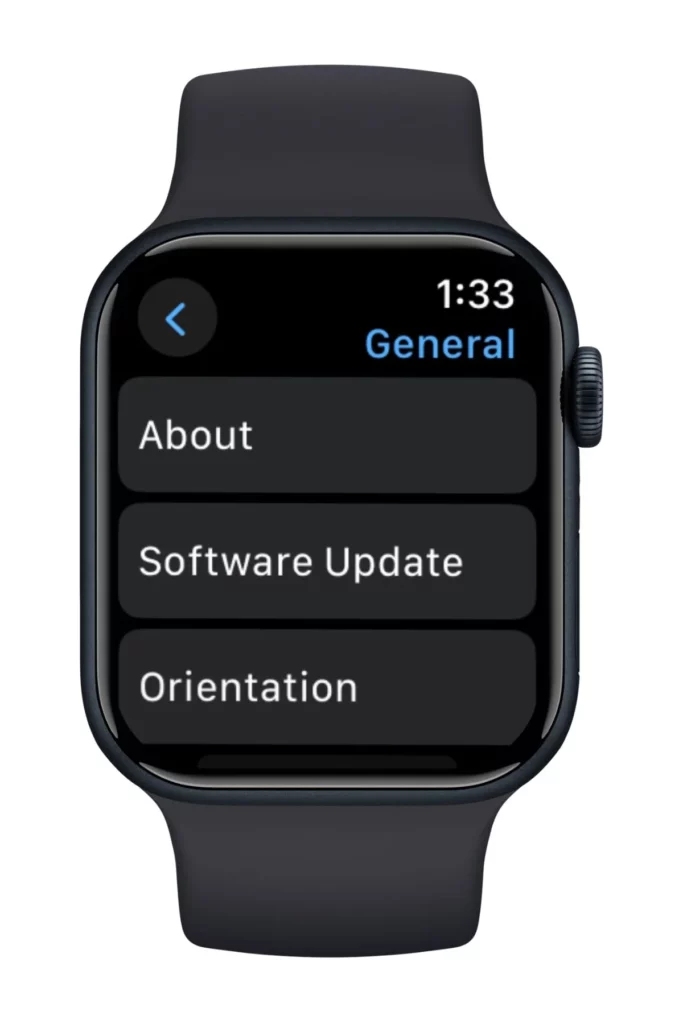
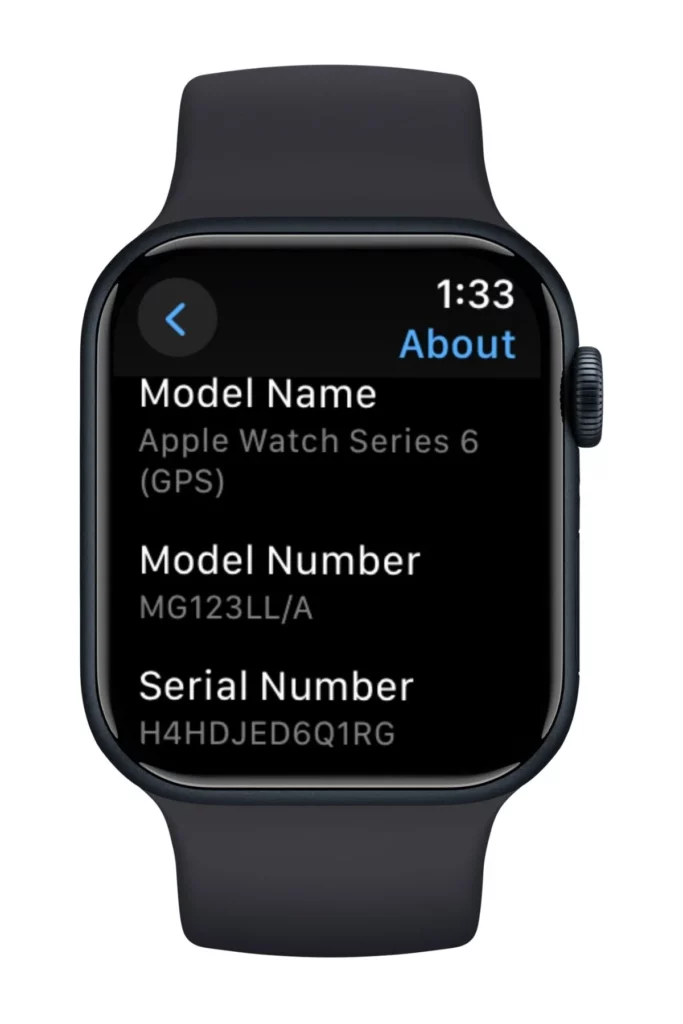
Settings > General > About > Model Name
4. Check the band slot#
It is not the most convenient option, but the model number of your Apple Watch is also embedded in the band slot of the watch. Simply remove the band and check in between the spaces of the slot to find the model number, which you can identify from the list provided by Apple that corresponds to its series.
5. iCloud list#
Assuming that the Apple Watch and the iPhone are paired and use the same Apple ID, head to
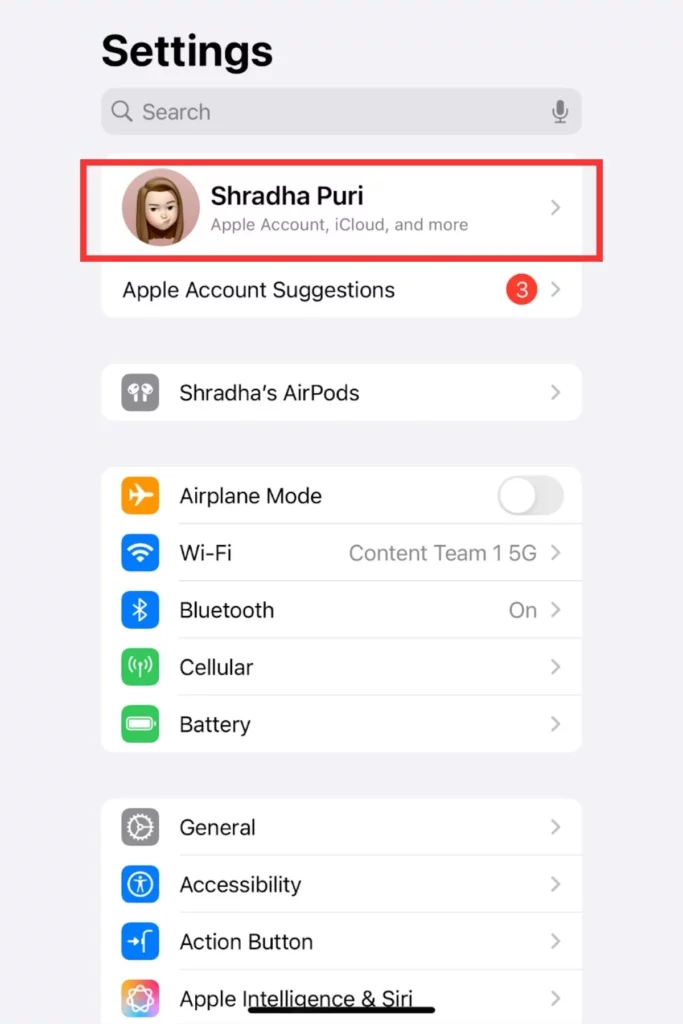

Settings > Tap on your name for Apple Account > Scroll down to find all your connected devices and find your Apple Watch
Wrap Up#
Whether you want to order a watch case or a new band for your Apple Watch, give it for repairs, or it’s handy to know which Apple Watch series you own. By simply looking at the base of your watch or any one of the five ways mentioned above, you’ll easily be able to identify the series of Apple Watch you own.
Also read: Apple Watch 3 Vs Apple Watch 5: Which One Is Still Worth It in 2025? and Apple Watch Series 7 vs 10; Which One Is Superior?
FAQs#
01What does the Apple Watch Series 7000 mean? Is it series 1 or 2?
If the Apple Watch says ‘Series 7000’ at the base of the watch, it is the original first-generation Apple Watch, also known as the Series 0. The 7000 denotes the name of the aluminum alloy used in its structure for its lightweight and durable properties.
02What size is my Apple Watch?
You can check the series and size of the Apple Watch by flipping your Apple Watch and checking the base of the watch where the sensors are present on a bulging round part. This information is engraved along the circular area of the watch.
 RK
Written by
With a focus on real-world usability, Rahul at WearableXP covers smartwatches and wearable fitness tech. He evaluates how devices combine activity tracking, health metrics, battery life and connectivity. His work helps readers understand how smartwatches fit into everyday routines through practical performance and software-driven features.
More from Rahul 341 storiesKeep readingmore from Smart Watches
All storiesSmart WatchesPixel Watch 5 vs Galaxy Watch 9: Which Android Watch Is Better for Health? Smart WatchesWithings ScanWatch 2 vs Apple Watch: Which Is Better for Health Tracking?
 Screenless BandsFitbit Air vs Samsung Galaxy Watch Ultra 2: Which Wearable Fits Your Health Goals?