 Screenless BandsFitbit Air vs Apple Watch: Which Wearable Is Better for Health Tracking?
How To Delete An Activity On Apple Watch?
Want to delete an Apple Watch activity? Follow this quick guide to remove unwanted workouts from your Fitness app.
Independently tested. We never accept payment for reviews.How we test

What’s inside5 sections · 4 min read
So, you want to delete your activity from Apple Watch? If yes, then you are in the right place, because I am going to share 2 methods on how to do it.
Earlier, I was at a crossroads on how to delete an activity from Apple Watch without any hassle, but soon I figured it out. To help you out, here is how you can delete your workout from your Apple Watch.
Step-by-Step Guide On How To Delete An Activity On Apple Watch#
Method 1: From Fitness App#


- I start by going to the Fitness app.
- Then I click on Sessions.
- Finally, swipe left on the workout you want to delete.
- Now, click on Delete.
- Now, on the pop-up, click ‘Delete Workout’ or ‘Delete Workout & Data’.
Method 2: From Health App#


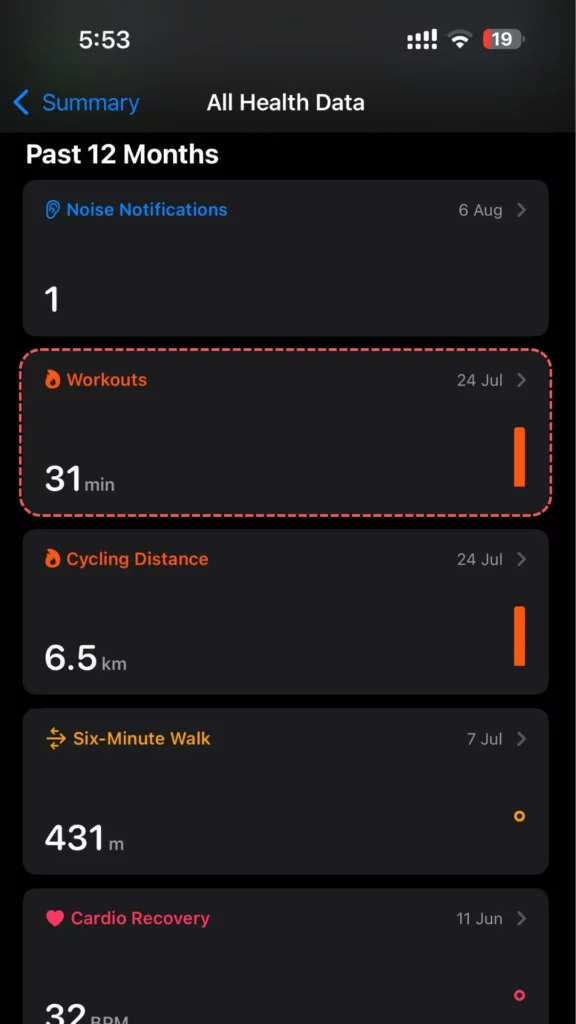


- I go to the Health app and click on ‘Show All Health Data’.
- There, I click on ‘Workouts’.
- Then, I click on ‘Tap All Health Data’.
- Now, I tap on a specific Workout to see the details.
- You will find the Delete option on the left-hand side of the workout.
Why You Cannot Directly Delete Activity From Apple Watch#
Apple Watch Is Designed That Way#
If you are wondering why you cannot delete the activity directly from Apple Watch, then that is because it is built that way. Just like fitness activities, I have found out that there are tons of functions that you can only regulate through your iPhone.
Apple does not give much liberty to make changes to the watch because, since it has a small interface, there is a chance users will delete it by mistake. In that case, retrieving the old data can be problematic. So, I am hot and cold about this issue, but maybe it is for the user’s good.
Apple Watch Syncs Data #
Since I am logged into my Apple Watch with my Apple ID, and so are my iPhone, iPad, and Mac. So, the data from your fitness activities is synced across all the devices. Hence, being able to delete data from one device will also lead to syncing the same to all the other devices.
This can lead to discrepancies and irregularities in the reading. I know there are apps and other features that do not get deleted even if you delete them in your Apple Watch; however, deleting the data does. Since it is regulated by the Health app of your iPhone, these are some of the core features of Apple Watch; they do not allow users to manually delete them.
Also, if your Apple Watch is pausing during a workout, here’s how to fix it!
You need an iPhone For It#
Finally, the simple answer for why your Apple Watch cannot delete your activity is that it lacks the permission to do so. As I said, your Apple Watch can only delete fitness activities from your iPhone.
Apple has designed it in such a way that users get a clear idea of what they are deleting. This also decreases the chances of accidental deletion. Even if you cannot do it on the Apple Watch, you have full access to deleting health and fitness-related data on your iPhone.
Can You Restore Deleted Workouts From Apple Watch#
I was very excited when I finally figured out how to delete activity on Apple Watch. However, once I did it, I was curious to try to figure out how to retrieve it. Unfortunately, once you have deleted your workout, you cannot restore it.
I came to know that Apple does not have a backup section for its health and workout-related data. So, once it is gone, it is gone forever.
Therefore, be very cautious when deleting work because it is impossible to retrieve. Although there are third-party apps that claim to be able to retrieve this data, I do not trust any such apps.
Final Thoughts#
Now you know how to delete an activity on Apple Watch. I have shared two ways to delete activity from an iPhone. Technically, you cannot delete your workout information from your Apple Watch. Just like this, there are tons of other data points that you cannot directly delete from your Apple Watch.
With all that said, keep in mind that deleting the activity for that day will also remove the calories related to it. I guess that is given. Moreover, you can lose track of the calorie count of that specific day, which will affect your weekly and monthly calorie count.
Frequently Asked Questions [FAQS]#
01Can you delete the workout on all iPhones?
Yes, you can delete workouts from all iPhones.
02If you delete a workout from Apple Watch, will it be deleted across all devices?
Yes, if all the devices are synced together, then deleting any information from one device will remove it from all devices.
03Is there any option to delete a workout after you’ve saved it?
Once you have saved your workout, you cannot delete it.
04Can you delete the specific day’s activity?
Yes, you can delete specific days’ activity, but only through your iPhone and not Apple Watch.
 RK
RKWritten by
With a focus on real-world usability, Rahul at WearableXP covers smartwatches and wearable fitness tech. He evaluates how devices combine activity tracking, health metrics, battery life and connectivity. His work helps readers understand how smartwatches fit into everyday routines through practical performance and software-driven features.
More from Rahul 339 storiesKeep readingmore from Smart Watches
All storiesScreenless BandsFitbit Air vs Apple Watch: Which Wearable Is Better for Health Tracking? Smart WatchesAmazfit T-Rex Ultra 2 Review: Is This Rugged Smartwatch Worth $549.99?
 Smart WatchesApple Watch Ultra 4 Review: Is Apple’s Adventure Watch Actually Worth Buying?