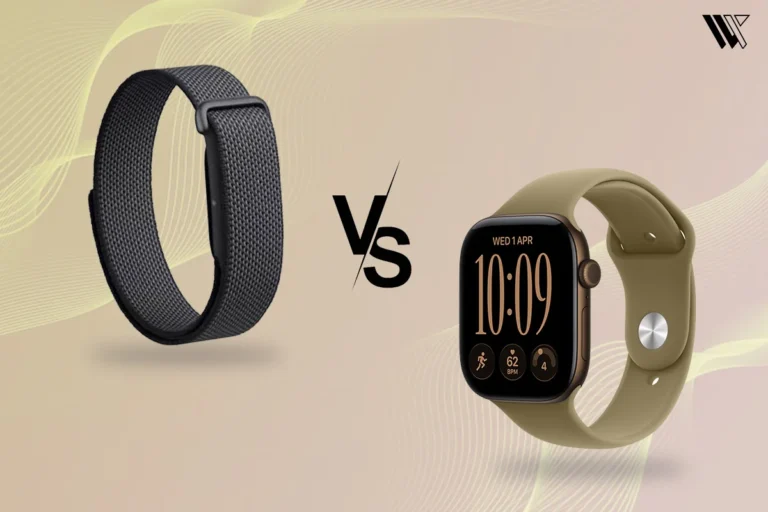
 Screenless BandsFitbit Air vs Apple Watch: Which Wearable Is Better for Health Tracking?
Fitbit Air Review: A Simple Screenless Fitness Tracker That Gets the Basics Right
For years, fitness trackers have been trying to put more and more information on our wrists. Bigger screens, more notifications, more workout stats, more apps. But the Fitbit Air takes a completely different approach: it takes the screen away. When I first started using it, I wasn’t sure how I would feel about having a fitness tracker that couldn’t actually show me anything. No steps at a glance. No heart rate on my wrist. No workout stats waiting for me. Just a small band sitting there and quietly doing its thing.
Independently tested. We never accept payment for reviews.How we test
What’s inside10 sections · 13 min read
- 01Fitbit Air Specifications Overview1 min
- 02Design and Comfort: Fitbit Air Is Made to Disappear2 min
- 03Health and Fitness Tracking Features2 min
- 04Fitbit Air Sleep Tracking Performance2 min
- 05Google Health App Experience and AI Health Coach1 min
- 06Fitbit Air Battery Life and Charging1 min
- 07Fitbit Air Limitations: What It Does Not Offer2 min
- 08Who Should Buy Fitbit Air?1 min
- 09Wrap Up1 min
- 10FAQs1 min
For years, fitness trackers have been trying to put more and more information on our wrists. Bigger screens, more notifications, more workout stats, more apps. But the Fitbit Air takes a completely different approach: it takes the screen away.
When I first started using it, I wasn’t sure how I would feel about having a fitness tracker that couldn’t actually show me anything. No steps at a glance. No heart rate on my wrist. No workout stats waiting for me. Just a small band sitting there and quietly doing its thing.
But after wearing the Fitbit Air for a while, something unexpected happened. I stopped checking my wrist altogether. And strangely enough, I didn’t feel like I was missing as much as I thought I would.
Of course, that doesn’t mean everything has been perfect. There are a few things about the Fitbit Air that surprised me, both in a good way and in ways I honestly didn’t expect from a Fitbit. And after using it day after day, I have a much better idea of whether going screenless actually makes the experience better. So, here’s my Fitbit Air review so you can decide if you want in on the screenless wearable trend on a budget for yourself.
Fitbit Air Specifications Overview#
| Features | Fitbit Air |
|---|---|
| Device Type | Screenless fitness tracker |
| Dimensions | 35.8 × 17.2 × 8.3 mm |
| Weight | 5.2 g (tracker pod) / 12 g (with fabric strap) |
| Display | None |
| Water Resistance | 5 ATM (up to 50 meters, swim-proof) |
| Sensors | Multi-path optical heart rate (PPG), SpO2 (blood oxygen), skin temperature sensor, 3-axis accelerometer |
| Health Metrics | 24/7 heart rate, resting heart rate, HRV, sleep stages & Sleep Score, skin temperature variation, breathing rate |
| Activity Tracking | Steps, Active Zone Minutes, calorie burn, cardio load, auto & manual workout logging |
| GPS | Connected GPS |
| Connectivity | Bluetooth Low Energy (BLE 5.0) |
| Battery Life | Up to 7 days |
| Charging Time | 0-100%: 90 minutes via magnetic snap charger |
| Compatibility | Android 11+ and iOS 16.4+ |
| Subscription | None required for baseline data (Optional $9.99/month for AI Health Coach) |
| Price | $99.99 USD |
Design and Comfort: Fitbit Air Is Made to Disappear#
© WearableXP
© WearableXP
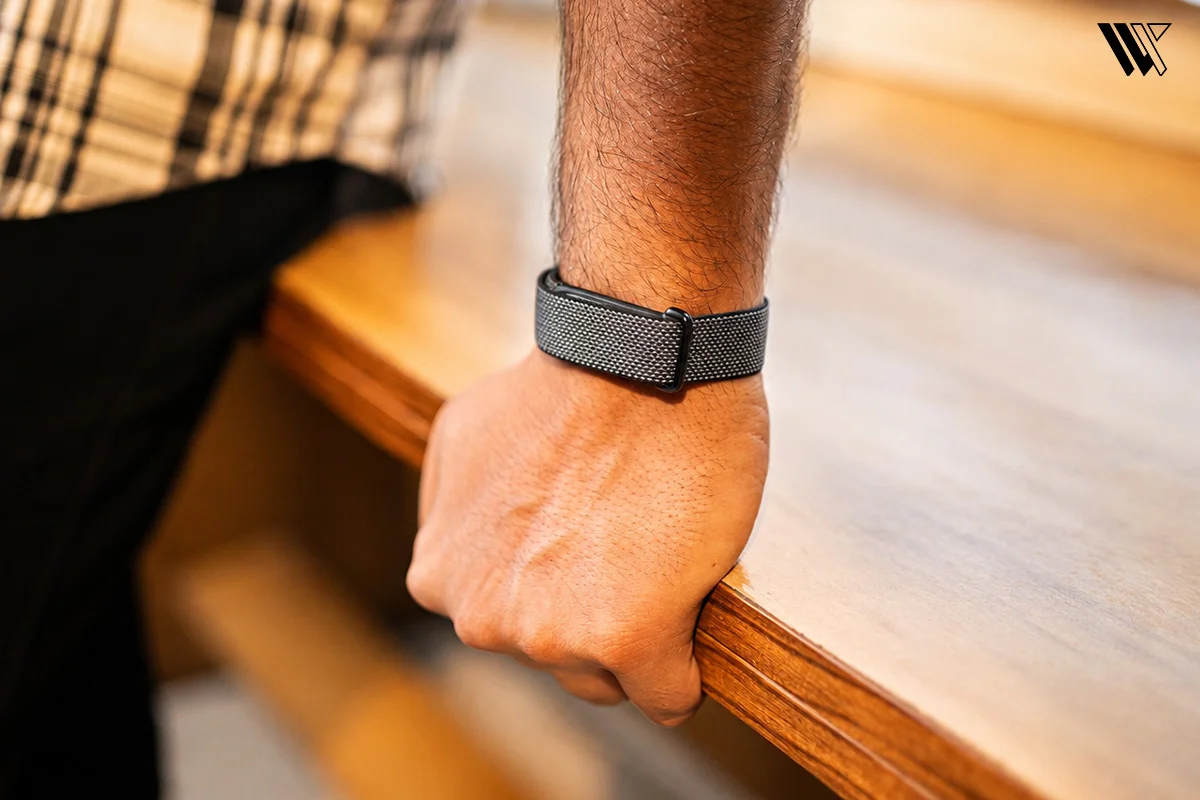
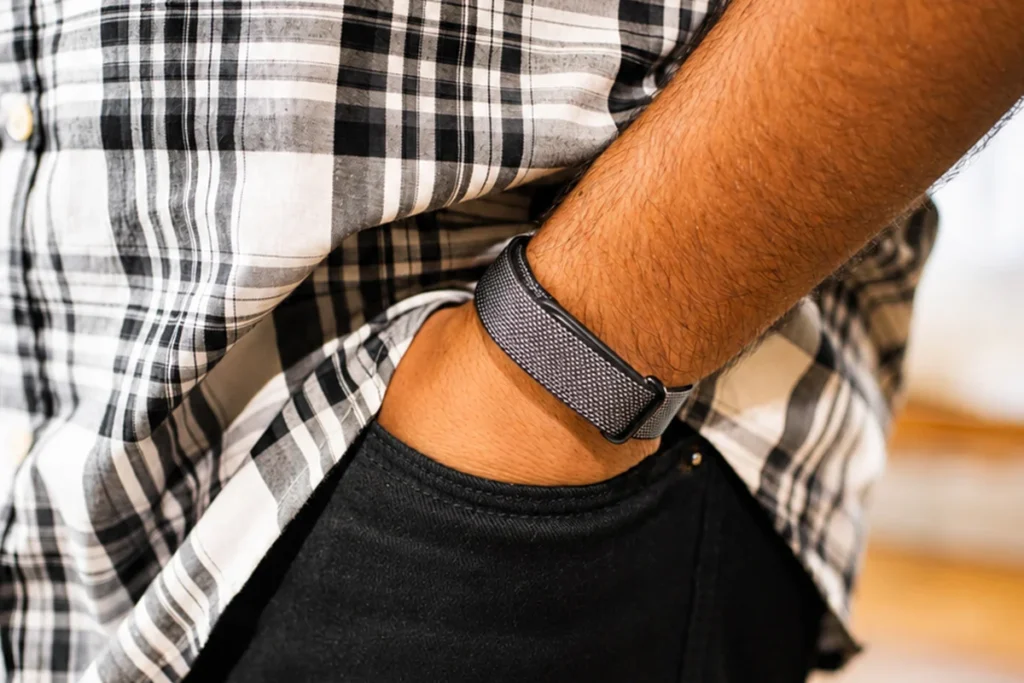
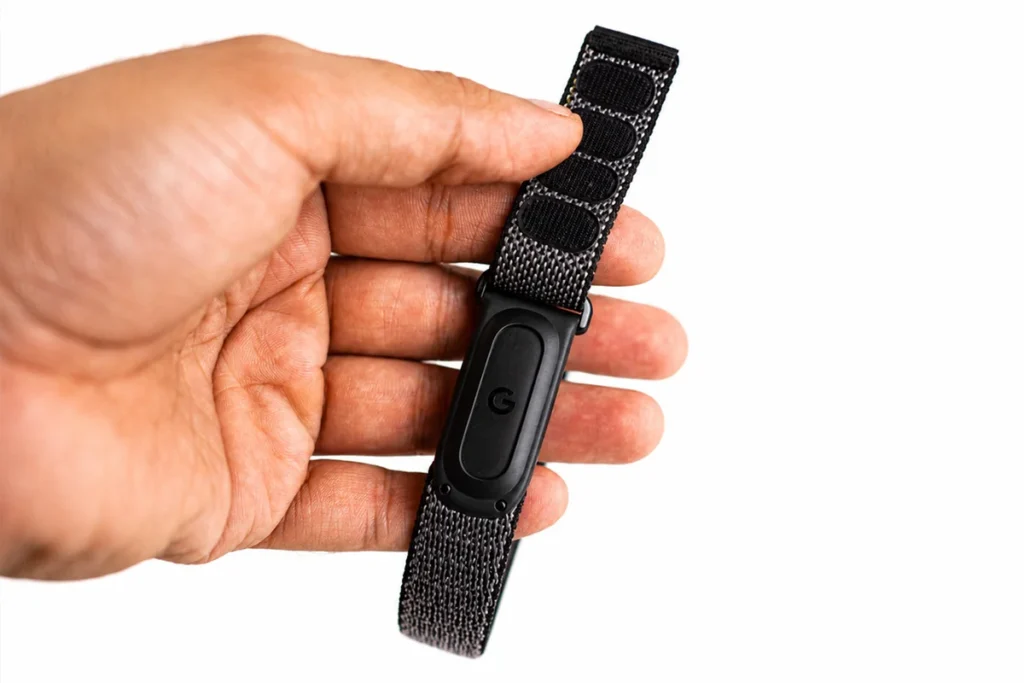
There is only one key factor that would make someone opt for the Fitbit Air instead of a normal smartwatch and that is its design approach. Fitbit Air is designed to go unnoticed and I found that it does this job perfectly. At the core of the product, there is a small tracker pebble with dimensions of 34.9 x 17 x 8.3 mm. This tiny pebble weighs just 5.2 grams alone and 12 grams once combined with the strap, which makes it one of the thinnest and lightest health trackers you can wear on your wrist. It feels much more like a friendship bracelet than a chunky gadget from today’s technological age.
Beyond that lightweight form factor, there is some clever engineering going on here. The pebble casing is made of recycled polycarbonate and PBT plastics, resulting in a sleek and sturdy build that can be snapped onto interchangeable bands using a simple press-click system. Although it lacks any screen at all, the designers at Google did not abandon their users entirely in terms of feedback. Instead of a display, the band comes equipped with a multi-color status LED indicator. If I give the band a double tap, the light will turn white to let me know that it is powered and working or turn red to signal that it is in need of a charge.
The removal of the screen is, in itself, a completely new way of interacting with the device for the entirety of your day-to-day life. Whenever I wear a normal smartwatch, I am constantly drawn to glance at how many steps I have taken, how many emails are sitting in my inbox or even how quickly my heart rate is beating during my walk after work. In the case of the Fitbit Air, this urge has disappeared entirely. For me personally, this has been a huge weight lifted off my shoulders. Whether I am typing at my computer or running, it simply tracks all the important information without bothering me. If you’re also looking for this kind of distraction-free experience, our guide to the best screenless fitness trackers is worth checking out.
This particular smartband also does well in terms of comfort, particularly for individuals who have sensitive skin. Heavy metal watches usually accumulate sweat during the day, resulting in tiredness in my wrists by the end of the day. However, the Fitbit Air bypasses this problem entirely. The band comes with a woven textile band that is breathable and hypoallergenic. This comfortable feeling continues into the night and leads me to the next important feature of this band: continuous wear. If you require a simple gadget that can be worn even in formal attire and that does not give an unexpected screen flash in the middle of the night, the Fitbit Air’s feather-light build is ideal.
Health and Fitness Tracking Features#
While the exterior of the Fitbit Air looks absolutely stunning, the interior holds a sophisticated set of sensors, offering some truly useful physiological data. The tiny pebble contains a multi-path photoplethysmography (PPG) optical sensor, a pair of LEDs for SpO2 monitoring, a sensor for changes in skin temperature and a low power 3-axis accelerometer. Because there is no display eating up the energy, all these sensors work continuously, collecting biometric data non-stop within one day. This is what the hardware setup resulted in during my tests.
Heart Health Tracking#
© WearableXP
© WearableXP
© WearableXP
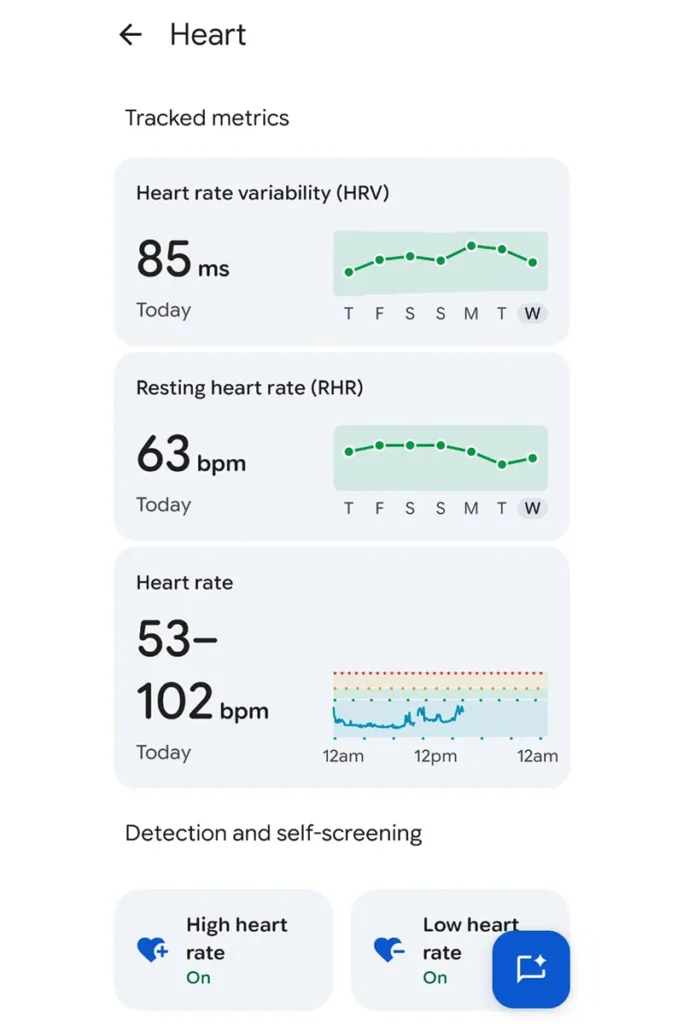
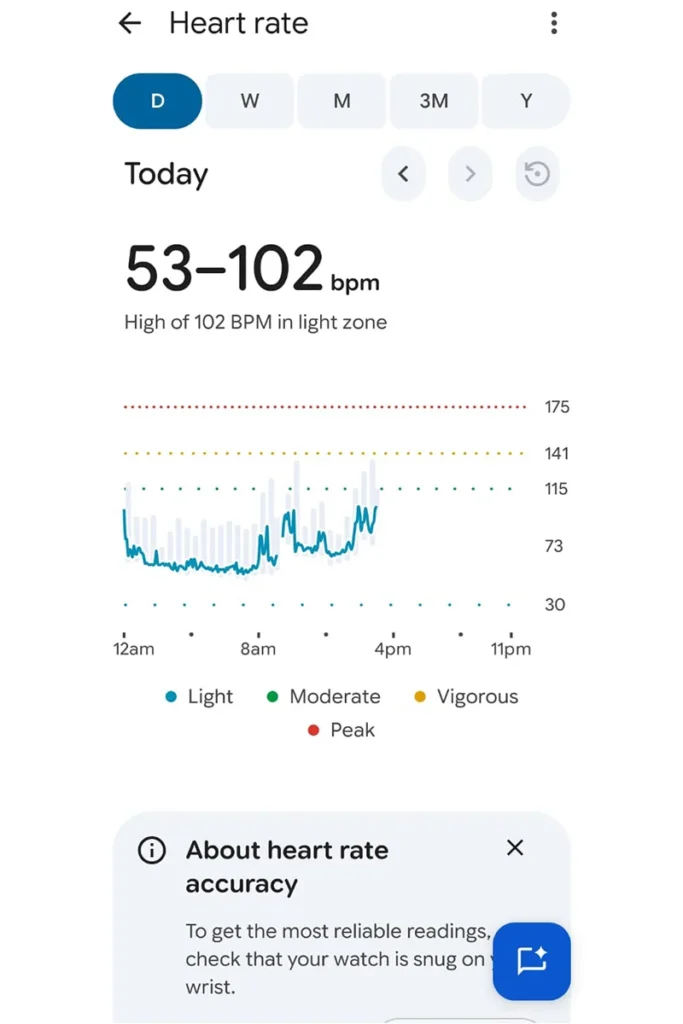
One of the features of the Fitbit Air health package is the heart rate monitoring function, which makes use of the advanced PurePulse optics from Google to monitor the heart rate continuously.
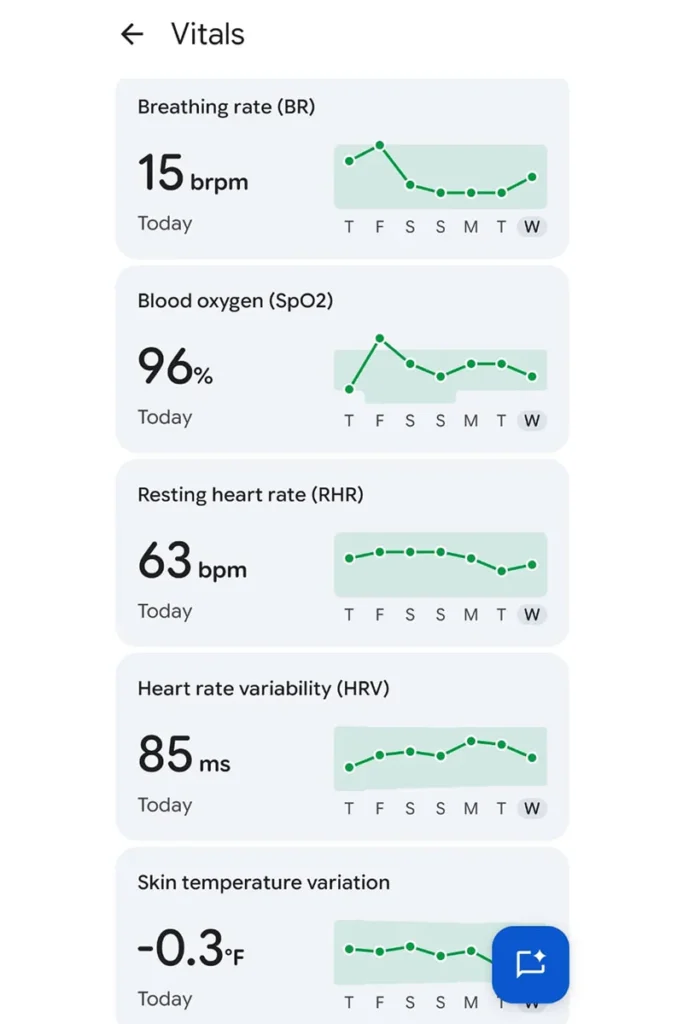
Through weeks of wearing the watch, I was able to notice that my resting heart rate trends were relatively stable and similar to those I gathered in the past when I used smart rings for the same purpose. The device monitors cardiovascular health patterns 24 hours a day, including HRV monitoring by detecting milliseconds between heartbeats in my sleep.
HRV monitoring has become a crucial tool in assessing the autonomic nervous system recovery and total physical stress. In case if my HRV becomes lower than my usual baseline in the Google Health app, it tells me to concentrate more on active recovery instead of doing high-intensity intervals. Along with overnight pulse oximetry, which helps estimate the blood oxygen levels (SpO2) and skin temperature baseline change, this gives a complete picture of the cardiovascular system status without any special efforts from the user side.
Fitness Tracking#
© WearableXP
© WearableXP
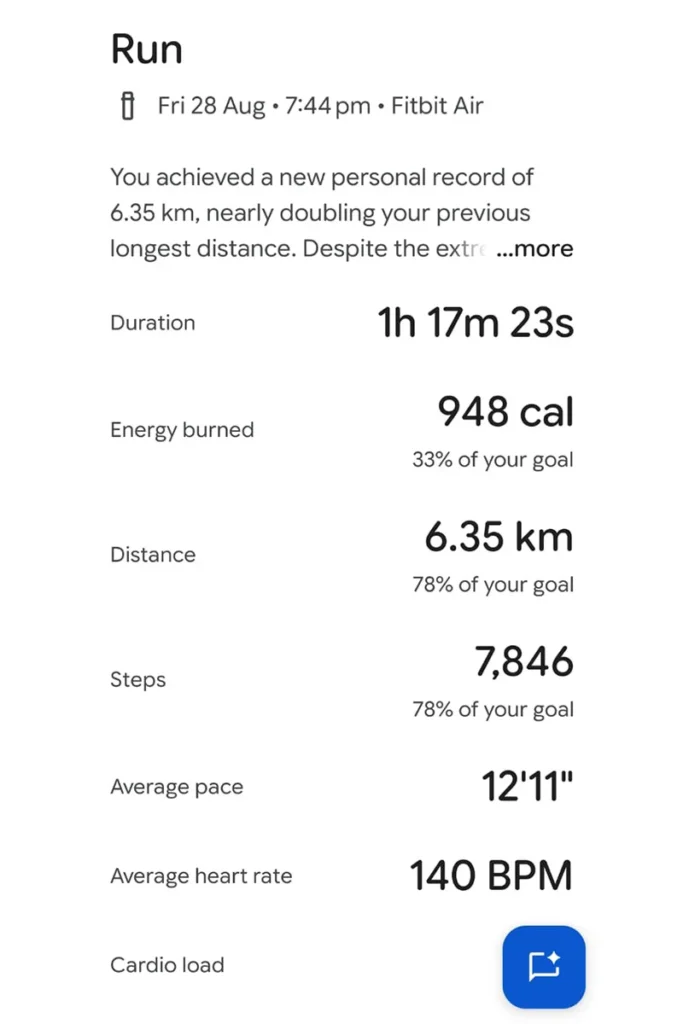
While moving from passive biometrics to intentional workout tracking, there appears to be an important practical trade-off in operation. The 3-axis accelerometer in the device tracks the number of steps throughout the day, analyzes the activity intensity and determines the number of Active Zone Minutes based on the activity level in comparison to the target heart rate zones. These baselines work well enough for general activity throughout the day.
But automatic workout detection has its issues. During the testing, I noticed that the automatic algorithm for starting workouts often failed to recognize brisk walks, running outdoors or bodyweight training and was always late for at least 10 to 15 minutes, sometimes not recording the whole session at all.
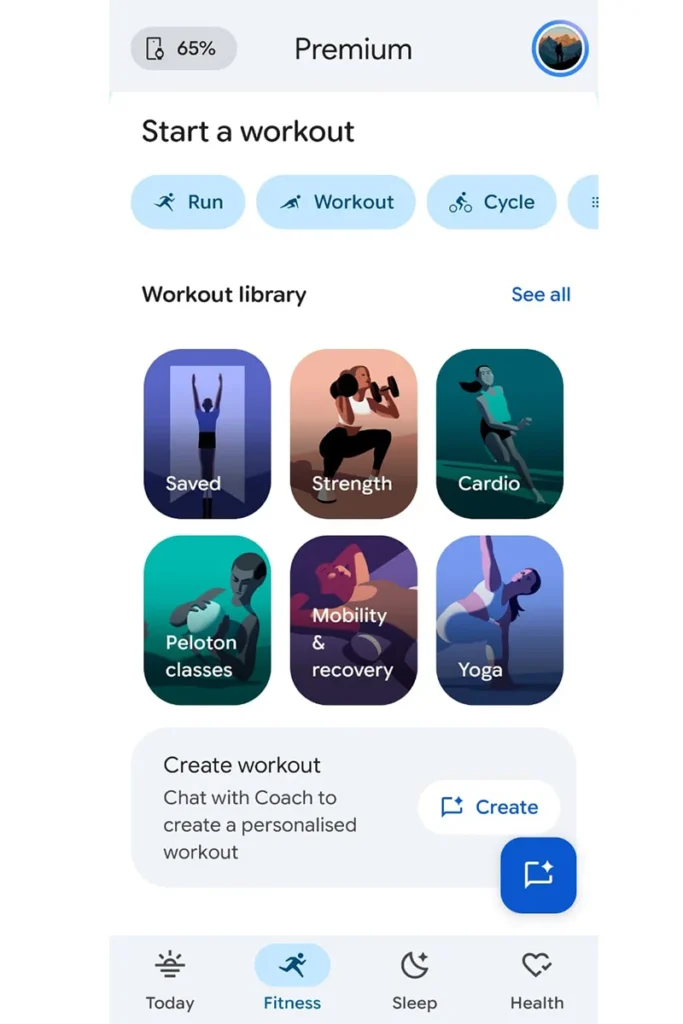
Luckily, there is a very simple solution to that problem. Just activate the workouts manually. As soon as I launch the Google Health app on my phone, I get access to more than 40 different workout modes, from running and cycling to weight training and yoga, so the data collected corresponds precisely to the physical activity I am involved in. In addition to that, activating the session manually forces the PPG sensor on the band to go into its high-accuracy sampling mode right away. Thus, with this approach, the data gathering goes well, heart rate zones, cardio load and calorie burn are measured for each workout session properly. It just means that you will have to launch your phone at the beginning of the session.
Fitbit Air Sleep Tracking Performance#
© WearableXP
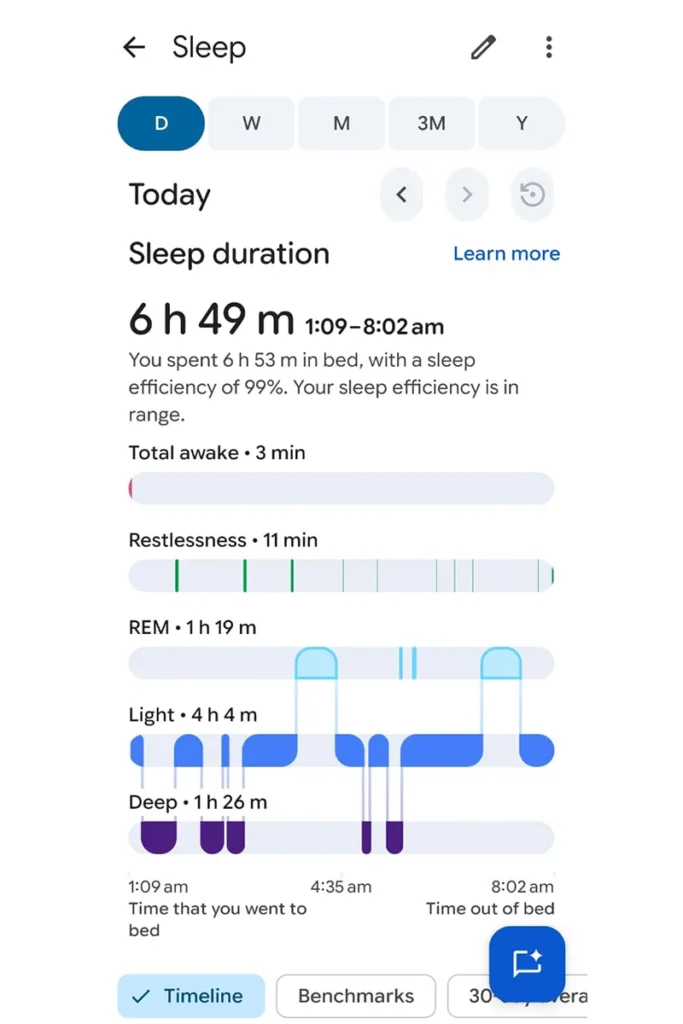
Sleep tracking is perhaps the place where the Fitbit Air displays its most impressive capabilities. As someone who constantly tracks nighttime biometrics using smart rings and wrist devices, consistency of sleep tracking has been my top priority over all other factors. The lack of a screen in the Fitbit Air takes away one of the most annoying aspects of nighttime wearables: the possibility of waking up due to a blinding screen while moving around. Since the feather-light pebble does not weigh anything, it provides amazing comfort overnight. That comfort contributes directly to why I enjoy using the Fitbit Air for overnight tracking. If sleep is your main reason for buying a wearable, you can also check out our guide to the best sleep trackers to see how other devices compare.
That comfort contributes directly to the technical precision of the tracker. In order to measure sleep accurately, the tracker needs to stay in constant contact with the skin during the entire duration of the night. The Fitbit Air makes use of a low-energy multi-path optical sensor array, as well as an infrared channel, an on-wrist skin temperature change sensor and a very sensitive 3-axis accelerometer. By correlating movement with slight changes in heart rate and heart rate variability (HRV), the tracker is able to detect sleep stages using actigraphy and the autonomic nervous system. It also turns on the red and infrared LEDs to detect SpO2 levels.
Every morning, the companion Google Health app calculates a Sleep Score from 100, divided into Light, Deep and REM sleep cycles based on these data feeds. Although the data from a consumer wristband will never be able to compete with a PSG test at a sleep lab, the relative trends have accurately corresponded with my subjective experience and feeling of recovery. In case I’ve had a bad night with a lack of restorative slow-wave deep sleep, the results on the dashboard are immediately evident and identify exact periods when I wake up. It is important that these AI-based interpretations are able to calculate accumulated sleep deficit and fluctuations in skin temperature baselines, providing you with realistic bedtime suggestions.
Google Health App Experience and AI Health Coach#
© WearableXP
© WearableXP
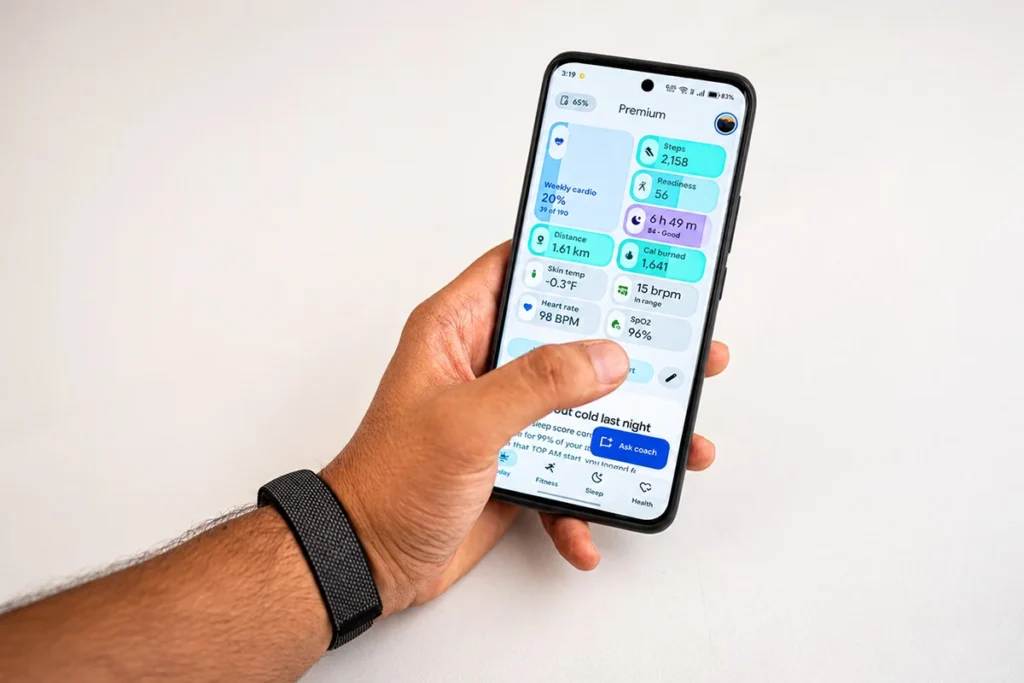
The absence of a screen on the Fitbit Air makes your smartphone the main control center for your device. The newly improved Google Health app is able to connect via Bluetooth Low Energy and categorize all your collected metrics into four simple tabs, namely Today, Fitness, Sleep and Health. The interface is simple and free of complex graphs.
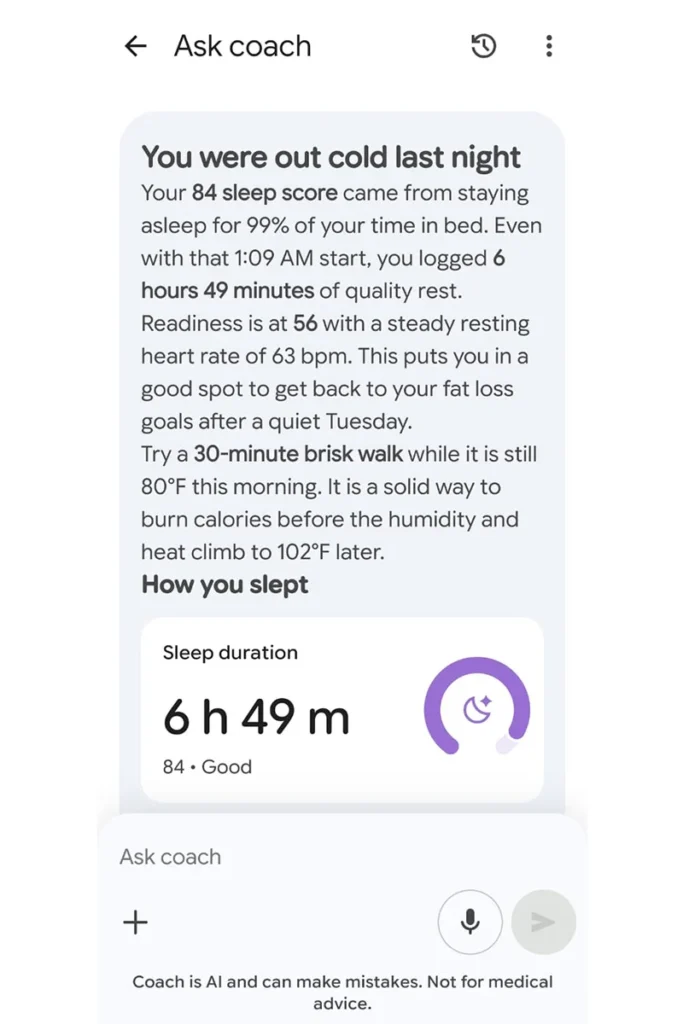
The best software feature is the AI health coach by Google, developed using Gemini technology. Rather than giving statistics and numbers, the AI health coach will analyze your results through correlations of various data points. If there is low recovery time, the AI will determine whether there was a delay that raised your resting heart rate and lowered HRV and provide recommendations to change things such as workouts and bedtimes for a better night’s sleep. The user can even type in questions about their sleep and receive answers.
Most importantly, you do not need a subscription to get core health insights. Google keeps your continuous heart rate, daily steps, full sleep stages (light, deep and REM) and SpO2 trends completely free. The optional Premium subscription is only required if you want the conversational Gemini coach and advanced predictive recommendations. The free experience remains robust and fully functional, ensuring you own your vital health data without being trapped behind a paywall.
Fitbit Air Battery Life and Charging#
© WearableXP
There is no need for any battery anxiety with the Fitbit Air since it has no power-consuming display. During my daily usage with heart rate monitoring and sleep tracking turned on, I got 7 full days out on a single charge.
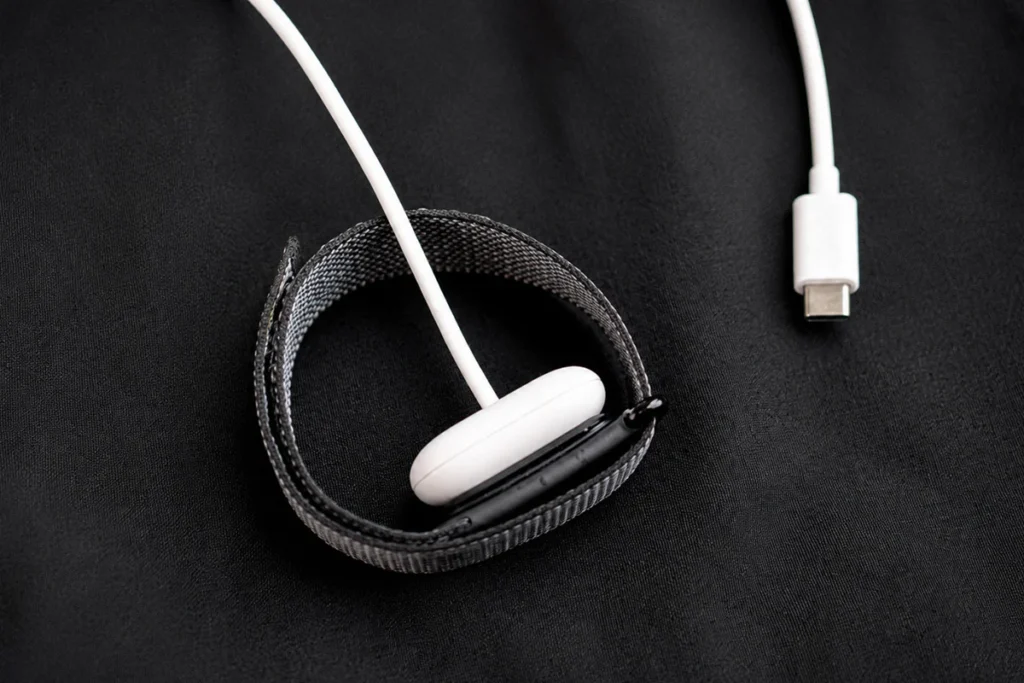
For charging, the device uses a special magnetic charging cradle, which comes together with the watch and features a USB-C connector. This connection is perfect as well as the fact that a multi-colored LED starts pulsing white to confirm the beginning of the charging process without checking your smartphone.
Charging is quite fast and simple since a complete 0 to 100% charge will be accomplished in about 90 minutes. Moreover, you can receive 24 hours of activity tracking within just 5 minutes of charging while taking a shower.
Fitbit Air Limitations: What It Does Not Offer#
Although the Fitbit Air is highly effective in providing discreet and lightweight health tracking, developing trust requires honesty regarding its flaws. The removal of the display and reducing the physical weight to a mere 5-gram pebble offer many advantages, but there are obvious disadvantages as well. These are some basic limitations of the device that one needs to consider before purchasing.
No Display#
There is nothing more apparent in the trade-offs than the absence of any screen on the device. Even though a non-screen fitness tracker will help avoid digital fatigue and increase battery life, the way you get the necessary information is drastically changed. You no longer can just look at your wrist to see the time, your current number of steps taken and your live heart rate. If you are used to having a fitness band as an ordinary watch, then you have to wear another watch or take your smartphone out to tell the time.
Limited Smartwatch Functionality#
Because there is no screen, the Fitbit Air eliminates practically all the convenient functions that can be found in today’s smartwatches. There will be no notification previews, call alerts, calendar reminders, music control and contactless payments. The only indicator of its operation is the LED status light which will show you the battery level and some hardware information but it will not tell you anything about the messages received or meetings scheduled in the calendar.
Requires Phone App for Insights#
Because the pebble design cannot itself provide statistics, your phone becomes the only means of knowing your health statistics. Whether it is about reviewing your sleep statistics, seeing your heart trends or confirming active zone minutes, everything requires opening the Google Health app. Even if your phone is in another room or goes out of power, you are effectively blind to any information until you are synced up again. It even affects exercise, as without stats displayed on your wrist, you will not be able to confirm if you have started a workout or your heart rate zones.
Not Designed for Advanced Athletes #
However, the Fitbit Air is designed more for everyday wellness than serious sports performance. It does offer basic activity and recovery insights, but there are no advanced training features that endurance athletes may need. If you are looking for a screenless wearable with a stronger focus on training, Garmin Cirqa is also worth considering. There is no training dynamics, recovery heart rate dynamics, pace alert, interval timer or other functions that would be useful for those who train according to a periodization schedule.
No Replacement for Dedicated Running Watches#
As far as outdoor activities such as running or cycling are concerned, the absence of onboard GPS can be seen as an important limitation of its functionality. In case of the Fitbit Air, everything depends on the “Connected GPS,” which means that the watch uses the built-in receiver of your smartphone in order to determine the routes, measure running speed and monitor elevation gain. So, if you like to go running for 10K without carrying anything but shoes and a wrist band, this device will have no choice but to use basic accelerometer data.
Who Should Buy Fitbit Air?#
Buy Fitbit Air If:#
- You want simple health and activity tracking without the extra smartwatch features.
- You prefer a screenless wearable that does not distract you with notifications.
- You mainly care about sleep, heart rate, daily activity and overall wellness.
- You want a lightweight tracker that is comfortable enough to wear throughout the day and night.
- You want to avoid paying for a subscription just to access basic health tracking.
Avoid Fitbit Air If:#
- You need built-in GPS for running or cycling without carrying your phone.
- You want detailed sports and training metrics for serious workouts.
- You want to see your steps, heart rate or workout data directly on your wrist.
- You are looking for advanced recovery and athlete-focused coaching.
- You want your fitness tracker to work more like a smartwatch.
Wrap Up#
Since I started using the Fitbit Air, I have developed a certain appreciation for its simplicity. The device stays strapped to my wrist, monitors my health and sleep and never interrupts me.
The device may have its flaws, particularly in automatic activity detection, but that does not matter much since it is still one of the lightest and most convenient trackers I have ever tried. If you need a screen-free fitness tracker that monitors your health without any of the features of a smartwatch, then the Fitbit Air will serve the purpose well.
FAQs#
01Can the Fitbit Air track swimming?
Yes, the Fitbit Air is water-resistant up to 50 meters. You can safely wear the Fitbit Air while swimming, showering or working out in the rain.
02Does the Fitbit Air have built-in GPS?
No, the Fitbit Air does not have onboard GPS. The Fitbit Air uses connected GPS, which means it uses your phone’s GPS to map outdoor routes and pace.
 RR
RRWritten by
Reetain, with a focus on emerging trends and immersive tech, covers smart wearables and evolving device categories. He explores how sensors, AI, and connectivity come together in modern wearables, helping readers understand how these technologies shape everyday digital experiences and the future of personal computing.
More from Reetain 66 storiesKeep readingmore from Screenless Bands
All storiesScreenless BandsFitbit Air vs Apple Watch: Which Wearable Is Better for Health Tracking? Screenless BandsFitbit Air vs Ultrahuman Air: Which Screenless Wearable Is Right for You?
 Screenless BandsFitbit Air vs Luna Band: Which Screenless Wearable Is Better for Health Tracking?
What’s inside
- 01Fitbit Air Specifications Overview1 min
- 02Design and Comfort: Fitbit Air Is Made to Disappear2 min
- 03Health and Fitness Tracking Features2 min
- 04Fitbit Air Sleep Tracking Performance2 min
- 05Google Health App Experience and AI Health Coach1 min
- 06Fitbit Air Battery Life and Charging1 min
- 07Fitbit Air Limitations: What It Does Not Offer2 min
- 08Who Should Buy Fitbit Air?1 min
- 09Wrap Up1 min
- 10FAQs1 min