 Smart GlassesRogbid VisionMax Launches With 20MP Sony Camera and Claimed 4K Video for $139.99
RayNeo iO Review: I Tested These Camera-Free AI Glasses for Everyday Use
Smart glasses have always been an interesting gadget for me, but one thing keeps coming back to my mind: will I be willing to use them on a regular basis or will they end up in my drawer when I realize that I am done with the novelty aspect of them?
Independently tested. We never accept payment for reviews.How we test
What’s inside14 sections · 15 min read
- 01RayNeo iO Review: What You Need to Know1 min
- 02Specifications1 min
- 03Design and Comfort: Can You Wear RayNeo iO All Day?1 min
- 04The Transparent Display: Useful Information or a Distraction?1 min
- 05Smart Crown, Voice Controls and Head Gestures1 min
- 06AI Assistant, Live Translation and Captions1 min
- 07AI Life Log and Meeting Notes: Does It Remember What Matters?1 min
- 08Teleprompter and Productivity Features1 min
- 09RayNeo iO Battery Life: How Long Does It Really Last?1 min
- 10RayNeo iO vs Ray-Ban Meta: Which AI Glasses Make More Sense?1 min
- 11What I Like and Dislike About RayNeo iO1 min
- 12Is RayNeo iO Worth Buying?1 min
- 13Wrap Up1 min
- 14FAQs1 min
Smart glasses have always been an interesting gadget for me, but one thing keeps coming back to my mind: will I be willing to use them on a regular basis or will they end up in my drawer when I realize that I am done with the novelty aspect of them?
I decided to find it out for myself by trying the RayNeo iO glasses and see if it makes everyday actions easier for me without the need to take my phone out every other minute.
It looked like an interesting idea at the very beginning, as the glasses provide a completely new way of interacting with the devices which is more discreet than anything else. However, when I started to use them, I realized that a cool idea doesn’t guarantee a perfect product. There were some things that I liked a lot and there were other things that I could improve. Is RayNeo iO the right type of device for me to continue wearing? Let’s take a closer look at what the RayNeo iO gets right, where it falls short and whether it can earn a place in my everyday routine.
RayNeo iO Review: What You Need to Know#
To begin with, let us discuss the basic features of the RayNeo iO. The RayNeo iO are camera-free smart glasses that bring AI features and notifications into your line of sight. While other similar devices strive to make recordings of everything, the RayNeo iO concentrates exclusively on text and voice capabilities. Due to their camera-free nature, these glasses are targeted at professionals, travelers and those people who need hands-free information without invading the privacy of others.
The first thing that catches your attention when you try on the RayNeo iO is its transparent heads-up display, which superimposes useful information over the real-life view. The initial price for the RayNeo iO in the US is $499.
For this amount of money, you receive a unique package of capabilities. In terms of my personal experience, my first impression of the RayNeo iO is that it is very futuristic but also at the same time quite rough-edged, because of the number of disappointing features that can be easily observed when wearing and by using these glasses on a regular basis.
Firstly, I experienced high pressure from the temple side, which makes the glasses very uncomfortable to use already after 30 minutes of usage. Secondly, the extremely slow processing speed when using live captions and translations makes me wait for the text to be displayed in order not to disrupt the conversation.
Moreover, it is worth mentioning that the RayNeo iO does not have any audio speakers nor any navigation feature. Additionally, we are also limited to their ecosystem since you have to purchase subscriptions separately in order to use the RayNeo iO. That means that you cannot use your own artificial intelligence account. Thus, although the display and the lack of camera features of the RayNeo iO look great, the hardware components and software speed lead me to assume that the gadget belongs to the first generation.
It is also worth noting that the device is MFi Certified, ensuring stable connectivity for iOS users, though it requires relying entirely on the dedicated RayNeo companion app for all data bridging.
Specifications#
| Specifications | RayNeo iO Glasses |
|---|---|
| Colors | Polar Night (Grey) and Dune (Gold) |
| Weight | 33 grams |
| Frame Materials | Magnesium-aluminum alloy front with aerospace-grade titanium temples |
| Display Technology | Binocular MicroLED with diffractive waveguide |
| Display Color | Monochrome Green |
| Screen Transparency | 97% active display transparency |
| Field of View (FOV) | 23.5 degrees |
| Screen Brightness | Up to 1,300 nits at eye level |
| Microphones | 4-mic array with a built-in bone-conduction sensor |
| Physical Controls | Smart Crown (rotating and clicking dial on the temple) |
| Hands-Free Controls | Voice commands and head gestures (nodding/shaking) |
| Connectivity | Bluetooth 5.4, MFi Certified |
| Battery Capacity | 240mAh |
| Durability Rating | IP54 dust and water resistance |
| Key AI Features | Live captions, invisible teleprompter, AI Life Log and RayNeo AI assistant |
| Price | $499 USD |
Design and Comfort: Can You Wear RayNeo iO All Day?#
© WearableXP
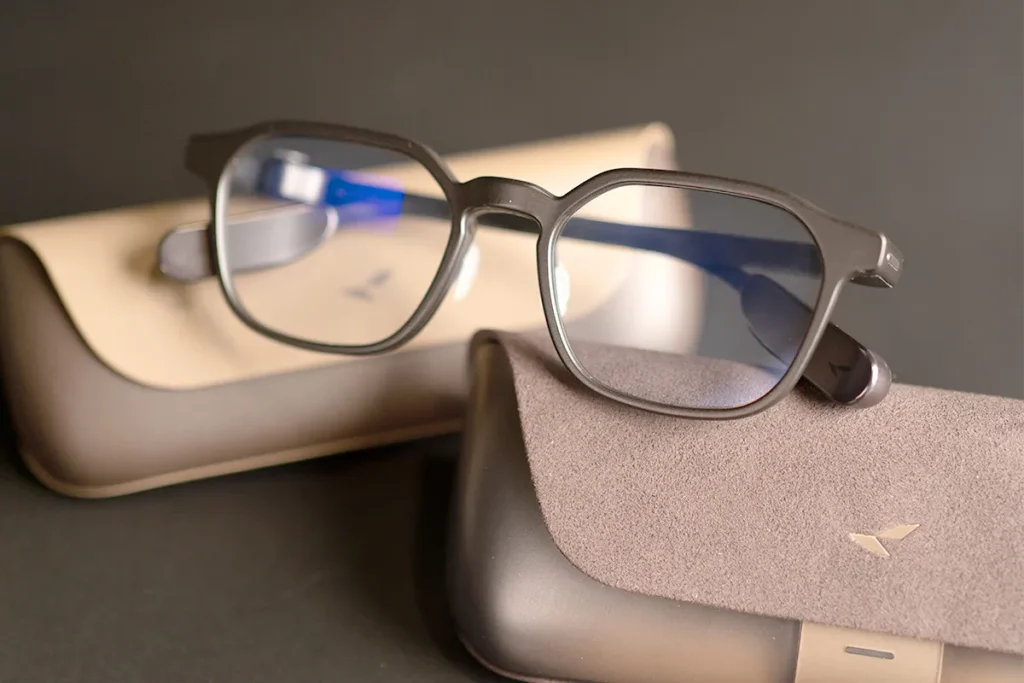
The first thing I notice about the RayNeo iO is how ordinary they look. The frame glasses feel light at first and at 33 grams, they don’t feel like a bulky piece of tech. I also liked that they looked like regular glasses rather than something that would draw attention. The magnesium-Aluminum frame and titanium temples create a premium feel. Wearing these RayNeo iO smart glasses in ordinary social situations did not attract any attention since these glasses look quite ordinary. This structural balance is maintained by utilizing a magnesium-aluminum alloy for the front frame and aerospace-grade titanium for the temples, keeping the build premium without making them bulky.
But looking good and feeling good are different things. Let me tell you the truth about the comfort level of RayNeo iO glasses. In the beginning, everything feels perfect. After about 30 minutes, I started feeling pressure around my temples. Due to this pressure, the glasses started digging in my head on both sides. Maybe I’m being picky, but I expect them to feel comfortable all day long if I am paying $499 for them. If you have a wider head, then you should know about this.
Although the problem of pressure remains, the stability of the RayNeo iO is very good. As I walked and turned my head, wearing the glasses, the glasses did not slide off my nose. Additionally, it is easy to charge the RayNeo iO due to its magnetic connector. Therefore, although the RayNeo iO looks amazing and is stable, the strong pressure on temples may require taking breaks.
The Transparent Display: Useful Information or a Distraction?#
© RayNeo
Now, let us take a look at the star of this show: the clear screen on the RayNeo iO.
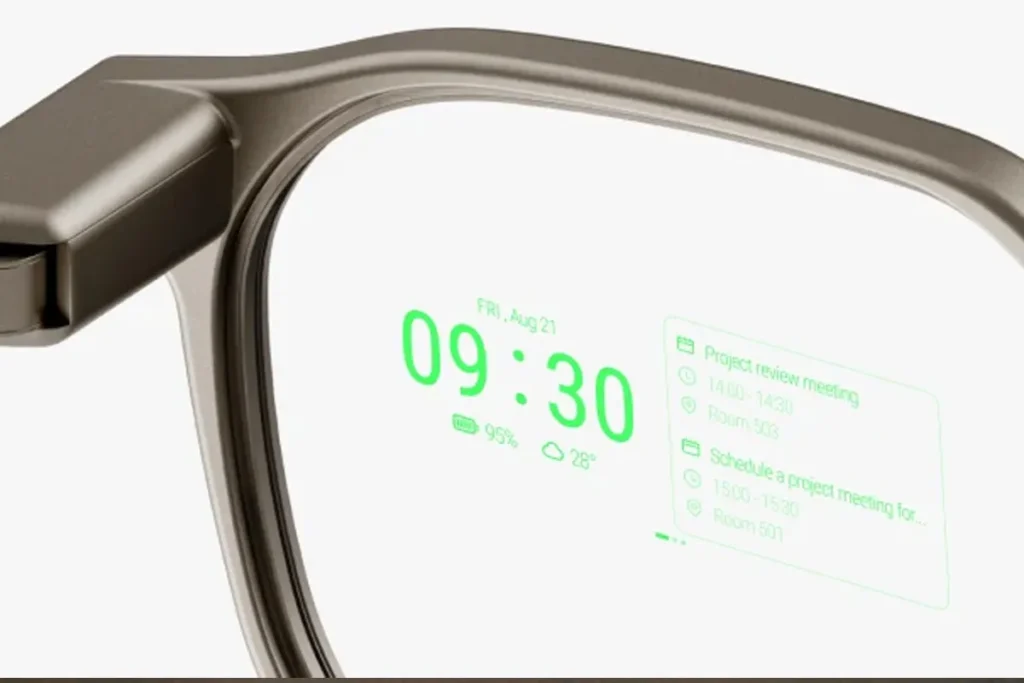
The device features a MicroLED display which projects green text right into your right eye. The company says that it is 97% transparent. From my experience, this means that the green text of the RayNeo iO does not obstruct your regular vision in any way. The optical clarity here in this is achieved using a binocular MicroLED with diffractive waveguide technology. The display can also push a peak brightness of up to 1,300 nits at eye level, which looks great on paper but yields real-world results.
During the test of the RayNeo iO under indoor conditions, the readability of the notifications and short messages was wonderful. The green text is clear and easily visible. Due to its clarity, short messages were easy to read at a glance. But during testing of the RayNeo iO in sunny weather conditions, there were small difficulties due to the presence of sun rays.
You might wondering: How naturally does the display sit within your line of sight? The display works quite well for that. It is quite glanceable when compared to always checking your phone. All you need to do is divert your eyes a little bit and everything is right there. However, it must be remembered that the RayNeo iO has a very small 23.5-degree field of view. Due to this drawback, the RayNeo iO is best suited to short text and simple graphics.
The other significant feature I found when using the RayNeo iO device is that there is no in-built navigation at all. As I was walking in the downtown area, I expected to find myself guided through floating arrows towards a nearby coffee shop. Unfortunately, the RayNeo iO device does not provide that. So you have to completely depend on text notifications. Hence, while the display of the RayNeo iO is quite interesting for messages but navigation seems to be lacking here.
Smart Crown, Voice Controls and Head Gestures#
© WearableXP
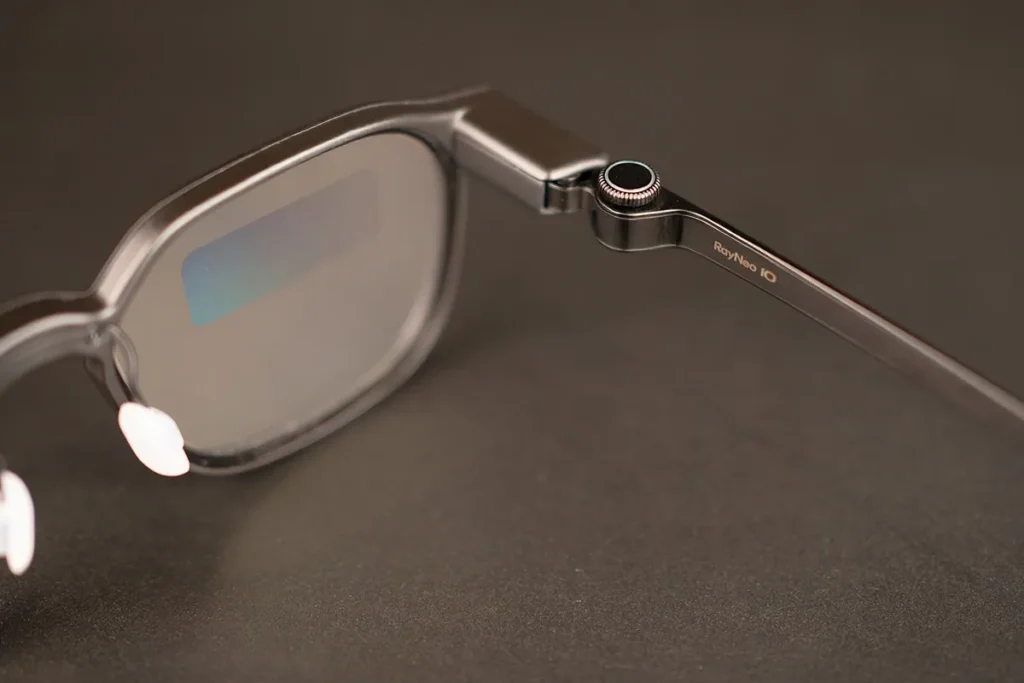
The use of smart glasses may at times be awkward, but RayNeo iO seeks to solve this problem. RayNeo iO comes with a physical dial on the temple known as the Smart Crown. I must say that I really like this small dial. Turning the dial and pressing it to select an option felt more intuitive than relying entirely on touch or voice controls.
Apart from the physical buttons, the RayNeo iO depends a lot on voice commands which i feel were less reliable in noisy environments. In my case, I often had to repeat myself, even though the glasses use a 4-microphone array and a bone-conduction sensor that is designed to isolate voice frequencies. Unfortunately, the real-world execution sometimes fails to leverage this tech effectively to filter out heavy background noise.
The RayNeo iO device can also detect head movements. For instance, one could nod their head to accept a phone call and shake their head to dismiss any notifications. During my testing the had gesture worked for me. And after a little practice, I got used to them because nodding at the RayNeo iO becomes natural, making it easier to accept or dismiss notifications without reaching for my phone. However, although the Smart Crown feature of the RayNeo iO is outstanding, its poor microphone quality limits its speech command capabilities.
AI Assistant, Live Translation and Captions#
The biggest strengths of the RayNeo iO lie in its collection of artificial intelligence capabilities. The RayNeo iO can act as your private translator and intelligent assistant. In my tests with the voice assistant, I posed several different questions to the software. Once it understands your query, you get a good response on the screen.
However, I tested live captions and translations during a conversation with a Spanish-speaking friend to try out this technology. The feature worked to a point, but the delay was noticeable. It takes up too much time to process the information. Due to this delay, the moment my friend finished speaking, I had to stare at the display of the RayNeo iO for an uncomfortable amount of time until the translation appeared. Since the glasses utilize Bluetooth 5.4 for data transfer, this severe latency is almost certainly a bottleneck in the app’s cloud processing backend rather than a slow local wireless connection.
And then came my personal problem with the RayNeo iO glasses. I cannot use my own Claude or any other AI with my RayNeo AI glasses. I am already paying for my premium AI services on my laptop. But with the RayNeo iO, I have to separately subscribe to a service inside the RayNeo app in order to get the best of the AI services. This is because I am bound within their system. So, if you purchase RayNeo iO, you better be ready to spend extra inside their app for the best AI performance.
AI Life Log and Meeting Notes: Does It Remember What Matters?#
Another big part of the advertising for the RayNeo iO is its AI Life Log feature. The concept is that the RayNeo iO will be able to listen in on all your conversations, record them and create notes from them. As I attend many meetings, I was quite excited about trying this out on my RayNeo iO.
I tested the Life Log during a short conversation in which there were 3 project deadlines. In the evening, when I reviewed the generated notes using the RayNeo companion app. It was successful in recording 2 out of 3 facts due to the fact that the microphone is not always clear and it failed to record a whisper. Moreover, because of the time lag in the process of summarization, it took some time before getting the summary. But when it works, I would appreciate that it is a great feature.
Privacy, of course, cannot be overlooked here. The fact that RayNeo iO lacks a camera means that you will not feel uncomfortable when wearing the device in public. On the other hand, microphones and transcription capabilities bring up big privacy issues. When the feature is on, the RayNeo iO is recording sound continuously. This implies that you should always have your conversation partners’ permission before wearing the RayNeo iO. Fortunately, there is a way for users to control what data they want to store and process using the RayNeo app.
Teleprompter and Productivity Features#
If you have to present or do videos, then the RayNeo iO has an additional capability that could be enough reason for you to buy the whole device. There is an integrated teleprompter function in the RayNeo iO. Since I sometimes produce short videos, I thought of testing it out.
Getting the teleprompter content ready within the RayNeo app is easy. You simply copy your content and get it projected on the screen of the RayNeo iO headset. It is easily readable and its scrolling speed can be set by using the Smart Crown. Since it projects right in front of your eye, viewing the screen becomes very easy. You do not even appear to be reading but only looking into the eyes of your audience.
During my testing the RayNeo iO teleprompter, I realized that it was extremely useful when it comes to making short videos rather than lengthy passages. Nevertheless, there were certain issues. When one tries reading long texts using the RayNeo iO teleprompter, he or she can experience some discomfort because of the monochrome green screen and limited field of view. That is why the RayNeo iO teleprompter should be used for short bullet points or scripts only.
RayNeo iO Battery Life: How Long Does It Really Last?#
© RayNeo
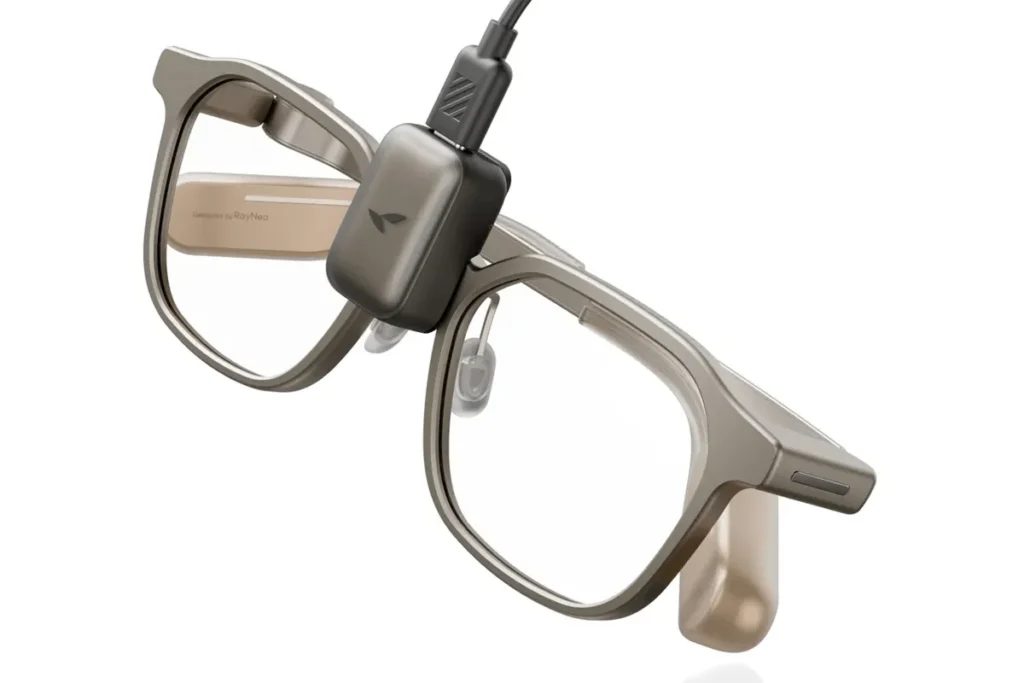
It is impossible to get around the fact that battery life always proves to be the final test for wearable technology. According to the company, the battery life of the RayNeo iO will be around 48 hours under normal circumstances. However, to make things clear, this is probably going to be the standby battery life. The internal hardware relies on a tiny 240mAh battery. While this keeps the frames lightweight, it severely limits the physical capacity for continuous, processor-heavy tasks.
For this test, the battery percentage of the RayNeo iO was measured when the day started. I have used the glasses for getting the notifications, a little help of AI and a teleprompter for 15 minutes. With the usage of the features, the battery percentage of the RayNeo iO dropped to 20 percent at the end of the afternoon. Hence, the battery drain in live translation and teleprompter use of the RayNeo iO is very high.
The battery life of the device when just receiving messages would be sufficient enough to last throughout the workday. However, when using all the power of AI, the battery will not hold and require recharging even before lunch time. Fortunately, the battery life of the RayNeo iO is pretty fast and the connector is easy to attach due to its magnet. Due to the high speed at which the device uses up the battery power, I strongly advise keeping the charging cord close at hand.
But, in case you require a more convenient method for charging the glasses, you may opt for buying the RayNeo iO Eyewear Charging Case separately at the cost of $69. The device has an in-built 2,000 mAh battery and claims to offer 5 complete charges to the glasses. This may prove useful in case you use the glasses throughout the day without carrying a charging cable everywhere.
RayNeo iO vs Ray-Ban Meta: Which AI Glasses Make More Sense?#
To discuss the RayNeo iO, one cannot ignore mentioning the elephant in the room, the Ray-Ban Meta smart glasses. Which set of AI glasses suits your needs best? It is all about what you want to achieve.
The first thing that immediately strikes the eye is the presence of the camera. The Ray-Ban Meta comes equipped with the cameras to take photos and record media content. This feature causes many people to be wary of these glasses. The RayNeo iO does not come with a camera at all.
Nevertheless, there is a great difference in hardware in terms of audio. The Ray-Ban Meta comes with incredible speakers built into it which can be used for listening to music and making phone calls with ease. In contrast to this, the RayNeo iO comes without any built-in speakers. No, literally none. The RayNeo iO works with visuals or texts or connects with your smartphone’s earphones. Thus, as a result of not having any built-in speakers, you get deprived of this great auditory experience.
Consequently, if you intend to click pictures, make videos and listen to podcasts, you must definitely go for the Ray-Ban Meta. On the other hand, if you wish to have a transparent display that will help you read notifications, teleprompting and texts without flashing a camera on people, you must definitely go for the RayNeo iO. If you want to explore more options before making a decision, check out our guide to the best smart glasses.
What I Like and Dislike About RayNeo iO#
What I liked#
- Lightweight frame with an everyday design.
- Quick access to notifications and short AI responses.
- Physical Smart Crown controls.
- Camera-free design for better privacy in public spaces.
- Useful teleprompter for short scripts and presentations.
What could be better#
- Uncomfortable temple pressure during longer sessions.
- Delays in live captions and translations during testing.
- Voice recognition struggles in noisy environments.
- Battery drains quickly with heavy AI use.
- No built-in speakers or navigation features.
- Some AI features require an additional paid subscription, with no option to use my own AI API keys.
Is RayNeo iO Worth Buying?#
© WearableXP
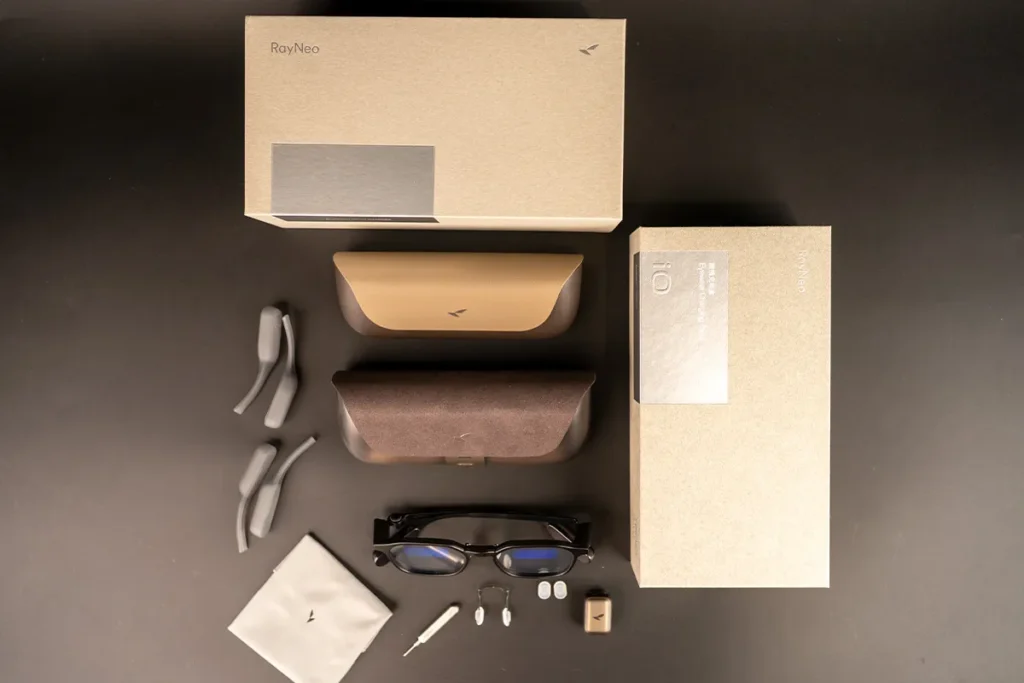
In other words, after this long series of tests, is the RayNeo iO really worth its $499 cost? Not so simple.
If you are a specialist, a public speaker or just someone attending countless meetings, there is something special about the RayNeo iO. Due to the great teleprompter and the fact that it does not have a camera, the RayNeo iO is perfect for use in the office environment. The transparent display comes in handy when you want to look into the eyes of other people.
Nevertheless, if you are seeking a single device that can serve your entertainment needs, the RayNeo iO is not your device. Since there are no integrated speakers, cameras and navigation features in the RayNeo iO, the product can be described only as a device for productivity through text. Additionally, the slow processing and tight temple pressure make the RayNeo iO look like a first generation product. If you seek to enjoy seamless music and photos, go for camera equipped AI glasses.
In summary, this is my opinion on the RayNeo iO: it is an intriguing, narrow-purposed device designed for a narrow purposed audience. For those who desperately need hands-free text reading and do not mind the lack of the camera, RayNeo iO can be an ideal choice. Nevertheless, for those who are searching for perfect and speedy AI processing and comfort in use, maybe, some software updates or second-generation RayNeo iO will suit better.
Wrap Up#
The RayNeo iO has a useful idea at its core: quick access to text and AI features without a camera or the constant need to check your phone. I really like the concept, especially the transparent display and teleprompter, but my testing also revealed some drawbacks. The uncomfortable temple pressure, delayed live captions, average microphone performance and battery drain still need improvement. For me, the RayNeo iO is a promising step toward more practical smart glasses, but it needs a few refinements before it can become a reliable part of my everyday routine.
FAQs#
01Does the RayNeo iO have a built-in camera?
No, the RayNeo iO is completely camera-free. I loved wearing the RayNeo iO in meetings without making people feel spied on, but you obviously cannot take photos with it.
02How long does the RayNeo iO battery actually last?
While the brand claims up to 48 hours, my RayNeo iO drained much faster. When heavily using the RayNeo iO for live translations, I had to recharge it by the late afternoon.
 RR
RRWritten by
Reetain, with a focus on emerging trends and immersive tech, covers smart wearables and evolving device categories. He explores how sensors, AI, and connectivity come together in modern wearables, helping readers understand how these technologies shape everyday digital experiences and the future of personal computing.
More from Reetain 60 storiesKeep readingmore from Smart Glasses
All storiesSmart GlassesRogbid VisionMax Launches With 20MP Sony Camera and Claimed 4K Video for $139.99 NewsXREAL 1 Pro+ Launches With 1,200-Nit Displays and Improved 3D Viewing
 Smart GlassesBleeQUp Rover Explained: Why AI Glasses Are Moving Beyond Notifications
What’s inside
- 01RayNeo iO Review: What You Need to Know1 min
- 02Specifications1 min
- 03Design and Comfort: Can You Wear RayNeo iO All Day?1 min
- 04The Transparent Display: Useful Information or a Distraction?1 min
- 05Smart Crown, Voice Controls and Head Gestures1 min
- 06AI Assistant, Live Translation and Captions1 min
- 07AI Life Log and Meeting Notes: Does It Remember What Matters?1 min
- 08Teleprompter and Productivity Features1 min
- 09RayNeo iO Battery Life: How Long Does It Really Last?1 min
- 10RayNeo iO vs Ray-Ban Meta: Which AI Glasses Make More Sense?1 min
- 11What I Like and Dislike About RayNeo iO1 min
- 12Is RayNeo iO Worth Buying?1 min
- 13Wrap Up1 min
- 14FAQs1 min