

Lately, I’ve found myself down a rabbit hole on a use case for smart glasses that I didn’t really pay attention to until now: for people who are blind or have low vision. And let me tell you, this subcategory has quietly turned into one of the most fascinating ones in wearable tech. At least, that’s the case when you take away the cool AR headset stuff. The actual, real-life changing sort of thing you would expect from tech in 2026.
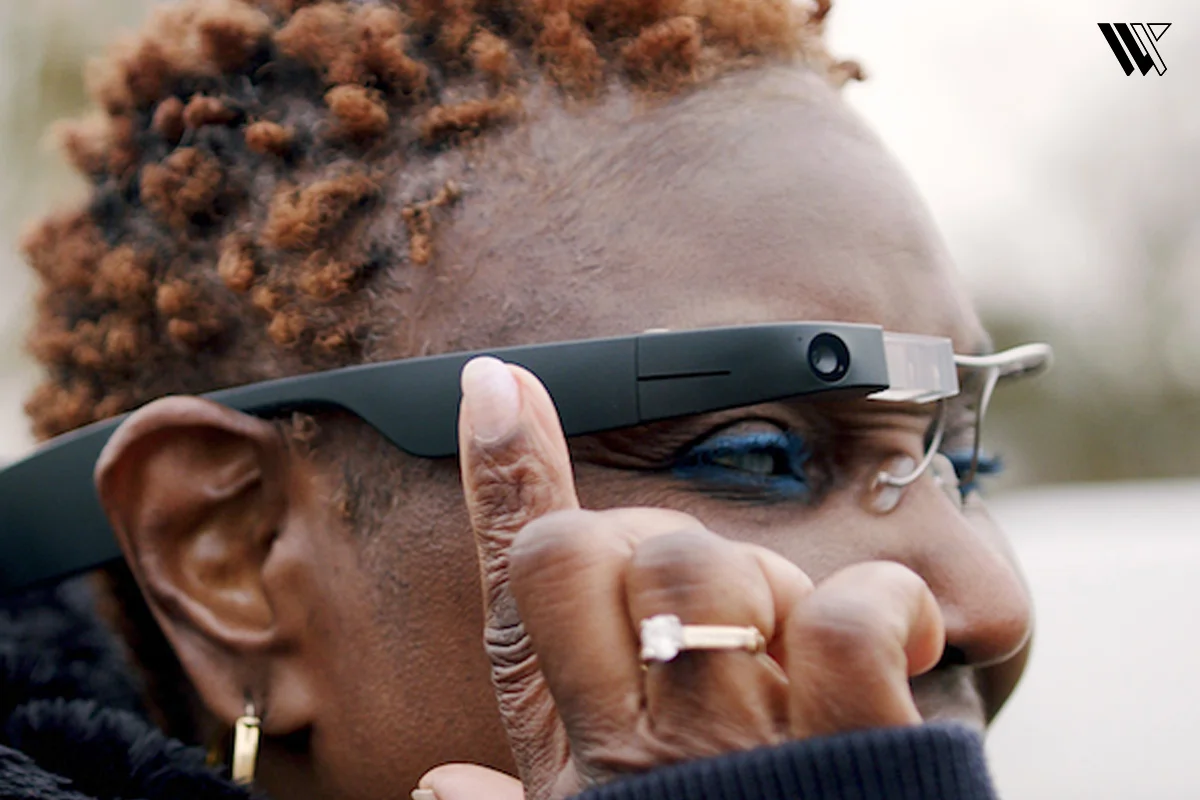
Smart glasses for blind and low vision are also not a single product category, at least not anymore. Some are made specifically as medical-grade assistive tech devices. There are also more generic types of smart glasses, like the Meta Ray-Bans that everyone knows about right now, which just happen to work amazingly well for this particular purpose due to their AI component. So, here’s a quick rundown of the best smart glasses for blind and low vision, not just what is trending.
Quick Comparison
| Product | Best For | Battery | Price |
|---|---|---|---|
| Ray-Ban Meta Smart Glasses (Gen 2) | Everyday hands free AI assistance | Up to 8 hours | Starts at $379 |
| Envision Glasses | Dedicated all around assistive tool | 4-6 hours | Starts at $1,899 |
| OrCam MyEye 2 Pro and 3 Pro | Clip-on reading and object ID | 60 – 90 minutes | $4250 for MyEye 2 Pro $4490 for MyEye 3 Pro |
| eSight Go | Low vision magnification and reading | 6 hours | $4950 |
| Acesight | Contrast heavy reading and print tasks | 4.5 hours | Approx. $4,295 |
| NuEyes Pro4 | Wireless magnification with OCR | Tethered | $3,895 |
| Solos AirGo V2 | Budget friendly AI glasses | 16 hours | $299 |
| Agiga EchoVision (Pioneer) | Standalone AI, no phone required | 6 hours | $599 |
| Vue Lite 2 – Gemini Smart Glasses | Audio notifications, not vision assistance | 3.5 hours | Starts at $199 |
Detailed Picks of the Best Smart Glasses for Blind and Low Vision
1. Ray-Ban Meta Smart Glasses Gen 2 (Audio)

Ok so this one keeps coming up in every blind tech forum I read and for good reason. These are just Ray-Bans. They definitely don’t look like an assistive gadget, something that’s crucial for those who would rather not advertise their impairment every time they go out.
Decode the Decor
The Smart Jewelry Revolution — a practical guide to wearable tech.
The camera is placed on the corners of the frame and it can scan menus, mail, appointments, pretty much anything you want by simply saying, “Hey Meta, look and read this”. You may request it to provide a description of a space or look for something such as your keys in a pile of papers on the table. The response rate is pretty quick, typically less than a second and multiple users have reported that they experience very few hallucinations.
And here is where things get a little frustrating. The device provides approximately up to 8 hours of battery life plus an additional 48 hours via its charging case. But if you are continuously using AI or video streaming, it may only last about 40 minutes to an hour. Installation via the Meta AI app is fairly straightforward for the majority of people, but for some visually impaired users noted that the first time connection process via Bluetooth, which involves aligning a blue light on the device, took several hours for them. The price starts at around $379.
The Ray-Ban Meta glasses also integrate with Be My Eyes, which allows you to use your smart glasses camera for hands-free visual assistance. You can simply command, “Hey Meta, be my eyes” to connect with volunteers who can see what your glasses and camera see and provide real time guidance for every day tasks.
Pros:
- No stigma, it looks completely normal.
- Fast and accurate voice responses.
- Compatible with WhatsApp, Messenger, Be My Eyes for video call support.
- More affordable and dedicated assistance technology.
Cons:
- Difficulty in processing complex images.
- Battery drains faster while doing live AI work or video streaming.
- Does not include an AI assistant for blind-specific spatial language.
2. Envision Glasses

The Envision Glasses are referred to as the industry benchmark and I understand why. First, it uses the hardware of Google Glass Enterprise Edition 2 and the software is Envision’s own AI called Ally, developed specifically for the needs of blind people, not a generic one.
It can scan entire documents written in so many languages, recognize handwriting, facial recognition of the people whom you have introduced it to, find currency denominations, and calls your designated emergency contact through a dedicated feature known as Companion if you need another pair of eyes on something. The added Ask Envision feature allows you to ask questions about scanned documents through the GPT-5 model. All of these functionalities are integrated into the user experience of the app, not just plugged in. And according to Envision, the accuracy of optical character recognition is higher than 95% for printed standard documents.
Battery life is about 4-6 hours. The thing that sets people off is the price. The Read Edition costs about $1,899 USD, Home $2,499 and Professional $3,499. The Professional tier has a lifetime subscription to advanced AI features, while for the Read and Home Editions, subscription to Aira/Ally is included only for 1 year, after which you will be paying $200 per year.
Pros:
- Built specifically for the Blind and low-vision users.
- Reads handwritten notes and dense text documents correctly.
- Companion video calling feature for actual human support.
- Ask Envision lets you ask follow-up questions on scanned text.
Cons:
- Very expensive with an ongoing subscription.
- Learning curve for new users
- Bulkier than regular smart glasses.
3. OrCam MyEye 2 Pro and 3 Pro

The difference here is that this item isn’t a plus pair of glasses at all, but rather a miniature camera that attaches to the temple of the frames you already own. Some people even like this option better since you’re not committing to an entirely new set of glasses.
This works best for love vision, as you use your finger to point to menus, pages of text and the MyEye 2 Pro and 3 Pro will read it out for you in various languages. Additionally, it has automatic page detection, good color detection and face recognition after you program it. All these operations are performed using a simple gesture of a finger, not through any voice command, which some users find quicker. Also, the process of learning how to use gestures takes a minute or two.
The price stands at $4250 for MyEye 2 Pro and $4490 for MyEye 3 Pro and operation is wireless, wherein it doesn’t require any phone and app connection to perform its main functions. The 3 Pro has more feathers to it cap with zoom in and zoom out, handwriting reading, converting images to digital text, supporting over 140 languages, AI assistants and summarizing, amongst others.
Pros:
- No need to buy a new pair of glasses as a clips on your own.
- Read in multiple languages.
- Recognizes faces, products and documents with a simple hand gesture.
- No need to buy a new pair of glasses as a clips on your own.
Cons:
- Price is very high.
- No scene description on navigation features like the Ray-Ban Meta Gen 2.
- Not for blind people.
- Both models last about 60-90 minutes only.
- Gesture controls can take some time getting used to.
4. eSight Go

If you have low vision, this is the device for you. eSight does not translate the environment around you into sound in any way, shape or form. This thing magnifies up to 24X and improves the images that you can actually see, in real time, using a screen right in front of your eyes.
It was designed for conditions like macular degeneration, glaucoma or diabetic retinopathy, where the problem is clarity and contrast, not complete blindness. You’ll get full-time video magnification, real time OCR (optical character recognition) and adjustable contrast modes with a 45 degree field of view and up to 2000 nits of display brightness. Users with a small amount of vision talk about being able to read again and identify people from across the room, things that audio-only solutions cannot provide.
The battery lasts about 6 hours on typical use and it costs $4950 USD. It’s a relatively expensive device compared to other products and weighs 170g, bulkier to wear during the day than Ray-Ban Metas, with some learning curve involved in figuring out how to adjust the modes properly.
Pros:
- Provides genuine restoration of functional vision to many low vision users
- Includes real-time OCR and adjustable contrast and zoom
- Good for reading, watching television and identifying faces
Cons:
- Cannot be used by blind people as it requires some level of vision
- More bulky as compared to smart glasses
- Expensive
5. Acesight

Acesight uses a wired controller to change contrast and colors, which means no need to deal with adjusting settings by touching the headset. The device works with visual acuity ranging from 20/100 to 20/800 and conditions such as macular degeneration and glaucoma.
The 8 megapixel camera is able to provide a picture of the environment using an AR integrated open display with 15x magnification and a 45-degree field of view and it actually exceeds many rivals in the same price range. Additionally, the system comes with 10 high contrast color combinations depending on the lighting and the situation or task in hand, plus a floating reading mode built specifically for print and has a 4.5 hours battery life with continuous use.
The price is approx. $4,295, which makes it expensive, though in this case you have to use a wired controller connected to the headset.
Pros:
- 10 color contrast settings makes it more customizable
- Wider 45-degree field of view
- Floating reading mode
Cons:
- Constrained by wired controller, limiting mobility
- High investment
- Bulkier design of headgear, not discreet
6. NuEyes Pro 4

NuEyes offers a completely wireless solution that can be operated using a hand-held remote or voice commands. The NuEyes are smart glasses for low vision specifically made for people with glaucoma, macular degeneration and diabetic retinopathy and connect to your smartphone, tablet or computer with a USB-C connection.
It has a front-facing camera that captures images and displays it within the lenses magnified by 12X with a 42-43 degree field of view (slightly smaller than Acesight and IrisVision). What makes the NuEyes different from its competitors is its additional features like OCR (text to speech) for reading aloud any text, along with the ability to scan barcodes or QR codes while weighing only 102 g. It is useful when you need to read the label of a product or medication, without having to use another tool.
It’s the most expensive one in this list with a $3,895 price tag, although I think it’s good to know beforehand.
Pros:
- Wireless headset, giving you more freedom compared to the wired options
- OCR and barcode/QR scanning feature included
- Voice control as a supplementary means to operate the device
Cons:
- The most expensive device of all on this list
- Smaller field of view
- Still a large and bulky headset
7. Solos AirGo V2

This represents the affordable segment on the spectrum. The Solos AirGo V2 Smart Glasses connect to your smartphone, where all AI processing happens and once you have asked your question or have taken a picture, the connected phone uses cloud-based AI and the answer is transmitted via Bluetooth speakers. This ensures that the weight of the glasses is not compromised yet it comes equipped with features like object recognition, reading of text, translation, AI assistance, etc.
The price of the AirGo V2 is $299, with 16 hours of battery life and a quick charge of 15 mins giving 3 hours of operating time, significantly outperforming both Meta and Envision glasses.
Pros:
- Cheaper price for an entry into AI assistive glasses
- Great battery life with 16 hours
- Ability to connect with the full Ally app experience
Cons:
- No in-glasses AI, completely reliant on your phone
- Dual camera system with unknown processing
- Less third-party integrations compared to Meta and Envision
8. Agiga EchoVision

Not as mainstream, but definitely worth keeping an eye on. Unlike almost all the other devices listed above, EchoVision is completely standalone but still needs and internet connection via WiFi or hotspot and is compatible with iOS 16.6 or later and Android 11 or later for its companion app via Bluetooth. This device has the ability to connect directly to WiFi and perform all its functions independently of your smartphone and it is powered by Android OS, offering plenty of opportunities for third-party apps to come into play later.
According to some early feedbacks, it features more descriptive AI than Meta AI, particularly when describing people and it performs OCR of documents using an independent model. Moreover, the device offers direct support for Be My Eyes and Aira.
Starting at $599 for Pioneer variant, it has 6 hours of battery life with single charge and 30 hours with a charging case.
Pros:
- Fully standalone (no phone required)
- More detailed AI descriptions, especially of blind people
- Direct support for Be My Eyes and Aira Services
Cons:
- Not widely released yet
- No real world reviews
9. Vue Lite 2– Gemini Smart Glasses

Another pair of audio only, the Vue Lite 2 is a lightweight pair that includes prescription lenses along with its audio features, which is very cool and is one of the less expensive options in this category. It only weighs 25g and comes in 8 styles to choose from while being IPX5 water resistant.
Starting at $199 with 3.5 hours of playback, 20 hours on standby and 10 mins of fast charging, it comes with an app that lets you adjust notification and sound settings. But there’s no camera, no text reader and no object recognition here, it’s focused solely on audio notifications. You can talk to voice assistants and use its simple touch controls for easy functionality. It also features noise cancelling mic to make sure you hear the notifications clearly, even in crowded spaces.
Pros:
- Inexpensive and comfortable to wear throughout the day
- Includes prescription lenses
- Simple app with audio and notification settings
Cons:
- No reading or recognition abilities
- Not made for people with low vision
- Limited value for blind users
How to Choose Smart Glasses for the Blind and Low Vision
Figure Out What You Actually Need
Do you require a magnifying effect for the low vision you have or an audio description because there isn’t much vision left to work with? They are two different types of products and you will be wasting your money if you get confused.
Think About How Visible You Want It to Be
It is important for some people to have an option that resembles regular glasses. For others, it is not really necessary because of functional features. Ray-Ban Meta and Solos are relatively discreet, while eSight, IrisVision, Acesight and NuEyes come in headset shape.
Check the Ongoing Costs
A lot of devices these days have subscriptions layered on top of the upfront price, especially Envision and Ally Solos. Factor the ongoing costs and how they will stack up over the years before you commit, since the sticker price is rarely the full story.
Wrap Up
Honestly, it all comes down to your preference and what works for you. Some people want a pair of glasses that integrates perfectly well with their lifestyle, offering them visual aids like magnification, text recognition or object recognition. Others might find audio-based smart glasses useful in delivering information, navigational capabilities and hands-free assistance without having to rely on any remaining vision.
There is no one-size-fits-all solution. Some depend on the extent of the vision loss, tasks for which assistance is required, battery power, comfort, ease of use and budget, among other considerations.
Smart glasses continue to evolve, making them not only sophisticated but also affordable. There are many features in today’s smart glasses to choose from reading menus to facial recognition, among others. Choosing the right pair can make everyday tasks easier and help you stay connected to the world with greater confidence.
FAQs
Decode the Decor
The Smart Jewelry Revolution
A practical guide to wearable tech's future — delivered straight to your inbox.
Author
