 Smart WatchesApple Watch Ultra 4 for Hiking: What You Actually Get on the Trail
Galaxy Watch Ultra 2 for Hiking and Trail Running: Features, GPS and Limitations
Explore how the Galaxy Watch Ultra 2 for Hiking handles GPS, GPX navigation, elevation tracking, battery life, and outdoor safety features on the trail.
Independently tested. We never accept payment for reviews.How we test
What’s inside10 sections · 9 min read
- 01Is the Galaxy Watch Ultra 2 Good for Hiking and Trail Running?1 min
- 02How Does GPS and Trail Navigation Work?1 min
- 03Trail Run Mode: What Can It Actually Track?1 min
- 04Elevation Tracking and GPS Accuracy: Can You Trust the Data?1 min
- 05Battery Life: Will It Last Through a Long Hike?1 min
- 06Outdoor Safety Features: What Happens in an Emergency?1 min
- 07Galaxy Watch Ultra 2 vs. Garmin: Is It Enough for Serious Hikers?1 min
- 08Who Should Buy the Galaxy Watch Ultra 2 for Outdoor Activities?1 min
- 09Wrap Up1 min
- 10FAQs1 min
Hiking sounds simple until you find yourself halfway up a mountain, wondering how much farther you need to walk and whether you took the right turn five minutes ago. Your legs are already asking for a break and checking your phone every few minutes isn’t exactly the most convenient option. This is where a good smartwatch can make life a little easier.
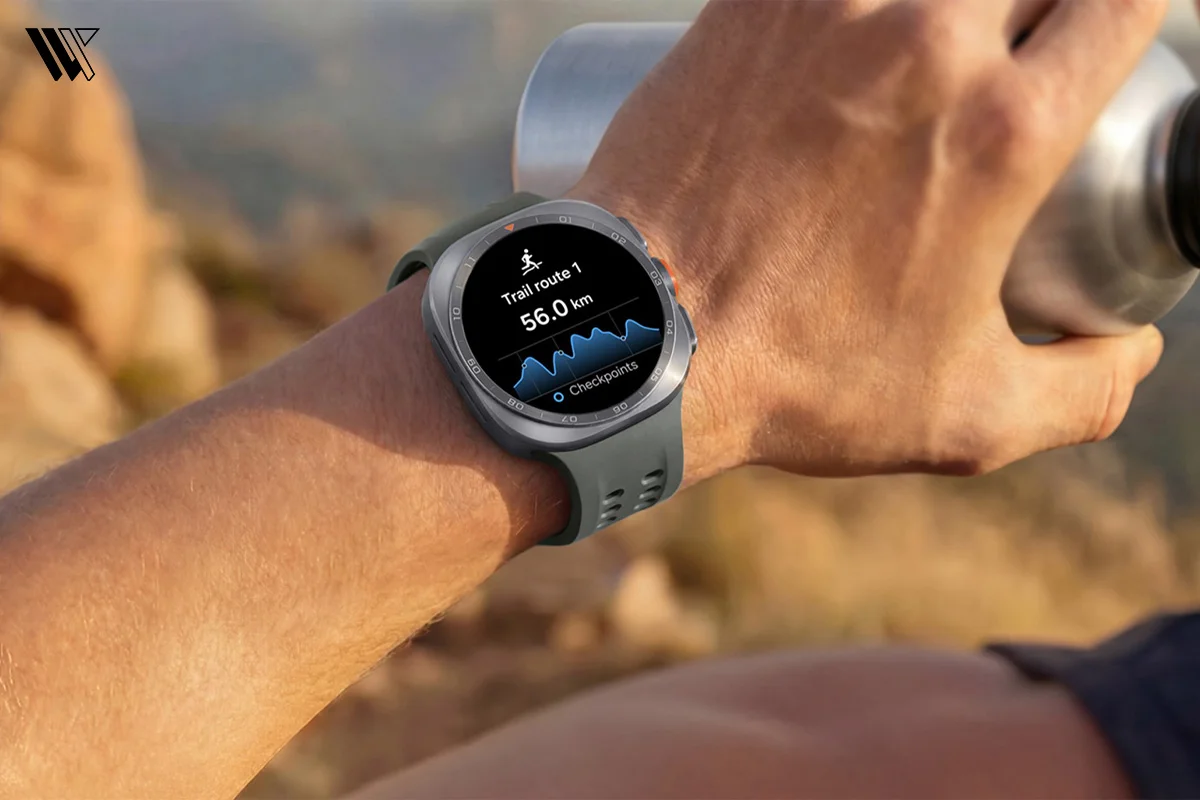
The Galaxy Watch Ultra 2 for hiking looks interesting because Samsung has packed it with features designed for outdoor adventures. It offers dual-frequency GPS, GPX route navigation, Climb Guidance and a dedicated Trail Run mode. There are also safety features that could come in handy when you’re exploring unfamiliar trails.
But does having all these features make it a reliable hiking companion or is it simply another smartwatch trying to look adventurous? Let’s take a closer look at its GPS, navigation, battery life and outdoor features to see what it can actually do when the road turns into a mountain trail.
Is the Galaxy Watch Ultra 2 Good for Hiking and Trail Running?#
Yes, the Galaxy Watch Ultra 2 for hiking and trail running is certainly worth considering for day hikes, local mountains routes and trail running fun. It features a sturdy 47mm titanium casing, 10ATM water resistance and IP69K dust resistance rating that will keep you from being too cautious with the device when it comes to mud, water and rocks. For further information about its everyday usability, see our full review of the Galaxy Watch Ultra 2.
This watch combines the features of dual-frequency GPS (L1 + L5), route uploads through GPX, Climb Guidance, hydration alerts and texting and music playing into one watch. It is not, however, a perfect substitute for an expedition watch made specifically for treks. Specialized outdoor watches offer better battery life for multiple days, built-in offline maps of terrain and satellite SOS communication services. The Galaxy Watch Ultra 2 for hiking is best suited to Android and Samsung Galaxy smartphone users who want a single watch for their Monday to Friday office work and weekend hiking.
How Does GPS and Trail Navigation Work?#
The use of the Galaxy Watch Ultra 2 for hiking entails the importation of pre-set courses and navigation by following the prompts of the watch. The Galaxy Watch uses dual-frequency L1 and L5 GPS in that it receives data from two satellites at once to accurately determine one’s location.
Importing GPX Routes and Following Trails#
When you are out of the house, you create a track in GPX format from your smartphone. After that, you import the GPX file to the Samsung Health application installed on your compatible Android phone and directly transmit it to the watch. While you begin hiking or running, the watch shows you the track and provides you with navigation assistance. If you go off-trail, the watch will inform you about it and help you change your direction back.
Using Track Back on Out and Back Trails#
The watch also includes a Track Back feature. This tool records your outbound path as a breadcrumb trail and guides you back along the exact same line to your starting point. It is simple, practical and very helpful when fog rolls in or a trail marker goes missing.
Offline Routes vs. Offline Maps#
This is one aspect that catches out many people when it comes to buying the Galaxy Watch Ultra 2: a GPX route loaded into the device for hiking will not provide full offline topographic maps. This is because a GPX file provides the breadcrumb line, directions on turns and elevation information without the need for cellular service. However, if you are looking for offline background maps that have contour lines, nearby roads and other landmarks, you will need to download offline map areas from either Google Maps or any other hiking apps before you go hiking. If topographic maps are what you are most interested in, you can take a look at some of the best smartwatches with offline maps for hiking.
Trail Run Mode: What Can It Actually Track?#
Samsung built a dedicated Trail Run workout profile into this watch and it goes well beyond standard road-running metrics. Standard outdoor running modes focus mostly on flat pace and split times. Trail Run mode adjusts for uneven ground, steep climbs and long hours away from aid stations.
- Core Performance Metrics: The watch tracks distance, pace, elapsed time and continuous heart rate through the upgraded Samsung BioActive Sensor. Its 1.52-inch Super AMOLED display hits up to 5,000 nits of peak brightness, which means you can read your numbers clearly even under harsh midday sun.
- Climb Guidance and Gradient Info: When you load a GPX route, Climb Guidance breaks down upcoming ascents. It shows you how steep the hill is, how much elevation remains and your progress up the slope. This helps you pace your legs on long climbs instead of burning out halfway up.
- Hydration Reminders: Long trail efforts make it easy to forget to drink water until you feel sluggish. The watch estimates sweat loss based on your body metrics and workout intensity, then sends timed hydration alerts reminding you when and how much to drink.
- Physical Controls for Tough Weather: Three spaced side buttons and a bright orange Quick Button let you pause workouts, mark laps or switch screens without struggling with a wet or sweaty touchscreen, even while wearing light gloves.
If you primarily train for road races or want to compare more running-focused wearables, explore more running smartwatch options to see how lighter watches stack up.
Elevation Tracking and GPS Accuracy: Can You Trust the Data?#
The existence of dual-frequency L1 and L5 GPS on paper is awesome because the second frequency will allow bouncing less signal off the rugged canyon walls and dense pine foliage. In most cases, on open ridges and trails, the Samsung Galaxy Watch Ultra 2 hiking watch is able to trace clear lines and accurate distance traveled.
On the other hand, the dual-frequency GPS is not a guarantee of accuracy either. There are two types of accuracy: the GPS accuracy and the elevation accuracy. The GPS accuracy is related to your horizontal positioning, while the elevation accuracy is based on the watch’s barometer.
- Horizontal GPS Drift: Deep switchbacks, narrow gorges and heavy rain can still cause minor zig-zags in your recorded track, which occasionally adds a slight bump to your total mileage.
- Elevation Inconsistencies: Sudden weather fronts change local air pressure and sweat or dirt blocking the sensor port can confuse altitude readings. Independent real-world evaluations have noted strong horizontal GPS locking alongside occasional inconsistencies in total elevation gain on rolling terrain.
- Wear Position Matters: Wearing the 47mm case snug above your wrist bone keeps the sensors steady and prevents sweat from pooling directly over the barometric port.
Battery Life: Will It Last Through a Long Hike?#
The only place you have to pay attention to details when hiking with the Galaxy Watch Ultra 2 is the battery life. Maximum battery life and maximum endurance while exercising using continuous GPS are two entirely different figures.
Using the Always-On Display, listening to music through an LTE connection and always checking the map on the screen with bright lighting will cause the battery with 800mAh capacity to drain faster than expected. Exercise saving mode allows for a longer battery usage time since it dims the screen and reduces the number of background checks.
Hiking in the Mountains or Multiday Trips: For day hiking or trail running that lasts from 6 hours to 12 hours, the Galaxy Watch Ultra 2 for hiking is perfect, especially if you start it with 100 percent charge. However, for multiday trips or weekend hikes, having 16-20 hours of battery life is insufficient. You will have to carry a charger for your Galaxy Watch along with the portable power bank in order to charge it at night.
Outdoor Safety Features: What Happens in an Emergency?#
When things go wrong on an unfamiliar trail, the Galaxy Watch Ultra 2 for hiking includes several practical safety layers.
- 86dB Safety Siren: Activating the Orange Quick Button for five seconds initiates an 86 decibels safety siren from Samsung. The company claims that the siren can be heard at a maximum distance of 180 meters (around 590 feet). It is completely independent of any online connection and will help people in nearby hiking spots track you in case you sprain your ankle away from the main path.
- Emergency SOS and Fall Alert: Pressing the Home button five times consecutively or falling with a hard blow ignoring the check-in prompt will trigger Emergency SOS. The watch automatically calls the nearest emergency services and sends your GPS location to your emergency contacts.
Critical Connectivity Problem: Emergency SOS calls or text alerts need either a connected smartphone or a working LTE cellular service on the watch. The smartwatch is not a satellite emergency communicator. As soon as you hike outside the range of the cellular tower, the Safety Siren still functions and the GPS continues to track the path you have taken, but the smartwatch will be unable to send SOS or your coordinates to your loved ones until you return to cell range.
Galaxy Watch Ultra 2 vs. Garmin: Is It Enough for Serious Hikers?#
Comparing the Galaxy Watch Ultra 2 for hiking against a dedicated outdoor watch like the Garmin Fenix 9 comes down to what you value more: everyday smart features or multi-day expedition endurance.
- Navigation & Maps: The Galaxy Watch Ultra 2 handles GPX breadcrumbs and basic turn prompts well, while Garmin watches include built-in, routable topographic maps with trail names, elevation contours and points of interest right out of the box.
- Battery Endurance: Samsung delivers up to 16 to 20 hours of GPS/GPX tracking in exercise power-saving mode, whereas Garmin’s multi-band GPS watches routinely run for 40 to 80+ hours of continuous tracking on a single charge.
- Controls in Cold Weather: Samsung’s Quick Button and three side keys are easy to press, though navigating menus still relies heavily on the touchscreen. Garmin uses a full five-button layout that lets you control every screen while wearing thick winter mittens.
- Daily Smartwatch Experience: Samsung easily wins off the trail with its vivid 5,000-nit AMOLED display, Wear OS apps, voice replies and seamless Android integration.
To see how a purpose-built trail watch handles multi-day mapping and recovery metrics, read our Garmin Fenix 9 Review or browse other fitness-focused smartwatch options if you want something smaller for everyday workouts.
Who Should Buy the Galaxy Watch Ultra 2 for Outdoor Activities?#
You Should Buy the Galaxy Watch Ultra 2 If:#
- You enjoy weekend hikes and day-long outdoor adventures.
- You regularly go trail running and want a dedicated Trail Run workout.
- You want dual-frequency GPS and GPX route navigation to follow planned trails.
- You need climbing information and elevation tracking during outdoor activities.
- You want a smartwatch that combines outdoor fitness features with everyday apps and notifications.
You Should Avoid Buying the Galaxy Watch Ultra 2 If:#
- You regularly go on multi-day hiking trips and need longer GPS battery endurance.
- You depend on detailed offline topographic maps for navigation.
- You frequently explore remote areas without cellular coverage and need satellite emergency communication.
- You need advanced outdoor training and recovery analytics.
Wrap Up#
The Galaxy Watch Ultra 2 for hiking is a capable outdoor smartwatch, especially if you enjoy weekend hikes, trail running and other outdoor activities. Its dual-frequency GPS, GPX route navigation, Climb Guidance and safety features make it a useful companion when exploring unfamiliar trails. However, its GPS battery limits and lack of established full offline topographic mapping mean it isn’t ideal for every adventure. If I had to choose one for regular outdoor activities without giving up everyday smartwatch features, I’d certainly consider it. After all, a good hiking companion should help you explore more, not leave you wondering where the trail went!
FAQs#
01Is the Samsung Galaxy Watch Ultra 2 good for hiking without a phone?
Yes, the Samsung Galaxy Watch Ultra 2 tracks hikes phone-free using dual-frequency L1 + L5 GPS, Track Back and preloaded GPX routes. However, the Samsung Galaxy Watch Ultra 2 still requires a phone or LTE connection for Emergency SOS alerts.
02Can the Samsung Galaxy Watch Ultra 2 use offline maps on hiking trails?
The Samsung Galaxy Watch Ultra 2 follows offline GPX breadcrumb routes natively without cell service. To view detailed background maps on the Samsung Galaxy Watch Ultra 2 offline, you must download areas in advance via Google Maps or a third-party trail app.
 RR
Written by
Reetain, with a focus on emerging trends and immersive tech, covers smart wearables and evolving device categories. He explores how sensors, AI, and connectivity come together in modern wearables, helping readers understand how these technologies shape everyday digital experiences and the future of personal computing.
More from Reetain 77 storiesKeep readingmore from Smart Watches
All storiesSmart WatchesApple Watch Ultra 4 for Hiking: What You Actually Get on the Trail Smart WatchesApple Watch Ultra 4 GPS Accuracy: Can It Really Replace a Garmin?
 Smart WatchesGalaxy Watch 9 vs Galaxy Watch 8: Is It Worth Upgrading?
What’s inside
- 01Is the Galaxy Watch Ultra 2 Good for Hiking and Trail Running?1 min
- 02How Does GPS and Trail Navigation Work?1 min
- 03Trail Run Mode: What Can It Actually Track?1 min
- 04Elevation Tracking and GPS Accuracy: Can You Trust the Data?1 min
- 05Battery Life: Will It Last Through a Long Hike?1 min
- 06Outdoor Safety Features: What Happens in an Emergency?1 min
- 07Galaxy Watch Ultra 2 vs. Garmin: Is It Enough for Serious Hikers?1 min
- 08Who Should Buy the Galaxy Watch Ultra 2 for Outdoor Activities?1 min
- 09Wrap Up1 min
- 10FAQs1 min