 Smart WatchesApple Watch Ultra 4 GPS Accuracy: Can It Really Replace a Garmin?
Apple Watch Ultra 4 for Hiking: What You Actually Get on the Trail
Is Apple Watch Ultra 4 good for hiking? Explore its offline maps, GPS navigation, Backtrack, satellite SOS, battery life and trail limitations.
Independently tested. We never accept payment for reviews.How we test

What’s inside9 sections · 13 min read
- 01Is Apple Watch Ultra 4 Good for Hiking?2 min
- 02Hiking Navigation: How Good Are Apple Watch Ultra 4’s Maps?2 min
- 03GPS Accuracy and Backtrack: Can It Keep You on the Trail?2 min
- 04Satellite Emergency SOS: What Happens When You Lose Phone Signal?2 min
- 05Battery Life: How Long Does Ultra 4 Last on a Hiking Trip?2 min
- 06Hiking Workout Features: What Can You Track?1 min
- 07Apple Watch Ultra 4 vs Garmin Fenix 9 for Hiking1 min
- 08Who Should Buy Apple Watch Ultra 4 for Hiking?1 min
- 09Wrap Up1 min
A smartwatch can do a lot more than tell you how many steps you have taken today. It can track your workouts, help you find your way around and even become useful when you are far away from a mobile network. But hiking brings a different set of challenges. You need reliable navigation, accurate location tracking and enough battery to get through the journey.
This is where the Apple Watch Ultra 4 for hiking becomes interesting. It brings offline maps, dual-frequency GPS, Backtrack and satellite emergency communication to your wrist. However, there are still a few things worth understanding before treating it as your primary hiking companion. Let’s look at what it actually offers.
Is Apple Watch Ultra 4 Good for Hiking?#
© Apple
Indeed, the Apple Watch Ultra 4 for hiking is a truly reliable outdoor companion for day hikes, excursions into the national parks and even weekends’ scheduled routes. Its cost in the United States starts from $799 and offers the combination of the comfortable smartwatch and robust hardware designed for abuse in the wild. Yet, its suitability for backpacking tours into the wilderness will depend on how detailed the maps should be and how you want to take care of the battery.
Let’s start with the design, as outdoor activities require solid gadgets and rugged equipment. The Apple Watch Ultra 4 comes with a 49mm Grade 5 titanium case together with flat scratch-resistant sapphire crystal screen. Thus, there is no fear that your wrist will be scraped by granite rocks or that the pine branches will crack the screen. The watch is waterproof up to 100 meters, dustproof with the protection level of IP6X and features MIL-STD 810H testing for vibrations, shocks and extreme temperatures. It will work on your wrist in the temperature range from –4°F to 130°F and at altitude up to 29,500 feet.
© Apple
High visibility on sunny mountains is one more advantage of the Apple Watch Ultra 4. Always-On Retina display allows for up to 3,000 nits of brightness in peak state, so you won’t need to strain your eyes trying to decipher the trail map or elevation gain during lunchtime. While camping at night, you can rest assured that the same screen provides just 1 nit of light when activated with Night Mode.
When it comes to the inner workings of the watch, all necessary hiking features are covered by the device. These include Hiking workout profile, precise dual-frequency GPS, offline maps, custom routes and Apple Compass with such functions as Backtrack and waypoints.
Alright, it’s time to get absolutely honest for a moment here. Now, if all you really want is an Apple Watch Ultra 4 to go on your hikes because you think it’ll be great to use in tandem with your iPhone and because you dig that titanium on your wrist, then there is absolutely nothing wrong with that. Gear purchases don’t have to be entirely scientific or mathematical. There is nothing wrong with wanting a watch that will look and work great at the office on a Monday while hiking ten miles of ridges on a Saturday.
Hiking Navigation: How Good Are Apple Watch Ultra 4’s Maps?#
© Apple
Lack of cellular connectivity is the most crucial challenge for Apple Watch Ultra 4 trail navigation. However, it should be noted that with the advent of Apple Maps offline maps, the process of phone-free trail navigation becomes easier than ever. One needs to simply download their preferred map region on a paired iPhone while having Wi-Fi access and the information will automatically be synced to the watch. As soon as the map region is stored on the 64GB internal storage of the watch, it is possible to go off-trail and navigate using the map on your wrist.
Creating a route is rather easy as well. Within Apple Maps, it is possible to develop your own custom one-way, out and back or loop hiking routes before you even go outside. When you begin your journey, the watch will guide you through the route providing turn by turn directions along with visual cues and wrist taps. It means that you no longer need to take out your phone when you need to choose a trail fork.
When you go hiking in the US, Apple gives you two extra features. One of them is the coverage of the US topographic maps with contours and elevations and information about trails in thousands of parks both national and regional. The second one is hundreds of hiking trails that Apple has made for 63 US national parks. If you travel to Yosemite, Zion or Acadia, you just choose your trail from the ready-made options.
© Apple
However, one thing you need to be aware of before you use the offline maps of Apple Watch Ultra 4 is that the offline maps are not the same as topographic maps. Downloading the offline map means downloading a particular area to be used without an Internet connection. The presence of topographic data depends on the presence of the topographic data collected in that particular park by Apple.
In case maps seem to lack details, the Apple Compass application is available to take care of that by displaying live compass, elevation, incline and GPS coordinates within one screen. Moreover, it allows setting custom waypoints for trailheads, water sources and campsites in order to simplify the process of returning.
Should you require more information about trails, watchOS 27 provides an opportunity for third-party applications to enhance the capabilities of the Apple Watch Ultra 4 for hiking. Some of the most popular outdoor applications like AllTrails, WorkOutDoors and Footpath allow loading GPX files and using vector maps on their watches. Nevertheless, even when using such applications, the native map tools appear to be easier to use comparing to another outdoor GPS watch capable of automatic rerouting off the trail.
GPS Accuracy and Backtrack: Can It Keep You on the Trail?#
However, good maps will not benefit you until your watch is aware of your location. If you need the GPS in the Apple Watch Ultra 4 to track your route accurately, the watch uses precise dual-frequency L1/L5 GPS components. The simple idea behind it is that the watch listens to two GPS radio frequencies rather than one at any particular point in time. Additionally, it also supports several global satellite networks: GPS, Galileo, QZSS and BeiDou.
But why is it important during your hikes? Satellite signals like to bounce around steep canyon walls and get obstructed by evergreen trees. As a result, standard single-frequency watches can sometimes lose the signal and start measuring fake distance, thus deviating from the actual route. The problem of bouncing signals is solved in dual-frequency GPS receivers, thus giving you an accurate route record and reliable distance statistics.
This great satellite lock works for the Apple Watch Ultra 4 Backtrack function as well. Backtrack is a function that is included in the Compass app that logs the GPS track in the form of breadcrumb trail if you are not connected to Wi-Fi and when you are somewhere that you do not know. If fog comes and the trail gets covered by snow or you make a mistake while walking, just use Backtrack and follow your way back in reverse direction. You can combine Backtrack with custom Compass waypoint and leave a trace of your car, trail junction or camp site.
Even with good hardware, it is important to distinguish between two different concepts, GPS tracking accuracy and full trail navigation. The Apple Watch Ultra 4 hiking device is highly efficient in tracking your route and keeping the line clean in both open ridges and forest trails. Nevertheless, physics is not something that can be overcome by any wristwatch. In slot canyons, valleys and extremely thick forest canopy, the GPS can experience minor wobbling. At the same time, even though Backtrack will help you go over your old route, it will not replace full turn by turn backcountry navigation if you need to create an entirely new route.
Satellite Emergency SOS: What Happens When You Lose Phone Signal?#
Being unable to get bars on your phone once meant being absolutely alone until hiking back into civilization. The satellite SOS functionality provided by the Apple Watch Ultra 4 will change this equation entirely. Satellite connectivity built-in to the Apple Watch allows it to connect to satellites while both cell and Wi-Fi connectivity have failed entirely.
The watch will allow you to activate Emergency SOS satellite in case of injury such as broken ankle or if you become stranded several miles away from any road. It will guide you to point at the satellite and send your location data, elevation, battery status and your emergency message to first responders in a text format. In addition to emergency situations, satellite connection is useful for satellite messages and sharing your location using Find My feature. It allows you to send a short text to your family or to set your pin so that they know you made it to camp.
Understanding how to use the rules is critical before venturing out. You get two years of satellite services included without charge once you turn on the watch. This is even better in that the emergency SOS through satellite does not need an active cellular plan from your watch. Nonetheless, sending satellite messages and location sharing through find my satellite will require additional setup, thus it would be wise if you set up your emergency contacts at home before setting off on your journey.
The satellite communication also needs a clear view of the sky and horizon. Thick canopy coverage, steep rock faces or finding yourself in a deep canyon could impede the process, hence the need to move around in order to transmit the message.
In addition to the satellite communication, the Apple Watch Ultra 4 for hiking comes equipped with useful safety features locally. The Fall Detection and the Crash Detection sensors work together to detect any hard impact and send an alert if you are unable to respond. Additionally, there is a Siren feature available on the watch that produces a loud sound at regular intervals audible to a distance of up to 600 feet. If you are stuck in thick brush and searchers are nearby, that loud signal helps them pinpoint you fast.
Battery Life: How Long Does Ultra 4 Last on a Hiking Trip?#
Battery duration has been the primary differentiation factor between regular smartwatches and expedition watches. There is no doubt that Apple has come a long way in terms of battery duration offering 50 hours for daily usage as well as additional workout modes for spending more time outdoors.
From the aforementioned graph, 45 hours of GPS tracking seems like an incredible achievement. Nevertheless, you have to keep in mind what compromises you have to make to achieve such figures. Standard outdoor workout tracking offers up to 18 hours of usage with all GPS and heart rate monitoring features turned on together with using all features of smartwatches.
Extended Workout mode enables you to have 25 hours of battery. This particular mode allows for enabling of Low Power Mode during the hike while ensuring that you can record GPS and heart rate information but disables any advanced running form data. For Max Extended Workout mode, you will have up to 45 hours of power while recording GPS every second. However, for this kind of extended workout, you need to maintain Low Power Mode, turn off all alerts and splits and limit certain metrics.
In other words, 45 hours of Max Extended Workout is not the same thing as 45 hours of unrestricted fun with a smartwatch. You will be giving up on having an always on display, frequent notifications and various alerts in order to keep recording the GPS trail. Actual use cases will shorten these periods compared to lab results. Frequent map scrolling from third-party navigation applications, maintaining cellular connectivity in areas with poor signal, full bright display and hiking in cold mountain air will drain the battery more rapidly.
On the bright side, the charging is quick and easy on the trail. The Apple Watch Ultra 4 for Hiking has fast charging technology that will charge the watch from 0 percent to 80 percent in only 45 minutes. It is even sufficient to have just 15 minutes charging time by a portable power bank, which will give you 18 hours of usual operation and only 5 minutes charging for sleep monitoring for 10 hours. So, you can easily cover up for your lack of battery capacity with a small battery pack and charging puck.
Hiking Workout Features: What Can You Track?#
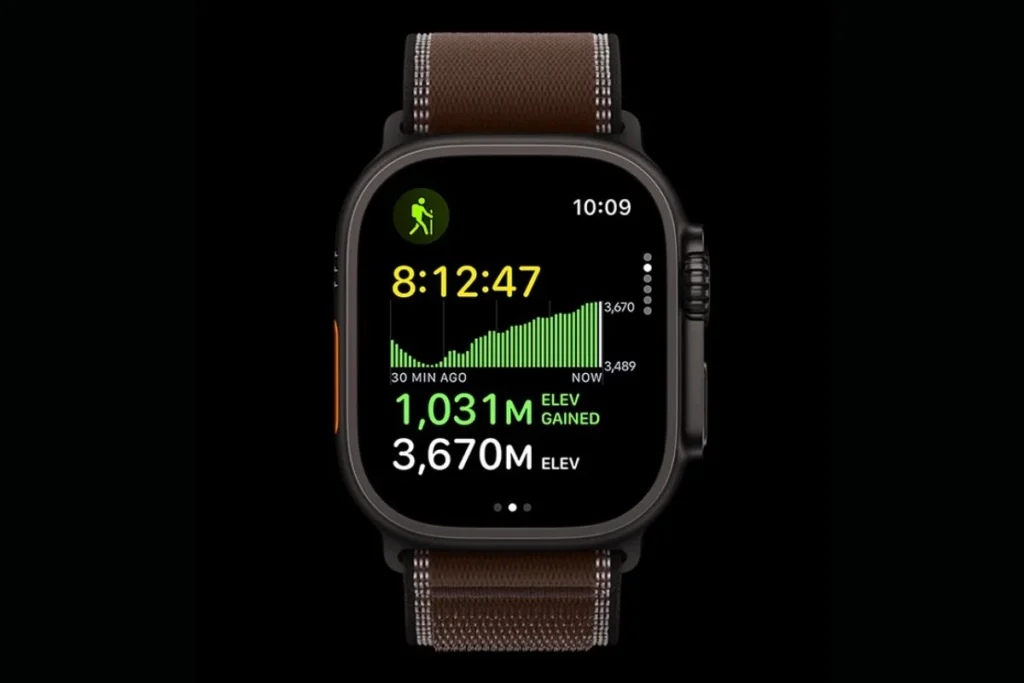
As someone who likes to hike for fitness and pleasure, the Apple Watch Ultra 4 Hiking abilities will provide plenty of useful health data to use without feeling overwhelmed. With just one click to the dedicated Hiking workout, you will be able to see your distance, pace, active calories spent, total elevation gain and current ascent. You may even set your elevation alerts to make sure that you pace yourself properly on the mountain.
Heart rate tracking is also an essential aspect for your steep trails. The Apple Watch Ultra 4 features the Health Sensing System and measures your heart rate constantly while you work out and every five seconds throughout the day in the background mode as well as organizes your effort into heart-rate zones. Knowing your heart rate zone will help you not to burn out in the first couple of miles of your climb.
Once the hike is over, watchOS 27 processes that data and creates actionable guidance for your recovery. With Post-Hike Workouts Summary, Recovery HRV Analysis, Workout Effort Assessment and Training Load Monitoring, you will be able to see whether you are ready for another difficult hike tomorrow or need to take a walk as an easy recovery option.
For convenience’s sake, there is a customisable Action button placed on the left side of the case. You can easily program it to start your Hiking workout activity with one click or drop a Compass waypoint without searching the touch screen of your watch with gloves or during the climb.
Apple Watch Ultra 4 vs Garmin Fenix 9 for Hiking#
When people compare the Apple Watch Ultra 4 vs Garmin for hiking, the Garmin Fenix 9 will be a logical contender since both products are rugged, robust and designed for outdoor adventures. At the same time, these devices offer hiking features and capabilities that have nothing in common with one another.
First of all, these watches differ in the way they relate to life styles. If you need a hiking gadget that works just like any other smartwatch in everyday conditions, the choice is obvious, the Apple Watch Ultra 4 will perform all tasks such as calling, messaging, payments via Apple Pay, Siri voice command and apps and even built-in satellite SOS with no additional monthly fee for the first two years.
In contrast to the previous device, the Garmin Fenix 9 is a dedicated outdoor watch and tool for athletes. It has pre-installed maps of whole continents, works well even in the rain or in the case when a person wears thick winter gloves, provides deeper Garmin Connect analytics and offers much better battery endurance due to the solar charge feature.
However, there is that wonderful permission to go a bit nuts again. After all, you do not have to spend money on the hardcore trekking watch just because you go on a hike twice a month. In case you appreciate the products by Apple and need one device to work on everything, then the choice of Ultra 4 is obvious. At the same time, when the backcountry navigation for several days and the battery life for a week matter most to you, then it is Garmin.
Who Should Buy Apple Watch Ultra 4 for Hiking?#
The Apple Watch Ultra 4 is a great choice if you are:#
- A weekend hiker who enjoys regular outdoor adventures.
- An iPhone user who wants fitness tracking and hiking features in one watch.
- Someone who explores national parks and follows planned hiking routes.
- A hiker who values offline maps, GPS tracking and satellite emergency communication.
Consider a dedicated hiking GPS watch instead if you:#
- Regularly go on multi-day backcountry expeditions.
- Need detailed topographic maps for remote trails.
- Want longer continuous GPS tracking without frequent charging.
- Depend on advanced navigation tools for challenging terrain.
Wrap Up#
The Apple Watch Ultra 4 makes hiking more convenient with its offline maps, accurate GPS tracking, Backtrack and satellite emergency features. It also gives you useful fitness information without needing to carry another device for everyday activity tracking. I think it is a great companion for regular hikes and outdoor adventures, but longer trips still require some planning around battery life and navigation. After all, a good hiking watch should help you enjoy the trail, not leave you wondering how to find your way back.
 RR
Written by
Reetain, with a focus on emerging trends and immersive tech, covers smart wearables and evolving device categories. He explores how sensors, AI, and connectivity come together in modern wearables, helping readers understand how these technologies shape everyday digital experiences and the future of personal computing.
More from Reetain 76 storiesKeep readingmore from Smart Watches
All storiesSmart WatchesApple Watch Ultra 4 GPS Accuracy: Can It Really Replace a Garmin? Smart WatchesGalaxy Watch 9 vs Galaxy Watch 8: Is It Worth Upgrading?
 Smart WatchesApple Watch Series 12 vs Pixel Watch 5: Which Has Better Health Tracking?
What’s inside
- 01Is Apple Watch Ultra 4 Good for Hiking?2 min
- 02Hiking Navigation: How Good Are Apple Watch Ultra 4’s Maps?2 min
- 03GPS Accuracy and Backtrack: Can It Keep You on the Trail?2 min
- 04Satellite Emergency SOS: What Happens When You Lose Phone Signal?2 min
- 05Battery Life: How Long Does Ultra 4 Last on a Hiking Trip?2 min
- 06Hiking Workout Features: What Can You Track?1 min
- 07Apple Watch Ultra 4 vs Garmin Fenix 9 for Hiking1 min
- 08Who Should Buy Apple Watch Ultra 4 for Hiking?1 min
- 09Wrap Up1 min