 Smart WatchesApple Watch Ultra 4 Review: Is Apple’s Adventure Watch Actually Worth Buying?
OnePlus Watch 4 Review: Does It Deliver the Best Battery Life on Wear OS?
A smartwatch can look great on your wrist, track your daily activity and keep you connected, but there is one thing that can quickly ruin the experience: having to charge it every night. This is something I always consider when looking at a new smartwatch. After all, I want a watch that makes my everyday life easier, not another device that constantly needs my attention.
Independently tested. We never accept payment for reviews.How we test

What’s inside11 sections · 13 min read
- 01Specifications1 min
- 02OnePlus Watch 4 Review: What You Need to Know1 min
- 03Design and Display: A Lighter Titanium Smartwatch1 min
- 04OnePlus Watch 4 Health Tracking: What Health Metrics Can It Monitor?3 min
- 05OnePlus Watch 4 Fitness Tracking: How Well Does It Track Workouts?3 min
- 06Battery Life: How Long Does the OnePlus Watch 4 Actually Last?1 min
- 07Wear OS 6 and Gemini: Is the Software Upgrade Worth It?1 min
- 08OnePlus Watch 4 vs Pixel Watch 5 and Galaxy Watch 91 min
- 09Who Should Buy the OnePlus Watch 4?1 min
- 10Who Should Avoid the OnePlus Watch 4?1 min
- 11Wrap Up1 min
A smartwatch can look great on your wrist, track your daily activity and keep you connected, but there is one thing that can quickly ruin the experience: having to charge it every night. This is something I always consider when looking at a new smartwatch. After all, I want a watch that makes my everyday life easier, not another device that constantly needs my attention.
The OnePlus Watch 4 takes an interesting approach. It combines a titanium body, Google’s Wear OS experience, Gemini support and a battery that promises several days of use. On paper, it sounds like a smartwatch that can handle both everyday tasks and fitness tracking without asking for a charger too often.
But does it offer enough improvements to stand out from its predecessor? Let’s look at what it offers to understand whether the OnePlus Watch 4 deserves a place on your wrist.
Specifications#
| Specifications | OnePlus Watch 4 |
|---|---|
| Display | 1.5-inch LTPO OLED (Up to 3,000 nits, Sapphire Crystal protection) |
| Dimensions | 47.4 x 47.4 x 11.0 mm |
| Case Material | Titanium-alloy with glass-fiber reinforced plastic back |
| Color Options | Midnight Titanium, Evergreen Titanium |
| Processor | Snapdragon W5 Gen 1 + BES2800 |
| Memory & Storage | 2GB RAM / 32GB Storage |
| Software | Wear OS 6 with OxygenOS Watch 8 |
| Battery Capacity | 646mAh |
| Sensors | Heart rate, SpO2, ECG, Wrist Temperature, Barometer, Compass |
| Connectivity | Dual-band L1+L5 GPS, Bluetooth 5.2, Wi-Fi |
| Durability | 5 ATM water resistance, IP68, IP69, MIL-STD-810H |
| Compatibility | Android 9.0 and above only (No iPhone support) |
| Price | £ 205.99 |
OnePlus Watch 4 Review: What You Need to Know#
The first thing people ask whenever any new wearable comes up is how does it fit the market. The OnePlus Watch 4 came into being after making a global product listing. The watch is known for its big 47.4mm titanium alloy casing that makes quite an impact on the wrist. It goes along with its stunning 1.5 inch LTPO OLED Display. Moreover, it peaks at a maximum of 3000 nits of brightness. Along with this, the latest Wear OS 6 with OxygenOS Watch 8 has been added to the watch.
The watch runs on a powerful 646mAh battery. It can offer you up to 5 days of usage in the smart mode. Under heavy use, it will serve you for 3 days. There is also a 16-day Power Saver Mode. However, the fact is I would like to be upfront with you on this. In my tests, I have come to know that the watch should not be considered as a revolutionary battery offering. In terms of endurance, it offers the same as the previous model did. The OnePlus Watch 4 is more about refinement than revolution.
Design and Display: A Lighter Titanium Smartwatch#

© OnePlus
As soon as you open the OnePlus Watch 4 packaging, the first thing that catches your attention is the weight of the device. With the transition from stainless steel to titanium alloy, there is definitely an improvement in this regard. Its weight without the strap is about 43 grams. That is definitely much lighter compared to the previous version. It is available in Evergreen Titanium and Midnight Titanium colors. Personally, I think the Midnight Titanium looks incredibly sleek.
It is made out of sapphire crystal and I feel very safe with it. As many people know, I am extremely clumsy. It has always been a problem for me to bump my wrist into a door frame. And being sure that this watch will not be damaged very easily is a great comfort. Gazing at its 1.5-inch LTPO OLED display is pure joy. Everything on the screen looks vibrant and clear. Going outside, I was able to observe 3,000 nits brightness. I didn’t have any trouble reading my notifications.
Nevertheless, there is one drawback when it comes to design. The case size of 47.4mm is pretty big. I have medium-size wrists, so it seems rather chunky to me. If you have smaller wrists, this OnePlus Watch 4 would probably look quite massive. Therefore, you should opt for a smaller design of the Pixel Watch 4.
OnePlus Watch 4 Health Tracking: What Health Metrics Can It Monitor?#
Nowadays, health monitoring is an essential feature in any wearable device. The OnePlus Watch 4 comes with a whole set of sensors. Let us see how efficient they are in real-life situations.
Heart Rate Monitoring#

© OnePlus
This constant heart-rate tracking system runs seamlessly in the background throughout the day. It makes use of a new optical sensor. I have taken my heart rate measurement at rest and during the day quite often. From what I can tell, it is very precise regarding the heart rate at rest on a day to day basis. It calculates your cardiopulmonary efficiency and then determines your overall level of fitness based on it. In addition, it has a feature that alerts you about the high and low heart rate when your heart rate suddenly surges up. I find it reassuring that the watch constantly monitors everything. But wrist sensors have their drawbacks as well. If you are into serious weight lifting or HIIT exercises, the watch may be a bit delayed compared to your actual heart rate. For such sports, you definitely should consider using a chest strap instead.
Blood Oxygen (SpO2) Monitoring#
This smartwatch also comes with blood oxygen monitoring feature. It uses a special oximeter sensor to perform this function. You have the option to monitor your SpO2 levels manually any time you want. However, you may simply allow the device to monitor them automatically while you are asleep. The user interface used to do this is pretty simple and easy to use. All it does is bring together your all day SpO2 monitoring data and display it on a chart for you. Just remember to take into consideration the fact that some of the health features may be available in your region only. When I tested this smartwatch, there was one problem that bothered me a little bit. You need to remain completely still to allow it to get your manual readings.
Sleep Tracking and Sleep Stages#

©: Techreviewer
The OnePlus Watch 4 accompanied me to bed for a whole week. My aim was to explore its sleep quality analysis in full. The sleep time and stage detection are really well developed. The device makes use of accelerometer data and heart rate measurements to determine the exact moment of falling asleep. Each morning I had to launch the OHealth app to check the light, deep and REM sleep stages in the form of graphs. Sleep tracking is very useful. The application utilizes machine learning to provide the actual behavioral insights rather than just numerical values. The only drawback is the physical size. Wearing 47.4mm metal bracelet all night long requires some time to adapt. To be honest, it is not the most pleasant experience. If you need a barely noticeable sleep tracker that won’t bother you at all during the sleep, you’d better choose a smart ring.
HRV and Stress Monitoring#

© OnePlus
The device monitors heart rate variability and stress throughout the day. This is achieved through specific functions of its Mind and Body applications. When my stress levels reached their peak on a hectic workday, the device monitored my heart rate recovery time. The device also provided useful recovery tips. As such, the device encouraged me to relax for a bit through its specific relaxation exercises. I must say that this function was actually quite useful in terms of dealing with my daily stress. The BES2800 chip monitors all these physiological parameters quite efficiently. Nevertheless, one has to keep in mind that this is just an algorithm of a software. Whether or not buzzing from a watch makes you calmer is up to you.
ECG and Wrist Temperature Monitoring#
The final health-related functions include ECG and wrist temperature measurement. Measuring ECG is very simple and fast. It is integrated in an amazing function known as “60s Wellness Overview“. This function measures up to nine different health parameters in one minute to provide a full physical assessment. The temperature sensor works passively throughout the night. It is a really great function that can be used to monitor the development of any illnesses or daily fluctuations in your temperature. However, it is extremely important to remember one very crucial thing. You should never rely on these features when diagnosing yourself. These are only for your wellness purposes. In addition, the function of measuring ECG greatly depends on the certification of your country for the medical equipment.
OnePlus Watch 4 Fitness Tracking: How Well Does It Track Workouts?#
Since you are about to invest some decent amount on the wearable, you want it to do well in the gym. The OnePlus Watch 4 really strives to become your ultimate fitness watch.
Sports Modes and Workout Tracking#
© OnePlus
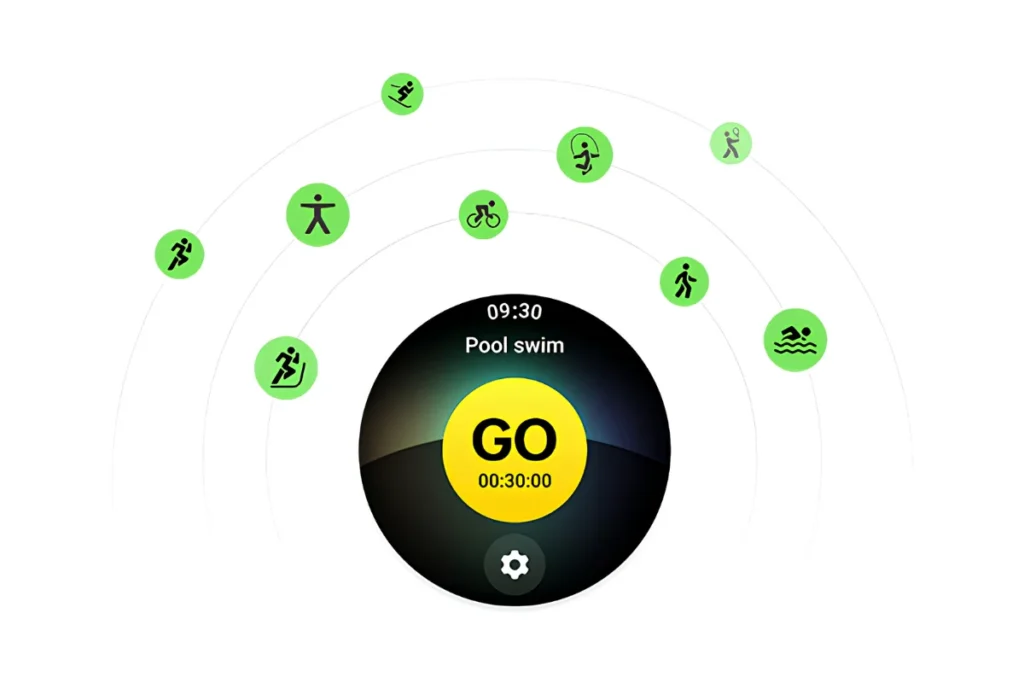
It gives instant access to more than 100 dedicated sports modes right out of the box. If you practice yoga indoors or have a difficult outdoor hiking route in front of you, you have the corresponding mode, which uses the built-in gyroscope and accelerometer to measure your physical performance. During the exercises, I could see on the bright and clear 1.5-inch LTPO OLED display how long I worked out and how many calories I burned. Additionally, the large display reaches 3,000 nits of peak brightness, making it very easy to view your statistics under harsh gym lighting or direct sunlight. Since I am a man who enjoys changing his schedule on a regular basis, I found the auto workout detection to be really convenient. The fact is that this watch has auto workout detection, which means that it will automatically track your walk or run without pressing the start button.
GPS Tracking and Accuracy#
The outdoor features are made possible by a sophisticated dual-band L1+L5 GPS technology in the device. It allows to establish connections with several satellite systems, such as GLONASS, Galileo and Beidou and track your position more quickly compared to single-band watches. I extensively tried out the route and location tracking function on several runs around my neighborhood. The GPS finds its connection quite fast, typically after 10-15 seconds of being outside. In my test run of this smartwatch, the location tracking function is pretty accurate, yet far from perfect. At some point, the map shows me running inside a building rather than along the sidewalk. The L5 frequency is supposed to eliminate that problem, yet sometimes it cannot do so. If you are looking for very precise GPS tracking for your marathon training, a dedicated Garmin watch is a much better choice.
Running, Cycling and Other Activity Tracking#
© OnePlus
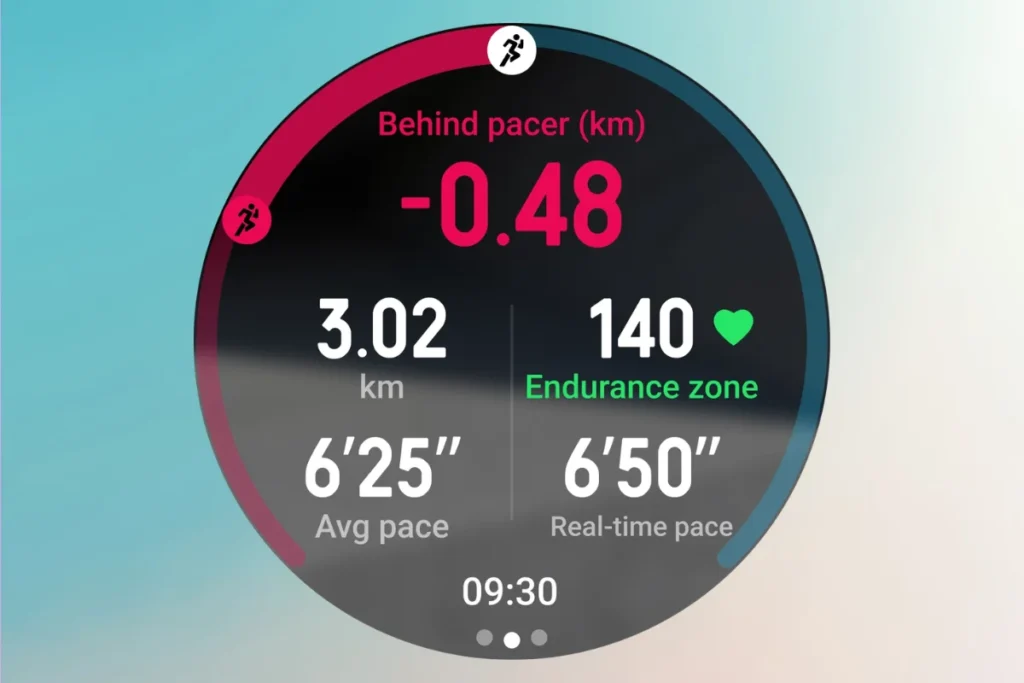
The running and walking capabilities of this watch for common users are well supported by algorithms of complex software. It monitors the frequency of your steps, your average speed and even provides an estimation of your VO2 Max in order to help you have a clearer understanding of your endurance. The cycling activities monitoring is also reliable because it constantly gets the data from the internal barometer and helps to track your elevation when climbing uphill. This watch does not have any problems with the standard workout types and captures all your workout data perfectly. For those people who want to be active and close the activity rings each day, this watch is quite enough. But one of the biggest cons of this device is its inability to support advanced running dynamics such as ground contact time or vertical oscillation.
Fitness Data and Insights Through the OHealth App#

©: Techreviewer
Once your workout ends, everything gets instantly synchronized through Bluetooth 5.2 into the corresponding OHealth app. The summaries following each exercise are neat, highly detailed and easy to read right from your smartphone screen. You can easily track your past activity, monitor your own heart rate zones and see long term trends in your fitness level. In addition, the app enables direct integration with Google Health Connect, so that you can easily transfer all your workouts into such third party services as Strava or MyFitnessPal. The app is highly intuitive, but at the same time, it lacks comprehensive athletic training analysis capabilities that you can readily find in dedicated sports watches. For example, you won’t be able to import any GPX routes for hiking trails or receive any advanced training load recovery advice. Thus, this might be quite a disadvantage for you, should you wish to peak up for a particular race.
Battery Life: How Long Does the OnePlus Watch 4 Actually Last?#
The battery life is the main reason why people choose the OnePlus Watch 4. The claimed 5 days of longevity in Smart Mode sounds great in theory. In order to pull it off, OnePlus uses a smart dual-engine system, switching from a high-end Snapdragon W5 processor to a low-power BES2800 processor based on your activities.
During my trials of this smartwatch, I aimed at seeing how much it lasts under intense use. I activated the always-on screen function. I also made sure that the heart rate tracking was active all the time. Finally, I monitored 1 hour of exercise using GPS each day. During 3 days of such heavy usage, the OnePlus Watch 4 survived for two and a half days until it begged for a recharge. You can increase this time up to four days without the always on feature. There is also a 16 day Power Saver Mode available if needed.
Wear OS 6 and Gemini: Is the Software Upgrade Worth It?#
The OnePlus Watch 4 comes with Wear OS 6. The performance is superb. Navigating through the OxygenOS Watch 8 interface is quick and smooth. Being able to directly access the Google Play Store from your wrist is a huge deal breaker. I enjoy using Google Maps for navigating through walking routes or using the Google Wallet to pay for my cup of coffee.
The coolest feature in this device is the native support for Google Gemini. You will be able to directly call up Gemini from your wrist and ask any queries or even control your smart home devices through it. While I was testing this watch, I used Gemini to summarize my upcoming calendar appointments. It performed exceptionally well. But one downside is that the voice responses take a bit extra time than they do on a phone.
Despite the new Gemini integration, I wonder whether my impression of this experience is that of something really new compared to the older version. The fact of the matter is that the core experience has not changed much. Notifications come up consistently and taking a call on the wrist is done clearly. However, if you already have a smartwatch with Wear OS 5, then this update may not shock you.
OnePlus Watch 4 vs Pixel Watch 5 and Galaxy Watch 9#
The market for wearable products is very competitive. The OnePlus Watch 4 needs to compete with other best Android smartwatches such as the Pixel Watch 5 and the Galaxy Watch 9.
If we talk about the battery life, the OnePlus Watch 4 beats the Pixel Watch 5 by far. Not having to charge the product every night is a huge plus. Nevertheless, if we consider the performance of Google software and AI implementation, the Pixel watch looks more natural and seamless.
As for health and fitness features, the Galaxy Watch 9 is a bit better in terms of ecosystem if you have Samsung phone. At the same time, the OnePlus Watch 4 counters with great display and robust construction out of titanium. The third-party apps on both watches are equal to each other as all three models use Google Play Store for app management. Thus, there is no global winner. It depends on what is important for you, OnePlus offers multi-day battery, while Pixel offers smartest AI integration.
Who Should Buy the OnePlus Watch 4?#
You Should Buy the OnePlus Watch 4 if:
- You need a quality smartwatch with a slim titanium build.
- You would like a smartwatch that doesn’t require daily charging but lasts for several days.
- You would like to have Google Gemini and Wear OS functionalities on your smartwatch.
- You track your sleep, heart rate and other health parameters.
- You engage in jogging, mountain climbing and other physical activities.
- You have an Android smartphone that is compatible with it.
Who Should Avoid the OnePlus Watch 4?#
You Should Avoid the OnePlus Watch 4 if:
- You have already bought the OnePlus Watch 3 and expect expect a major battery improvement.
- You are looking for standalone LTE/eSIM capabilities.
- You have an iPhone or an Android Go phone.
- You like a slimmer and smaller size of your smartwatch.
- You require professional athletic training tracking with accuracy.
Wrap Up#
The OnePlus Watch 4 has brought a combination of high-quality titanium body, useful features for your health, a lot of exercises and an impressive battery that will serve you for multiple days. The approach followed by OnePlus seems good to me, despite the fact that the battery life of the device hasn’t been significantly increased compared to its predecessor. However, if you need a smartwatch that can cope with your everyday routine and help with your fitness, the OnePlus Watch 4 might become a great choice. Is it worth its price, though?
 RK
Written by
With a focus on real-world usability, Rahul at WearableXP covers smartwatches and wearable fitness tech. He evaluates how devices combine activity tracking, health metrics, battery life and connectivity. His work helps readers understand how smartwatches fit into everyday routines through practical performance and software-driven features.
More from Rahul 338 storiesKeep readingmore from Smart Watches
All storiesSmart WatchesApple Watch Ultra 4 Review: Is Apple’s Adventure Watch Actually Worth Buying? Smart WatchesBest Running Smartwatches With Music Without a Phone: GPS Watches Compared
 Smart WatchesBest Fitness Smartwatches for Workouts and Heart Rate Tracking
What’s inside
- 01Specifications1 min
- 02OnePlus Watch 4 Review: What You Need to Know1 min
- 03Design and Display: A Lighter Titanium Smartwatch1 min
- 04OnePlus Watch 4 Health Tracking: What Health Metrics Can It Monitor?3 min
- 05OnePlus Watch 4 Fitness Tracking: How Well Does It Track Workouts?3 min
- 06Battery Life: How Long Does the OnePlus Watch 4 Actually Last?1 min
- 07Wear OS 6 and Gemini: Is the Software Upgrade Worth It?1 min
- 08OnePlus Watch 4 vs Pixel Watch 5 and Galaxy Watch 91 min
- 09Who Should Buy the OnePlus Watch 4?1 min
- 10Who Should Avoid the OnePlus Watch 4?1 min
- 11Wrap Up1 min