 Smart WatchesGoogle Pixel Watch 5 Review: Are Its New Health Features Worth It?
Pixel Watch 4 vs Apple Watch Series 11: Ecosystem Battle, Battery, Health and Safety
Compare Pixel Watch 4 vs Apple Watch Series 11 in ecosystem, battery life, health features and safety to find the best choice for Android or iPhone users.
Independently tested. We never accept payment for reviews.How we test

What’s inside9 sections · 6 min read
I spent the last two weeks looking like a very confused tech reviewer wearing a Pixel Watch 4 on my left wrist and an Apple Watch Series 11 on my right. My dry cleaner noticed and jokingly asked if I was training for two lives at once. Honestly? I was just trying to see which one of these flagship wearables actually deserves a spot on your wrist in 2026 in today’s Pixel Watch 4 vs Apple Watch Series 11 battle.
Walking into a grocery store with both watches buzzing at once is a chaotic experience, to say the least. The Apple Watch gives you that polite haptic tap, while the Pixel Watch feels like a tiny, enthusiastic pebble trying to get your attention. It’s the ultimate ecosystem face-off and after 14 days of constant notifications, gym sessions and a few frantic searches for chargers, I finally have the answer.
In this Pixel Watch 4 vs Apple Watch Series 11 comparison, I’m not just looking at specifications, I’m looking at how these watches feel after days of real use. So instead of asking which watch is better on paper, let’s talk about which one actually works better on your wrist.
Design and Comfort#


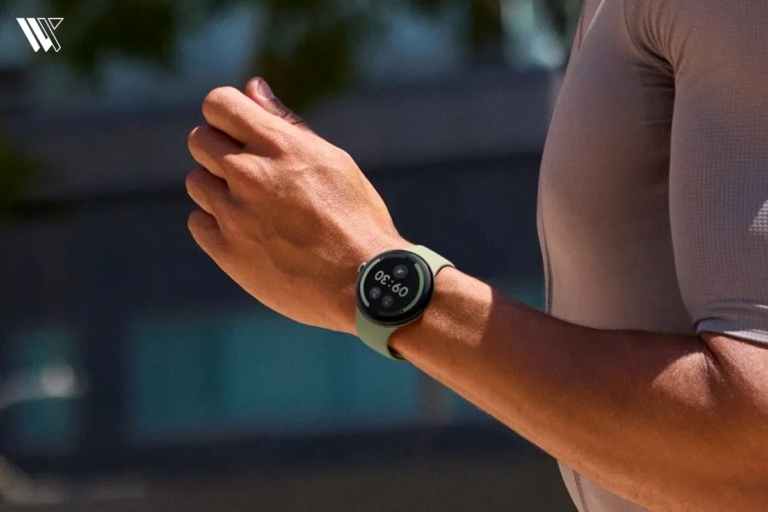
The Pixel Watch 4 keeps that signature domed glass look that Google has perfected. It’s smooth, circular and honestly feels more like a piece of jewelry than a gadget. On the other hand, the Apple Watch Series 11 is square-shaped. It uses a flat display, which makes it easy to view text, notifications and workout stats.
Google Pixel Watch 4 comes with two different sizes, 41mm and 45mm, that feature an Actua360 domed display, which feels like a smooth pebble. The 41mm variant weighs 31g without the strap, while the 45mm variant weighs 36.7g.
The Apple Watch Series 11 comes with two different sizes: 42mm and 46mm. Here, the 42mm variant weighs just 30.3g for the aluminium, which is incredibly lightweight and the 46mm variant weighs 37.8g for the aluminium variant.
Performance and Software#
Using these watches daily, I have been impressed by their processors because they are smooth in their working. The Snapdragon W5 Gen2 in the Pixel and the S10 chip in the Apple Watch are both so fast that lag looks like a thing of the past. As the apps open instantly, scrolling through the notifications feels so smooth.
Wear OS 6 on the Pixel feels very clean as it focuses on Gemini AI and integrates deeply with Google Calendar and Gmail. Meanwhile, watchOS 26 is the most advanced version of watchOS I’ve ever used.
The Pixel Watch feels a bit more fun and experimental while the Apple Watch feels like a reliable tool that never misses a beat.
Ecosystem#
If you have a Pixel phone, the Pixel Watch 4 feels smoother to use. It uses Gemini AI, which can help you to draft messages and it even provides a Daily Readiness Score through the Fitbit integration, something missing in the Apple Watch.
While the Apple Watch Series 11 with an iPhone is still the best. Features like unlocking my Mac, controlling my Apple TV, mirroring my Apple Watch and the seamless way iCloud syncs my health data across devices is hard to beat.
Health and Fitness Tracking#
| Sensor | Pixel Watch 4 | Apple Watch Series 11 |
|---|---|---|
| Heart Rate | Multi-path Optical | Third-gen Optical |
| ECG (Electrocardiogram) | AFib detection (FDA-Cleared) | AFib detection (FDA-Cleared) |
| Blood Oxygen (SpO2) | Red/Infrared Sensors | Blood Oxygen Sensor |
| Temperature | Continuous Skin Temp Sensor | Dual-sensor |
| Stress Tracking | cEDA Sensor | Uses HRV (Heart Rate Variability) |
| Special Features | Loss of Pulse Detection (FDA-Cleared) | Hypertension Notifications (FDA-Cleared) |
I walked 20,000 steps with both watches to test their accuracy and the results were surprising. The Pixel Watch 4 was actually more accurate at counting my steps. It seems that Google’s machine learning model for motion has truly mastered the art of understanding how humans walk.

Apple, on the other hand, wins on the deep medical-grade features. The Apple Watch Series 11 offers FDA-cleared hypertension notification, which passively monitors your blood pressure trends over 30-day periods. It also provides a detailed sleep score that breaks down your recovery in a way that feels very friendly.
While the Pixel Watch 4 uses Fitbit’s excellent coaching and AI-driven insights to tell you how to improve, Apple gives you the raw data to show you exactly what your body is doing.
The Pixel Watch 4 has a unique edge with its cEDA sensor, something the Apple Watch needs third-party apps for. This tracks tiny changes in your sweat levels to detect stress before you even realize you’re feeling it. It also features the revolutionary Loss of Pulse Detection, an FDA-cleared lifesaver that can detect when your heart stops and automatically call for help.

Meanwhile, Apple Series 11 comes with FDA-approved hypertension detection, which analyzes how your blood vessels respond to your heartbeat to catch high blood pressure patterns.
If you want a personal coach that monitors your stress and recovery, go for Pixel. If you want a doctor that focused on long-term heart health, go for Apple.
Safety Features in Pixel Watch 4 vs Apple Watch Series 11#
Both watches are literally life-savers. They both come with fall detection, crash detection and Emergency SOS. The Pixel Watch 4 has a hidden edge here as it includes satellite SOS at no extra cost, it’s a feature that Apple usually saves for its Ultra models.
For someone who hikes in areas with zero cell service, having that satellite connection on a standard watch is a huge relief.
Battery Life#
The Google Pixel Watch 4’s 41mm variant comes with a 325mAh battery, which gives up to 30 hours of battery life with Always On Display and with battery saver mode, it gives up to 48 hours of battery life.
The Google Pixel Watch 4’s 45mm variant comes with a 455 mAh battery, which gives up to 40 hours of battery life with Always On Display and with battery saver mode, it gives up to 72 hours of battery life.
On the other hand, the Apple Watch Series 11’s 42mm variant comes with a 300mAh battery, which gives up to 24 hours of battery life with Always On Display and with Low Power Mode, it gives up to 38 hours of battery life.
The Apple Watch Series 11’s 46mm variant comes with a 365mAh battery, which gives up to 24 hours of battery life with Always On Display and with Low Power Mode, it gives up to 38 hours of battery life.
Price and Availability#
The price for the Pixel Watch 4 for the 41mm variant starts at $349.99 USD, while the 45mm variant starts at $399 USD. You can purchase this watch from Google’s official Website, Best Buy and Amazon.
The price for the Apple Watch Series 11 for the 42mm variant starts at $399 USD, while the 46mm variant starts at $429 USD. You can purchase this watch from Apple’s official website and stores, Best Buy, Walmart and from Amazon.
Final Verdict#
If I had to choose just one watch to wear every day, I would choose the Pixel Watch 4, primarily because I’m an Android user and it pairs perfectly with Android phones. I really like the polished feel of the Apple Watch, but the 40-hour battery life and the pebble design fit better into my lifestyle.
I love not having to worry about a charger every single night, and the Gemini AI feels like a genuinely helpful assistant rather than just a voice command tool.
You can choose the Pixel Watch 4 if you are an Android user who wants the AI integration and who hates charging your watch every day. You can choose the Apple Watch Series 11 if you are already in the Apple ecosystem and want seamless device switching, or if you want advanced medical-grade features like the hypertension alerts.
FAQs#
01Can I use the Pixel Watch 4 with my iPhone?
No, you can’t use the Pixel Watch 4 with an iPhone. Unlike some older Wear OS watches, the Pixel Watch 4 is strictly for Android users. You need a phone running Android 10.0 or newer to even activate the watch.
02Can Apple Watch Series 11 detect sleep apnea?
Yes, the Apple Watch Series 11 uses its accelerometer and heart rate sensors to monitor for breathing disturbances during the night that may indicate sleep apnea. It will provide a notification if it detects consistent signs over a period of time.
 RK
RKWritten by
With a focus on real-world usability, Rahul at WearableXP covers smartwatches and wearable fitness tech. He evaluates how devices combine activity tracking, health metrics, battery life and connectivity. His work helps readers understand how smartwatches fit into everyday routines through practical performance and software-driven features.
More from Rahul 334 storiesKeep readingmore from Smart Watches
All storiesSmart WatchesGoogle Pixel Watch 5 Review: Are Its New Health Features Worth It? Smart WatchesXiaomi Watch 5 Muscle Sensing Explained and What It Can Actually Tell You
 Smart WatchesApple Watch Series 12 Packs Some Surprises You Might Not Expect