 Smart GlassesBest Hands-Free Smart Glasses for Calls, Photos and Voice Assistants in 2026
VITURE Pro 2 Explained: What Do You Really Get for $299?
There is something strange about watching a movie on a phone when you know you could be watching it on a much bigger screen. The problem is that you cannot exactly carry a TV with you everywhere. A laptop works, but it is not always comfortable. And a portable monitor? That starts to defeat the whole point of traveling light.
Independently tested. We never accept payment for reviews.How we test
What’s inside11 sections · 12 min read
- 01VITURE Pro 2 Specifications1 min
- 02Display and UltraClarity 3.02 min
- 03Comfort and Vision Adjustment May Be the Real Upgrade2 min
- 04The VITURE Pro 2 Is Mostly a Display: Not a Standalone Computer1 min
- 05Audio1 min
- 06Gaming1 min
- 07Productivity and Multi-Screen Use1 min
- 08Accessories Can Change the Real Price1 min
- 09Who Should Buy the VITURE Pro 2?1 min
- 10Who Should Skip VITURE Pro 2?1 min
- 11Wrap Up1 min
There is something strange about watching a movie on a phone when you know you could be watching it on a much bigger screen. The problem is that you cannot exactly carry a TV with you everywhere. A laptop works, but it is not always comfortable. And a portable monitor? That starts to defeat the whole point of traveling light.
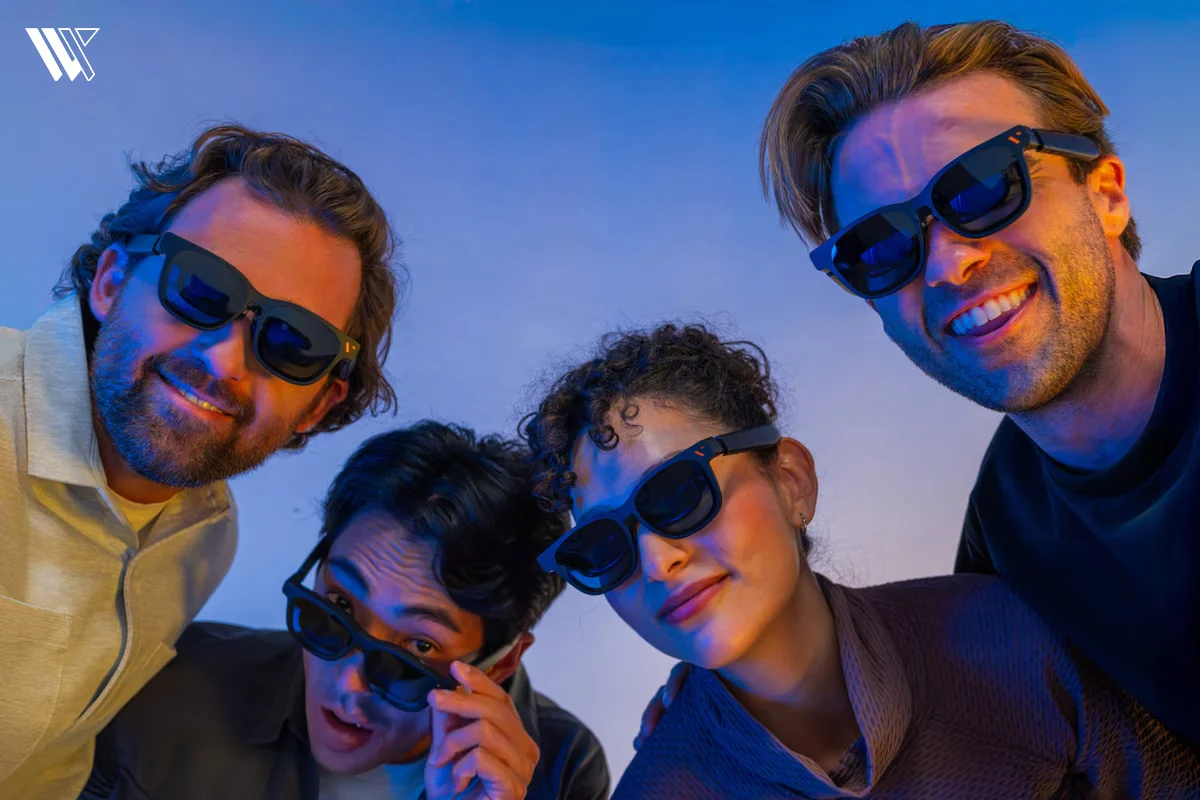
This is where glasses like the VITURE Pro 2 become interesting. At first, they look like a normal pair of glasses. Put them on, connect them to a compatible device and the experience starts to feel a little different. Instead of holding a screen in your hands, the screen comes with you.
That sounds simple, but there is more going on behind those lenses than you might expect. The VITURE Pro 2 sits somewhere between ordinary display glasses and the more ambitious idea of spatial computing.
And that raises the real question: what is it actually like to use a pair of glasses built around that idea and does the experience make sense for the way people use their devices today?
VITURE Pro 2 Specifications#
| Features | VITURE Pro 2 |
|---|---|
| Display Type | Sony Micro-OLED |
| Weight | 63 grams |
| Resolution | 1920 × 1080 per eye (1080p) |
| Field of View (FOV) | 50 degrees |
| Perceived Brightness | Up to 1,600 nits |
| Refresh Rate | Up to 120Hz |
| Vision Adjustment | Built-in diopter dials (0 to -5.0D) |
| Connectivity | Standard USB-C DisplayPort Alt Mode |
| Spatial Tracking | Software-based 3DoF (via SpaceWalker) no native 6DoF |
| Audio | Built-in speakers with spatial sound |
| Audio Codec | AAC |
| Nose Pads | 3 interchangeable nose pads |
| Fit Adjustment | 7 height/position settings and 3 temple-angle adjustments |
| Prescription Support | Built-in myopia adjustment, prescription frame available |
| Software | VITURE SpaceWalker |
| Price | $299 |
Display and UltraClarity 3.0#
© Viture
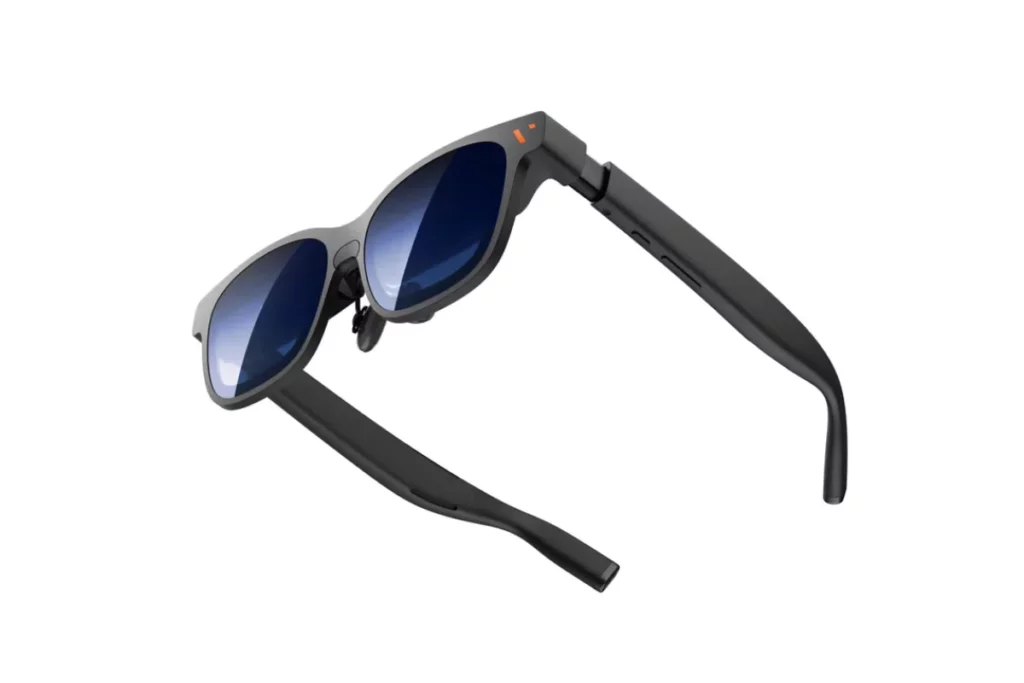
The visual experience of the VITURE Pro 2 centers on dual Sony Micro-OLED panels paired with custom Birdbath optics and the UltraClarity 3.0 optical engine. Each eye looks at its own 1920×1080 Full HD micro-display, which merges together to form a native 3840×1080 canvas for immersive 3D content. By routing light through this specialized optical stack, the glasses project those tiny pixels outward to create the feeling of a massive 146-inch theater display floating right in front of you.
Because each micro-OLED pixel emits its own individual light, the screen reaches an ultra-high contrast ratio of over 100,000:1 with 108% sRGB color coverage. This means dark scenes feature true, inky blacks instead of washed-out gray shadows, making movie colors look rich and lifelike. At the same time, the display delivers up to 1,600 nits of peak brightness across nine adjustable levels, so your games and videos stay punchy and easy to see even in a brightly lit room.
© Viture
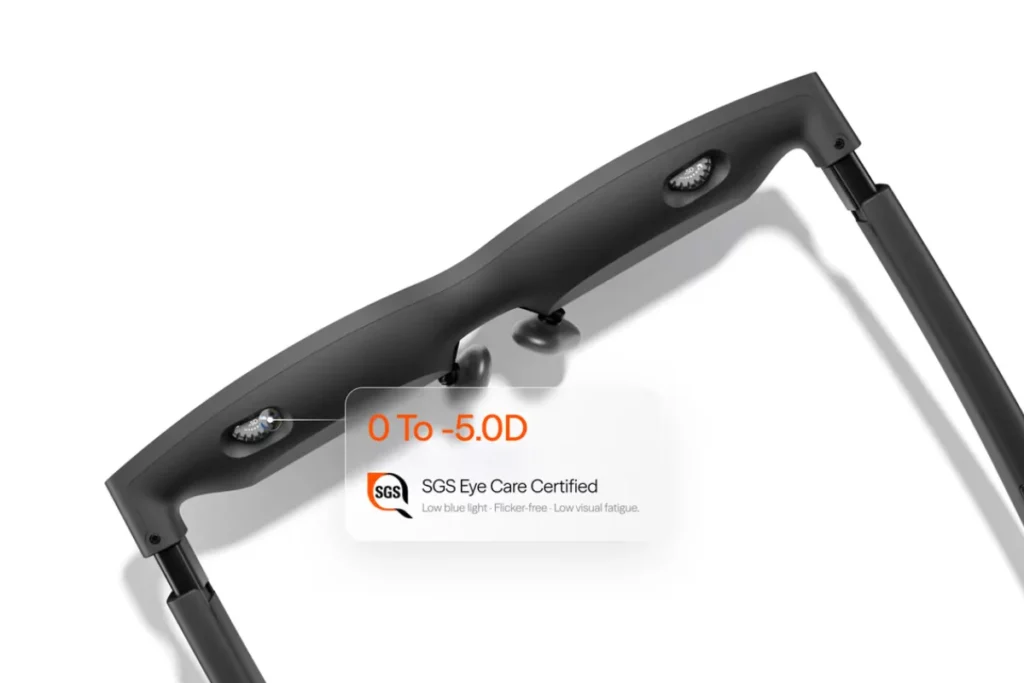
For fast-paced media, the VITURE Pro 2 supports a smooth 120Hz refresh rate to eliminate motion blur and ghosting during intense gaming sessions. The hardware also carries SGS A+ Eye Care certification for flicker-free performance and low blue light emissions, which keeps your eyes from tiring out during back-to-back episodes. Guiding all of this is the UltraClarity 3.0 system, an upgraded lens layer designed to bend light smoothly and minimize visual distortion across the wide 50-degree field of view.
Even with this advanced optical hardware, your everyday visual clarity still depends heavily on physical fit. Since the lenses must line up precisely with your pupils, slight variations in facial shape or resting angle can lead to soft corners when reading dense text documents. However, once you dial in the nose pads and match the sweet spot to your eyes, the deep contrast, high refresh rate and vibrant color range deliver a sharp, captivating image across your entire central view.
If you want to see how VITURE’s display technology performs in everyday use, our VITURE Pro XR Review takes a closer look at the real-world viewing experience, comfort and overall performance.
Comfort and Vision Adjustment May Be the Real Upgrade#
Wearing a pair of XR glasses for a few minutes is easy. Wearing them for a 2 hour movie or a long gaming session is where things get interesting. If the glasses do not sit properly on your face, even a great display can quickly become uncomfortable. To prevent that familiar fatigue, the VITURE Pro 2 makes physical customization its core priority by cutting the frame weight down to an ultralight 63 grams. This lightweight profile works alongside an internal Interpupillary Distance (IPD) accommodation of 56.5 mm to 71.5 mm, ensuring that the dual display centers match a wide variety of pupil spacings without introducing eye strain.
© Viture
© Viture
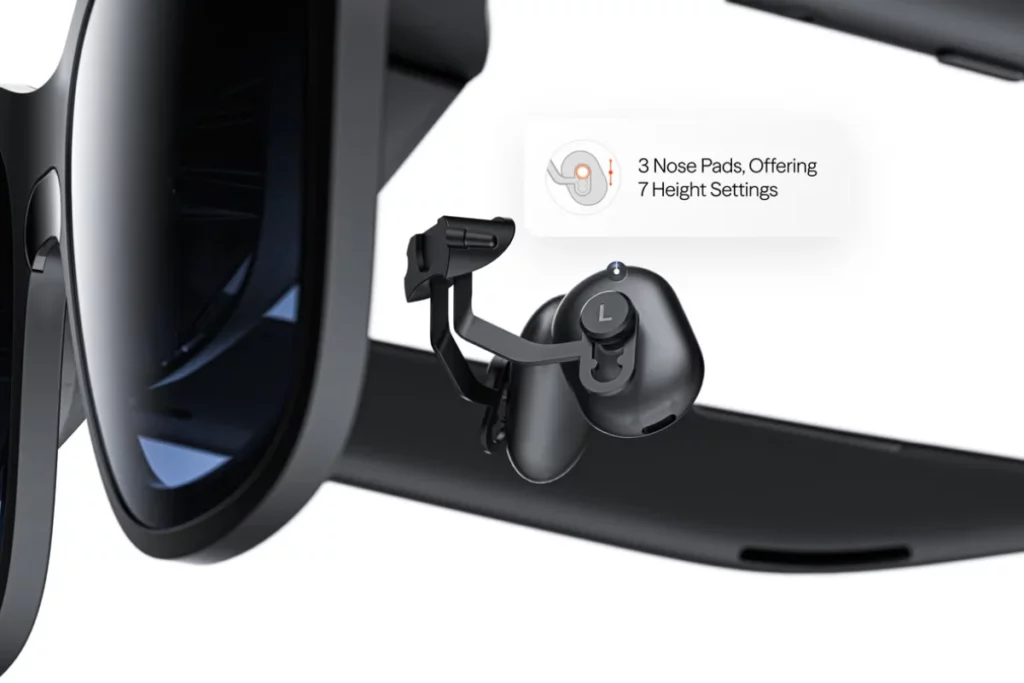
To dial in that alignment on your face, the package includes three swappable nose pads (sizes 0, 1 and 2) that combine into seven distinct height and depth configurations. Finding the right pad height elevates or lowers the frame so the optics sit directly inside your central sightline. In addition, the frame arms feature three adjustable temple angle detents, letting you tilt the display angle upward or downward to match the natural resting height of your ears.
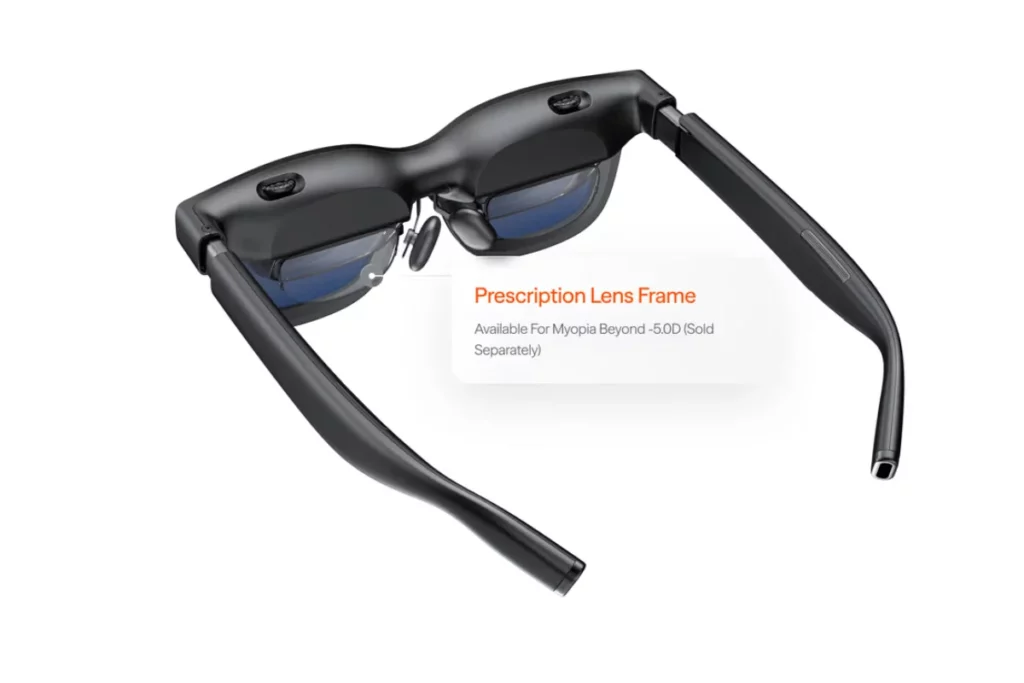
For vision correction, the top edge of the frame houses independent rotary dials that control step-free diopter adjustments from 0.0D down to -5.0D for each eye. Turning these dials mechanically shifts the focus of the Birdbath optical elements, allowing most nearsighted users to enjoy a sharp image straight out of the box without wearing contact lenses. The frame also incorporates an intelligent wear detection sensor that automatically pauses video playback and powers down the panels the moment you take the glasses off, preserving your connected device’s battery life.
While the built-in diopters offer instant relief for standard myopia, they are mechanically engineered to correct spherical focus only. This means that if you have astigmatism or a strong prescription that falls beyond the -5.0D limit, you will still need to snap on the optional magnetic prescription frame. For everyday nearsighted users within range, however, this combination of mechanical tuning and multi-axis physical adjustments makes the VITURE Pro 2 easy to wear comfortably through extended movie and gaming sessions.
If you need prescription-friendly smart glasses and want to compare options beyond the VITURE Pro 2, our guide to the Best Smart Glasses With Prescription covers some of the alternatives worth considering.
The VITURE Pro 2 Is Mostly a Display: Not a Standalone Computer#
© Viture
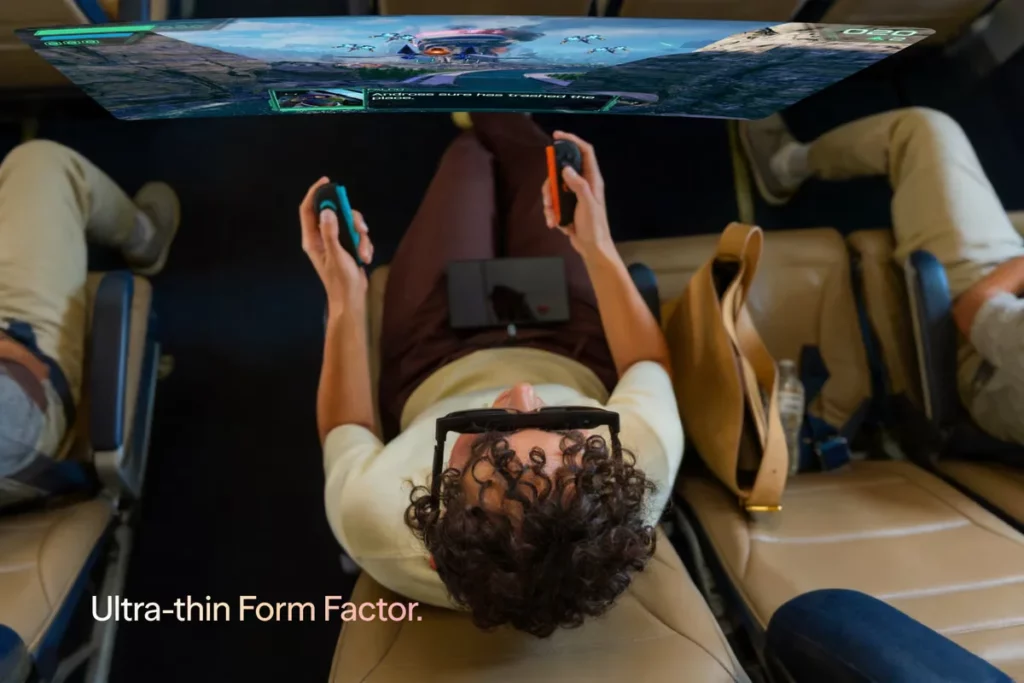
The VITURE Pro 2 functions as an ultra-portable external display rather than an independent computing device. Instead of carrying heavy internal processors or onboard batteries, it channels high-definition video and power directly from your host devices through a streamlined hardware architecture.
- Direct DP-Alt Mode Video Feed: The glasses connect over a standard USB-C cable using DisplayPort Alternate Mode (DP-Alt Mode), drawing minimal power while delivering direct digital mirroring with virtually zero input lag.
- Hardware-Level Stereoscopic 3D: A physical rocker button on the frame instantly switches the dual Micro-OLED panels into side-by-side (SBS) 3D mode, splitting incoming stereoscopic signals into discrete left-and-right channels without needing secondary rendering software.
- Embedded 9-Axis IMU Sensor: An integrated sensor package featuring a 3-axis gyroscope, 3-axis accelerometer and 3-axis magnetometer tracks rotational head velocity and orientation in real time.
- Software-Driven 3DoF via SpaceWalker: The companion SpaceWalker app on macOS, Windows, Android and iOS uses those sensor feeds to deliver smooth 3 Degrees of Freedom (3DoF) tracking, allowing you to anchor floating multi-monitor setups in fixed mid-air positions.
- Deliberate Absence of 6DoF Hardware: To maintain its featherlight 63-gram frame and low power profile, the unit omits outward-facing SLAM tracking cameras, LiDAR and computer-vision processors, meaning it cannot map room geometry or track bare hands.
By handling video projection cleanly through a wired pipeline, the VITURE Pro 2 leaves heavy computing tasks to your laptop, phone or console. It delivers a fast, low-latency viewing experience tailored for media and gaming rather than trying to replicate an all-in-one spatial headset like an Apple Vision Pro.
If you are exploring the wider AR glasses market rather than looking at VITURE alone, our guide to the Best AR Glasses 2026 is a good place to compare the options available right now.
Audio#
The temples of the VITURE Pro 2 house a dedicated open-ear acoustic setup designed to beam audio straight toward your ears without plugging up your ear canals. Built on an Advanced Acoustic System (AAC), the micro-speakers feature a fundamental resonance frequency tuned to 250 Hz (±40 Hz). This internal acoustic chamber shapes the soundwaves, providing spatial audio positioning that makes game effects and media cues feel like they are happening around you in 3D space.
To keep your listening experience private, the frame uses directional sound projection combined with inverse phase acoustic venting. This design creates destructive audio cancellation outside the immediate ear zone, preventing sound from bleeding into quiet rooms when you are sitting near family or coworkers. You can fine-tune the volume directly across 9 integrated sound steps using the onboard rocker buttons, allowing you to quickly match your audio levels to your surrounding environment.
For casual gaming sessions, streaming YouTube videos and listening to spoken podcasts, the speakers deliver clean mids and clear vocal dialogue. Because the micro drivers prioritize a lightweight open ear build, low-end sub-bass response remains modest. If you are sitting inside a loud airplane cabin or want heavy cinematic rumble for action movies, pairing your phone or console with a set of active noise-canceling wireless earbuds will give you the deepest, most immersive audio experience.
The VITURE Pro 2 is therefore better understood as a wearable display with built-in audio than a traditional pair of smart glasses. If you are looking for glasses that put more emphasis on everyday features beyond viewing content, our guide to the Best Smart Glasses covers some other options worth considering.
Gaming#
© Viture
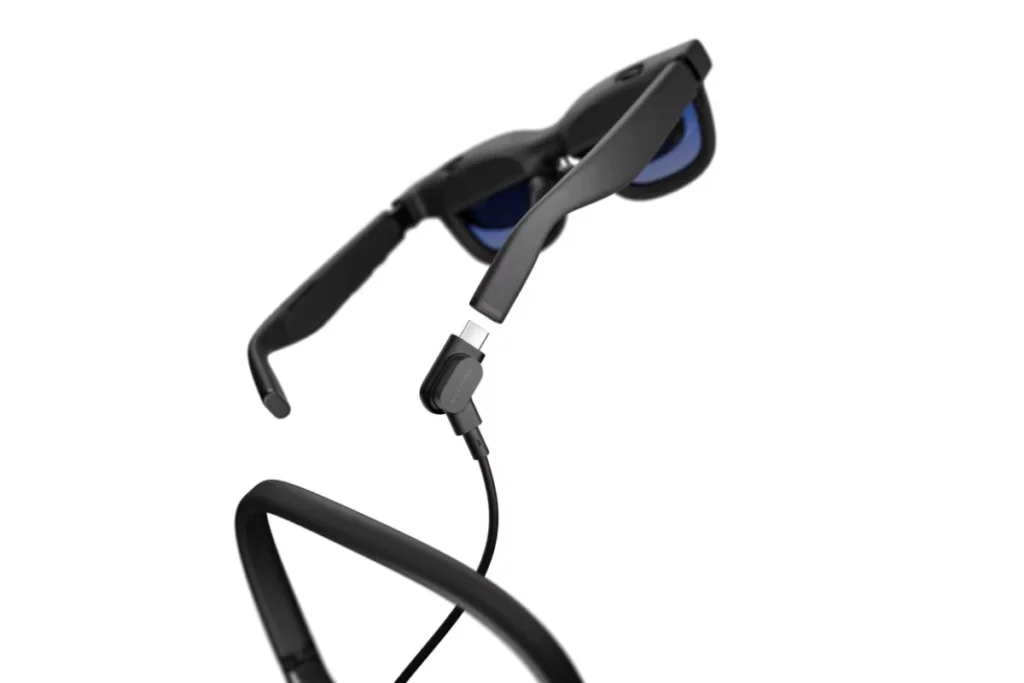
Gaming is where the VITURE Pro 2 delivers its most immediate value, transforming compact handheld consoles into massive personal gaming monitors. By channeling direct digital signals with virtually imperceptible input latency, the hardware eliminates the display lag typically found in wireless streaming setups.
- Plug-and-Play Handheld PC Support: The glasses connect directly over standard USB-C DisplayPort Alternate Mode to devices like the Steam Deck, Steam Deck OLED, ROG Ally and Lenovo Legion Go without requiring external power hubs or driver installations.
- 120Hz Native Refresh Rate: The dual Micro-OLED panels support native 1080p output at up to 120Hz, providing ultra-low pixel response times that keep high-speed competitive shooters and racing titles fluid and free of motion ghosting.
- Enhanced HUD and Text Readability: Thanks to the sub-millisecond response time of Micro-OLED pixels and a 100,000:1 contrast ratio, fine text elements, like in-game mini-maps, damage numbers and inventory menus, stay sharp against high-contrast backgrounds.
- Ergonomic Posture Relief: Shifting the screen from your lap up to your natural eye level eliminates neck strain on long flights or train commutes, letting you recline fully while keeping a stable 146-inch virtual canvas in view.
- Nintendo Switch Protocol Requirements: Because the Nintendo Switch and Switch 2 require specific proprietary handshakes and 15V powered docks to output video, running these consoles requires a powered accessory like the VITURE Mobile Dock Mini or Pro Mobile Dock rather than a direct passive cable.
For power users playing for hours at a time, pairing the VITURE Pro 2 with a USB-C charging adapter allows pass-through power delivery up to 45W, charging your console simultaneously while outputting video. This combination of low latency, high refresh rates and ergonomic comfort makes handheld gaming the single most natural and seamless way to use these smart glasses.
If you are mainly looking at these glasses for handheld gaming, it is also worth seeing how VITURE compares with one of its biggest rivals. Our XREAL vs VITURE comparison looks at the differences that matter when choosing between the two.
Productivity and Multi-Screen Use#
For desktop tasks, the VITURE Pro 2 pairs directly with the SpaceWalker utility to transform a single laptop feed into a virtual multi-display workspace. This software suite unlocks extensive virtual workspace features across different operating systems.
- Virtual Display Layouts: SpaceWalker renders up to three side-by-side virtual displays or a continuous 32:9 ultrawide canvas, giving you extra digital real estate for cross-referencing documents, notes and web browsers.
- 3DoF Spatial Pinning: Using the 9-axis IMU sensors built into the frame, the desktop software locks your virtual windows into fixed 3DoF coordinates in mid-air so they stay anchored when you turn your head.
- High-PPD Text Rendering: With an optical resolution delivering a sharp Pixels Per Degree (PPD) rating, centered text in word processors, email clients and code editors remains legible without severe pixelation.
- Cross-Platform Compatibility: The SpaceWalker suite supports macOS and Windows with native multi-screen rendering, Android with floating app windows and iOS via dedicated hardware adapters like the USB-C XR Charging Adapter Ultra.
- Resolution and Refresh Options: The virtual workspace operates at native 1080p resolution per eye and lets you toggle between 60Hz, 90Hz or 120Hz refresh rates depending on your system’s GPU capabilities.
While managing multiple windows in mid air works smoothly for light multitasking, text clarity can vary near the periphery of the 50-degree field of view. Minor optical misalignments on your nose bridge can cause slight edge softness, which makes scanning wide spreadsheets or dense code bases over long working days tiring on the eyes. For the best experience, treat the VITURE Pro 2 as a portable second screen for light multitasking and focused travel workflow rather than an all-day replacement for physical desktop monitors.
Accessories Can Change the Real Price#
Although the starting VITURE Pro 2 sells at an affordable price of $299, customization of the glasses for particular gaming consoles or non-compatible phones requires extra setup accessories. Because these glasses act as a passive display monitor, certain host devices require external power handshakes or specialized signal conversions to output video smoothly.
- Mobile Dock Mini: Packs a built-in 10,000 mAh battery cell with 27W USB-C output and high-bandwidth video passthrough, providing the dedicated power handshake and HDMI conversion needed to run the Nintendo Switch, Switch 2 and TV streaming sticks on the go.
- Pro Mobile Dock: Houses a large 13,000 mAh power bank with dual USB-C display outputs and an HDMI 1.4 port, allowing two people wearing VITURE Pro 2 glasses to share the exact same video feed or play split-screen co-op games simultaneously.
- USB-C XR Charging Adapter: Supports up to 65W Power Delivery (PD) passthrough charging, letting you keep your smartphone, Steam Deck or ROG Ally powered while simultaneously routing DisplayPort signals directly to the glasses.
- Magnetic Prescription Frame: Snaps magnetically over the inner optical housing to provide customized corrective lenses for users with severe myopia beyond -5.0D or those with uncorrected astigmatism.
- Pro Neckband: Operates as a standalone, Android-based wearable computing engine equipped with onboard storage and Wi-Fi 6E connectivity, allowing you to stream apps like Netflix and Xbox Cloud Gaming without tethering to a smartphone.
Who Should Buy the VITURE Pro 2?#
You should buy the VITURE Pro 2 if:
- You want a large screen for your Steam Deck or other handheld gaming device.
- You travel often and want a private screen without carrying a monitor.
- You enjoy watching movies and shows on a large virtual display.
- You want lightweight XR glasses for longer gaming or viewing sessions.
- You are nearsighted and can use the built in 0 to -5.0D adjustment.
- You want to try XR glasses without spending $500 or more.
- You mainly need a wearable display rather than a standalone spatial computer.
- You are comfortable connecting the glasses to another device through USB-C.
Who Should Skip VITURE Pro 2?#
You should skip the VITURE Pro 2 if:
- You need full 6DoF tracking for advanced spatial experiences.
- You want completely standalone smart glasses that do not need another device.
- You want cameras, AI features or environmental awareness.
- Your main goal is an all-day virtual office with anchored multiple screens.
- You do not want to deal with a cable connecting the glasses to your device.
- Your prescription needs go beyond the built-in -5.0D adjustment.
- You want the best possible built-in audio without using separate headphones.
- You are willing to spend more for stronger built-in spatial features like those on VITURE Beast.
Wrap Up#
The VITURE Pro 2 is one of those gadgets that sounds a little strange until you actually understand the idea. Instead of carrying a bigger screen, you simply put one on your face.
At $299, it makes the most sense for gaming, movies and travel. It is not a standalone spatial computer, but if all you want is a big, private screen without the extra bulk, the VITURE Pro 2 makes a pretty convincing case for itself.
 RR
RRWritten by
Reetain, with a focus on emerging trends and immersive tech, covers smart wearables and evolving device categories. He explores how sensors, AI, and connectivity come together in modern wearables, helping readers understand how these technologies shape everyday digital experiences and the future of personal computing.
More from Reetain 66 storiesKeep readingmore from Smart Glasses
All storiesSmart GlassesBest Hands-Free Smart Glasses for Calls, Photos and Voice Assistants in 2026 Smart GlassesRayNeo iO Review: I Tested These Camera-Free AI Glasses for Everyday Use
 Smart GlassesRogbid VisionMax Launches With 20MP Sony Camera and Claimed 4K Video for $139.99
What’s inside
- 01VITURE Pro 2 Specifications1 min
- 02Display and UltraClarity 3.02 min
- 03Comfort and Vision Adjustment May Be the Real Upgrade2 min
- 04The VITURE Pro 2 Is Mostly a Display: Not a Standalone Computer1 min
- 05Audio1 min
- 06Gaming1 min
- 07Productivity and Multi-Screen Use1 min
- 08Accessories Can Change the Real Price1 min
- 09Who Should Buy the VITURE Pro 2?1 min
- 10Who Should Skip VITURE Pro 2?1 min
- 11Wrap Up1 min