

A few years ago, the idea of wearing glasses that would place a huge screen right before you seemed possible only in science fiction films. Moving into 2026, augmented reality smart glasses are now among the most fascinating categories in wearable tech.
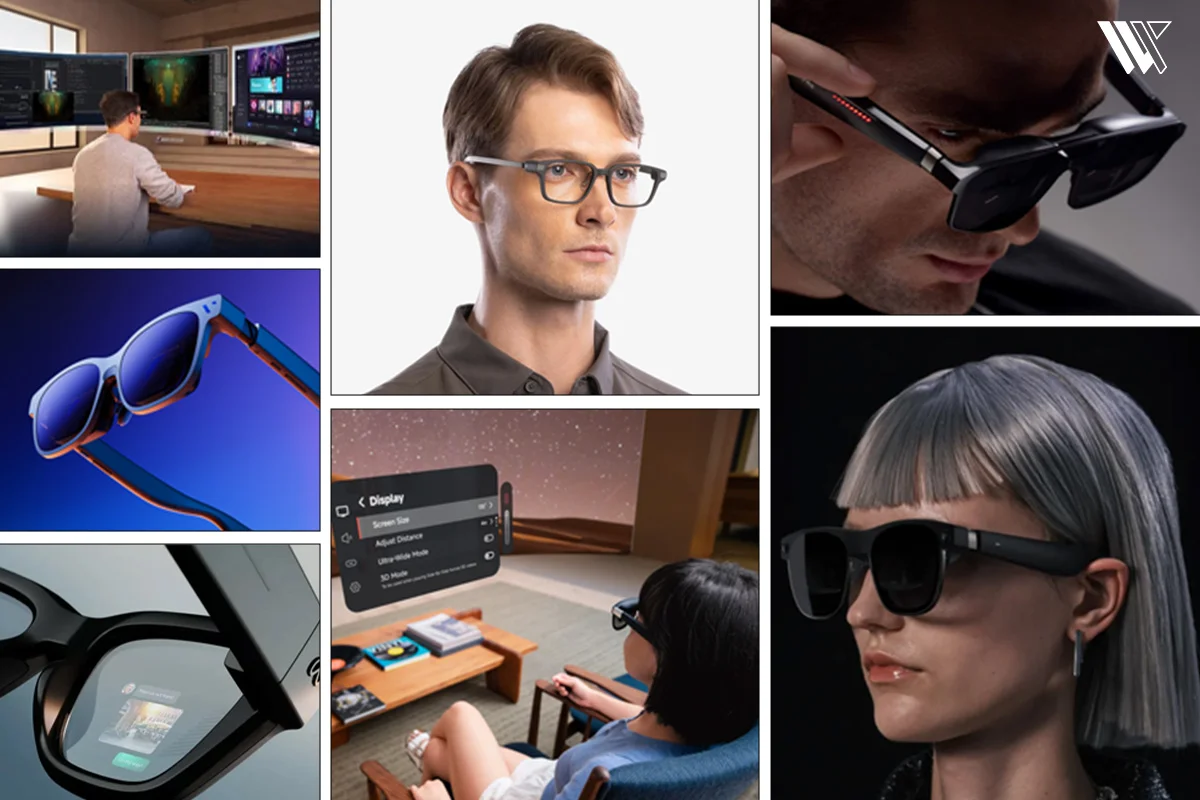
In recent years, I have been observing how this technology has developed from clumsy prototypes into something that people actually like to wear outside their homes. Some are meant to serve as media devices, some want to become productivity devices and some are striving to become an AI companion right before our eyes.
Decode the Decor
The Smart Jewelry Revolution — a practical guide to wearable tech.
However, the issue here is that not all glasses can be considered the best AR glasses for everyone. That’s why finding the right AR glasses isn’t about choosing the most expensive model, but the one that best fits your needs.
Best AR Glasses 2026: Quick Picks
- Meta Ray-Ban Display glasses: Best for quick photography
- Rokid AR Spatial: Best for media streaming
- Viture Beast: Best for traveling
- XREAL One Pro: Best for remote office work
- XREAL Air: Best for budget gaming setups
- Asus ROG R1: Best for hardcore gaming
- Even Realities G2: Best for professionals
Comparison
| Product | Display | AI/AR Features | Battery | Price | Best For |
|---|---|---|---|---|---|
| Meta Ray-Ban Display | Monocular micro-LED overlay | Native Meta AI, look-and-ask vision, real-time translation | 4 hours (Charging case extends to 24+ hours) | $799 | Everyday style, voice assistance, quick photography |
| Rokid AR Spatial | Dual Micro-OLED (Up to 300″ virtual size) | Native Google Gemini integration, 3-DoF three-screen setup | Tethered to host device / Rokid Station | $488 | Extended media streaming and multi-window multitasking |
| Viture Beast | Sony Micro-OLED (174″ screen simulation) | Dynamic spatial audio, Myopia adjustments, XR app dock | Tethered to host device / Mobile Dock | $549 | Traveling movie buffs and glasses wearers wanting no inserts |
| XREAL One Pro | 1080p Micro-OLED (57° Field of View) | Onboard X1 stabilization chip, hardware 3DoF anchor mode | Tethered to host device (Phone/PC/Puck) | $599 | Road warriors, software developers and remote office work |
| XREAL Air | 1080p Micro-OLED (46° Field of View) | Basic screen mirroring, legacy 3DoF via Nebula app | Tethered via USB-C DisplayPort | $349 | Entry-level screen mirroring and budget gaming setups |
| Asus ROG R1 | Dual 1080p Micro-OLED (240Hz refresh rate) | Native ROG Ally integration, 2ms low-latency response, Bose audio | Tethered via USB-C (Supports power pass-through) | $849 | Hardcore handheld gaming and competitive refresh rates |
| Even Realities G2 | Minimalist green waveguide HUD | “Conversate” meeting summary, AI translation, Teleprompter | 6 hours of independent daily usage | $599 | Public speaking, professional notifications, stealth style |
What Are AR Glasses?
When we talk about the best AR glasses of 2026, it is important to distinguish this category from virtual reality (VR) headsets or heavy mixed-reality goggles. VR encloses your eyes completely, shutting out the physical room to place you in an entirely simulated space. True AR smart glasses, by contrast, maintain absolute environmental transparency. They are built around clear glass or polycarbonate lenses that let you see the real room around you, superimposing digital content smoothly over your physical surroundings.
The inner mechanics rely on highly precise optical configurations, such as micro-OLED or micro-LED modules, which are built directly into the frames, that project high-resolution imagery into specialized waveguides or reflective “birdbath” lenses. This hardware configuration bends the light beams directly into your pupils, tricking your brain into seeing a massive, crisp display floating several meters away in mid-air.
In real-world use, this wearable AR tech serves three core categories. For productivity, it allows you to cast secondary floating monitors right above your laptop keyboard without occupying desk space. For media and gaming, it functions as a private, high-fidelity theater screen while you are sitting in an airplane seat. For casual daily wear, it serves as a lightweight heads-up display that feeds you navigation instructions, translations and context-aware notifications without forcing you to pull a smartphone from your pocket.
Best AR Glasses for Gaming
1. Asus ROG R1
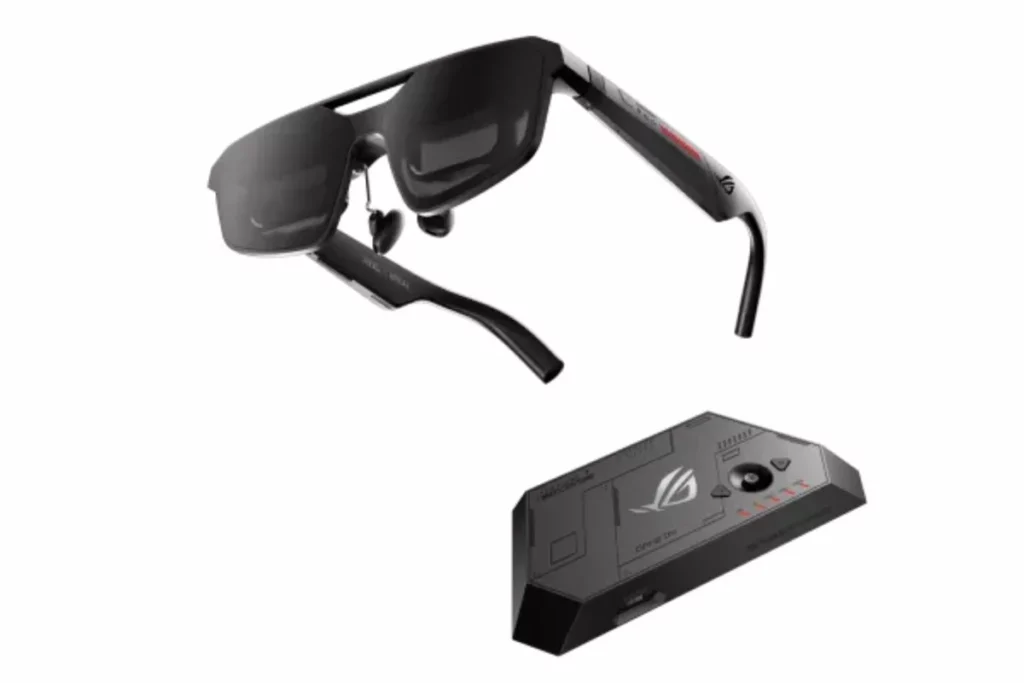
The Asus ROG R1 has fundamentally changed how I interact with handheld gaming consoles like the ROG Ally X and portable PC rigs, earing a spot on my list of best AR glasses. This device sets a blistering standard by utilizing custom Sony Micro-OLED panels that push an unprecedented 240Hz refresh rate. When playing fast-paced first-person shooters or racing simulators, the motion clarity is astonishing, effectively eliminating the ghosting and blurring that plagues older, slower headsets. It features a native 1920 x 1080 resolution per eye and a wide 57-degree diagonal field of view, projecting a gorgeous virtual display that feels like a 171-inch monitor positioned exactly four meters away.
It weighs 91 grams and Asus perfectly balanced the frames by distributing the internal mass evenly along the reinforced temples and the padded nose bridge. I have worn these during intense multi-hour gaming sessions without experiencing painful pressure points on my ears. The glasses also feature electrochromic auto-tinting lenses that dynamically shade themselves when you step into bright rooms, keeping your black levels deep and your contrast ratios sharp. Sound is delivered via integrated open-air temple speakers tuned by Bose, which project clean spatial audio right into your ears while ensuring you can still hear someone knocking on your room door.
Price: $849
Battery Life: Tethered via USB-C
2. XREAL Air
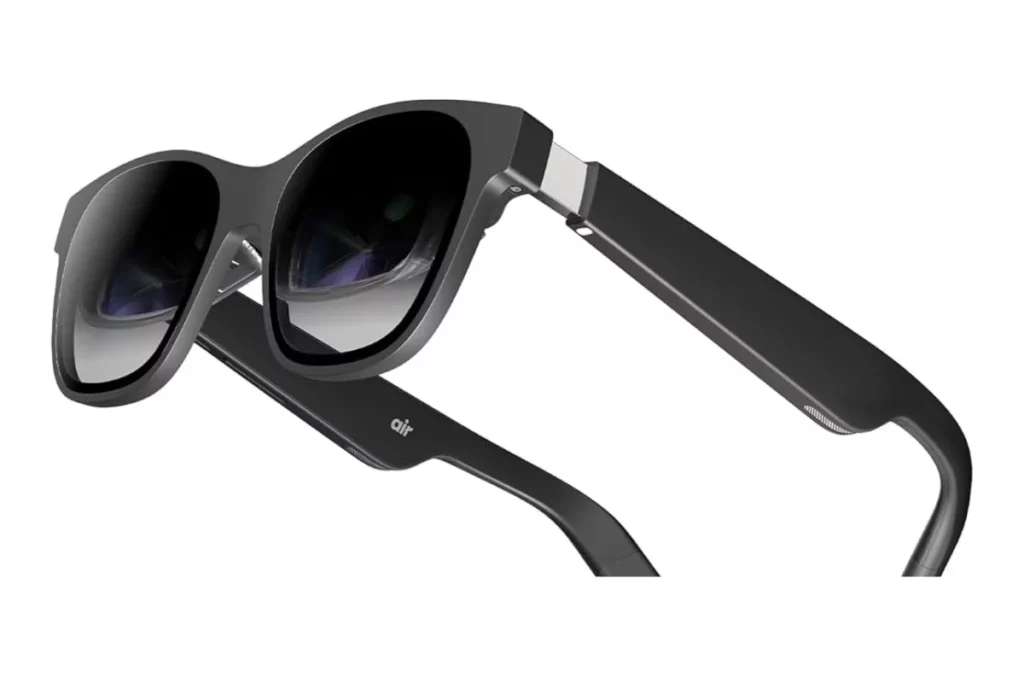
The classic AR glasses, XREAL Air, remain an absolute staple in my tech bag for straightforward, reliable portable gaming on a budget. This unit relies on a sharp 1080p Micro-OLED display that delivers a 46-degree field of view. While it doesn’t boast the ultra-high refresh rates of specialized gaming frames, its 120Hz display mode handles standard console outputs beautifully. If you want a quick, dependable way to play your Nintendo Switch or Steam Deck while lying completely flat on your back in bed, this hardware remains incredibly satisfying.
The physical chassis is remarkably lightweight at 79 grams, making it feel very close to standard sunglasses. The image clarity is crisp in the center, though you have to ensure the nose pads are perfectly adjusted to keep the edges of the screen from blurring out of your line of sight. It connects purely over a plug-and-play USB-C DisplayPort cable, drawing minimal current directly from your handheld device. These AR glasses don’t offer native hardware spatial tracking on their own without separate accessories, meaning the virtual monitor is locked directly to your face’s movements, but for pure, unadulterated couch gaming, it gets the job done reliably.
Price: $349
Battery Life: Tethered via USB-C
3. Even Realities G2

The Even Realities G2 approach gaming from a completely unique, non-traditional angle. You aren’t going to plug these into a PlayStation 5 or a PC to stream cinematic graphics, because the G2 uses a monochrome green waveguide display meant strictly for data overlays. However, where this device excels is in real-world, physical gaming and high-intensity activities. For instance, when tracking stats, lap times or text-based prompts during complex simulations or physical workouts, the G2 projects clean, unintrusive data strings directly into your peripheral vision.
The physical design of these AR glasses looks like a premium pair of everyday titanium eyeglasses. It uses an incredibly subtle monochrome screen that remains perfectly legible without distracting you from your immediate physical surroundings. The glasses sync seamlessly with their companion R1 smart ring hardware, allowing you to cycle through stats or timing files with subtle finger taps rather than constantly reaching for an app interface or tapping the side of your head like a sci-fi character. It is a niche choice for gaming, but for real-world sports data tracking or tabletop gaming setups where you need text data on demand, it is an elegant solution.
Price: $599
Battery Life: 6 hours of independent daily usage
Best AR Glasses for Productivity
4. XREAL One Pro

The XREAL One Pro is an absolute powerhouse designed specifically for serious, mobile productivity. What separates this model from standard consumer AR glasses is its dedicated onboard X1 computing chip. This silicon handles spatial orientation and 3DoF (Three Degrees of Freedom) tracking directly on the glasses rather than forcing your connected laptop or smartphone to run heavy software layers. When you activate the anchor mode, your virtual monitors stay locked into specific coordinates in your physical room, allowing you to turn your head naturally to look at a physical notepad and then look back up at a perfectly steady digital window.
The display quality features a high-density 1080p Micro-OLED matrix with a wide 57-degree field of view, providing ample screen real estate to span multiple text windows or spreadsheets. I have written extensive articles using this setup while sitting in cramped coffee shops.
The text rendering is remarkably sharp, which is absolutely mandatory if you spend your day reading code or fine print. It draws power directly via its robust USB-C tether line, working flawlessly as an external plug-and-play monitor extension for macOS, Windows and Android operating systems.
Price: $599
Battery Life: Tethered to host device
5. Rokid AR Spatial
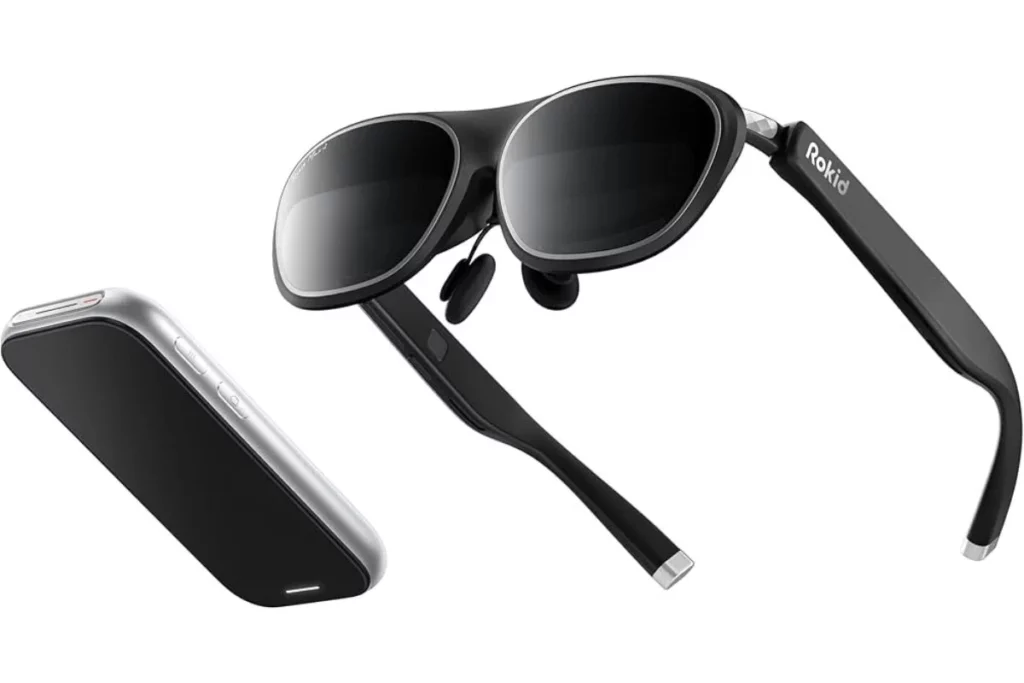
The Rokid AR Spatial is purpose-built for users who want to ditch their desk monitors completely and work inside a multi-screen virtual ecosystem. The standout feature here is its native ability to simulate a massive 300-inch virtual workspace split across three independent spatial windows. By utilizing its advanced 3-DoF tracking engine, you can look to your left to monitor an active Slack channel, keep your main text processor at rest and glance to your right to track your email inbox or research data.
The optics are exceptionally vibrant, pushing up to 600 nits of perceived brightness from its dual high-definition projection modules. This makes it an incredibly strong tool for deep data tasks and video editing workflows where color accuracy and panel luminosity are critical.
The built-in audio system handles voice calls and video conferences cleanly with minimal sound leakage, ensuring that colleagues sitting nearby in an open office environment won’t hear your private conversations. It does require a wired connection to a host system or the standalone Rokid Station compute unit, but the sheer breadth of its virtual desktop real estate makes it an incredible productivity multi-tasker.
Price: $488
Battery Life: Tethered to host device
6. Viture Beast

The Viture Beast brings an unparalleled level of physical comfort and luxury styling to the mobile workspace. The crowning hardware feature of this unit is its individual, built-in rotary myopia adjustments located on top of the frame chassis. If you wear prescription lenses, you can independently adjust the focal depth for each eye until the 1080p Sony Micro-OLED panel looks perfectly sharp, completely eliminating the need to order expensive, custom prescription lens inserts.
The display simulates a massive 174-inch workspace with stunning color contrast and rich black levels, making it incredibly comfortable for extended document editing sessions. Viture pairs this hardware with an optional ecosystem, including an intelligent Mobile Dock that runs an optimized spatial interface, transforming the glasses into a completely self-sustained environment for cloud computing. The physical frame is slim and avoids looking overly industrial, making it a very professional option to wear during remote business trips or long-haul flights.
Price: $549
Battery Life: Tethered to host device
7. Meta Ray-Ban Display Glasses

The Meta Ray-Ban Display glasses take a fundamentally different, fashion-first approach to office productivity. Instead of tethering you to a laptop with a giant virtual desktop screen, these frames remain completely wireless and look identical to a standard pair of premium Wayfarer glasses.
Tucked inside the frame is a sharp, monocular micro-LED display element built right into the lens. This hardware setup projects crisp, full-color data overlays, like text or a miniature navigation map, directly into your line of sight without blocking your view of the real world.
This hardware architecture really shines when handling hands-free communication during a busy workday. Incoming text message headers, calendar invites and real-time reminders appear instantly, allowing you to stay on top of your schedule without breaking your focus or looking down at a screen.
The frames utilize an advanced five-microphone array that isolates your voice perfectly during phone calls. This allows you to handle important meetings seamlessly, whether you are walking through noisy city streets or working in a bustling office. It is the ultimate productivity tool for anyone who needs to stay continuously connected to their data streams without being physically chained to a desk or a laptop monitor.
Price: $799
Battery Life: up to 4 hours
AI Integration In AR Glasses
The rapid evolution of AI AR glasses has completely transformed these wearables from simple monitors into predictive, intelligent daily partners. In 2026, the battleground for these devices isn’t just about pixel density, it is heavily focused on how smart the glasses are when disconnected from a computer. We are seeing a distinct engineering divergence between devices that rely entirely on on-device silicon processing and those that leverage your smartphone’s cellular connection to access massive cloud networks.
The AI-driven feature sets on these models are incredibly practical for daily use. Take the Rokid Glasses, for example: a major software update in early 2026 made them the very first smart glasses to natively integrate Google Gemini directly into the glasses. This allows you to walk through a foreign city, look at a menu written in a different language and watch a flawless, real-time translated text layer overlay itself directly onto the physical page.
Similarly, the Meta Ray-Ban Display frames utilize Meta AI’s advanced “look-and-ask” multi-modal vision capabilities. Because the frame houses an ultra-wide 12MP camera sensor, you can simply double-tap the temple arm and ask the assistant to identify a machine part you are trying to fix, summarize a document lying on your desk, estimate the nutritional content and macros of a meal, or provide real-time walking directions through a complex corridor.
On the minimalist end of the spectrum, the Even Realities G2 features an incredibly smart “Conversate” mode. During long business meetings or lectures, the integrated microphones capture surrounding audio, while the AI instantly transcribes and subtitles the conversation directly onto your lenses. Once the meeting concludes, the software processes the audio text to output a complete summary, highlighting key action points and generating an interactive to-do list right inside your companion application.
Battery Life and Practical Use
When dealing with wearable AR tech, managing your expectations around power delivery and battery endurance is absolutely important. The physics of smart glasses design requires a strict engineering trade-off: if you want a lightweight frame that you can wear comfortably on your face for eight hours, you cannot pack a massive lithium-ion battery inside the temple arms.
Because of this limitation, the market has split into two very distinct operational profiles:
Independent Wireless Frames
Devices like the Meta Ray-Ban Display and the Even Realities G2 operate entirely on internal battery cells tucked away inside the plastic or titanium arms. Under typical daily use, such as receiving periodic notifications, checking navigation cues and making occasional voice calls, you can expect roughly 4 to 6 hours of active runtime before the frames need to go back into their specialized cases. Fortunately, these protective storage cases double as high-capacity charging banks, capable of completely replenishing the glasses up to five times over, ensuring you easily make it through a full day of travel.
Tethered Media Glasses
On the other side of the spectrum, heavy-duty display glasses like the XREAL One Pro, Asus ROG R1 and Viture Beast feature zero internal batteries in the frames to keep their weight down to around 80 to 90 grams. Instead, they draw operational power continuously through a physical USB-C cable hooked directly to your phone, gaming console or laptop.
While this completely removes the worry of your glasses dying mid-movie, it means they act as a direct power drain on your host device. Pushing a bright, dual-panel 1080p Micro-OLED array at high refresh rates will typically drain a standard smartphone battery by roughly 20% to 25% per hour. If you plan on taking a cross-country flight, investing in a dedicated charging adapter or an external compute puck such as the XREAL Beam or XREAL Beam Pro can significantly extend usability while keeping both your glasses and your connected device powered.
Limitations to Keep in Mind
As exciting as the current generation of hardware is, I am not going to sugarcoat the realities of using these devices daily. We are still operating in an early-adopter phase for many of these form factors and there are several distinct engineering boundaries you need to accept before diving in.
- Field of View (FOV) Restrictions: Even the most advanced display glasses, like the XREAL One Pro, max out with a diagonal field of view of around 57 degrees. In practical terms, this means that while the floating screen looks absolutely massive when you look directly at it, the digital image will clip or cut off sharply if you try to look at it through the very corners of your eyes. You have to learn to move your entire head to track windows, rather than just shifting your gaze.
- The Sharpness Sweet Spot: Birdbath optics require the frames to sit at an exact angle and height on your face. If the glasses slide down your nose even a few millimeters or if your pupillary distance (PD) doesn’t perfectly match the optical alignment, the edges of the virtual screen will instantly shift from crisp to frustratingly blurry. Finding the correct combination of included nose bridges and temple arm angles takes real patience.
- Thermal Output: Packing high-resolution displays, cameras and wireless transceivers into plastic eyeglass frames creates inevitable thermal challenges. After roughly 45 minutes of continuous video streaming or active multi-screen computing, the right temple arm of most tethered glasses will feel noticeably warm to the touch. It is rarely hot enough to cause discomfort, but it is a constant physical reminder of the heavy computing happening centimeters from your temple.
- App Ecosystem Immaturity: While basic screen mirroring and spatial tracking work seamlessly, dedicated third-party AR applications remain fairly sparse. Many proprietary software interfaces feel like experimental beta builds, frequently dropping device connections or requiring manual app reboots when switching between display modes.
Who Should Buy AR Glasses in 2026?
- Immersive Gamers: If you own a handheld gaming PC like an ROG Ally or Steam Deck and want a massive, ultra-smooth display that you can use comfortably while traveling or lounging on the couch.
- Tech Enthusiasts & Early Adopters: Anyone looking to break free from traditional smartphone screen setups and experiment with hands-free, multimodal AI assistants.
- Traveling Professionals: Writers, developers and creators who need a private, multi-monitor workspace that fits easily inside a standard backpack pocket.
- Public Speakers & Presenters: Corporate users who want a discreet, camera-free teleprompter layout to keep presentation notes clearly in sight without losing engagement with their audience.
Who Should Avoid AR Glasses
- Casual Users on Strict Budgets: If your primary goal is simply checking basic notifications or viewing standard phone screens, the current price premium of advanced AR hardware may not be justified.
- Users Expecting Full VR Environments: If you want a fully enclosed virtual world for total isolation or complete gaming immersion, a dedicated VR or Mixed Reality headset is a far better choice than transparent AR optics.
- Strictly Privacy-Conscious Individuals: If you are uncomfortable wearing data-linked smart sensors or using devices with built-in cameras out in public spaces, you should avoid camera-equipped models and stick strictly to camera-free, text-only choices like the Even Realities G2.
Final Verdict
AR glasses are no longer just a glimpse of the future. They have matured into capable wearable devices that can enhance productivity, entertainment and everyday convenience. The best choice ultimately comes down to how you plan to use them.
If I had to pick one for myself, I would go with the XREAL One Pro. It offers the best balance of immersive visuals, portability and versatility. I like that it can handle work, movies and casual gaming without feeling too specialized. It may not replace my laptop or smartphone completely, but it comes closest to delivering the practical AR experience that most people expect. For me, it is the pair that best represents what wearable AR tech in 2026 should be: useful, comfortable and easy to fit into everyday life.
If you’re more interested in capturing POV photos and videos than viewing virtual displays, be sure to check out our guide to the best smart glasses with cameras.
FAQs
Decode the Decor
The Smart Jewelry Revolution
A practical guide to wearable tech's future — delivered straight to your inbox.
Author
