 Smart GlassesBest Hands-Free Smart Glasses for Calls, Photos and Voice Assistants in 2026
Smart Glasses with Cameras in 2026: The Models Actually Worth Buying
Smart glasses are having a bit of a moment right now. The problem is that most products being marketed as smart glasses don't actually do the same thing. Some are wearable displays designed for watching content, others focus on AI assistants. And there's another, much smaller category of smart glasses with camera that are able to take pictures and shoot video. That's the category we're focusing on here.
Independently tested. We never accept payment for reviews.How we test

What’s inside14 sections · 10 min read
- 01Best Smart Glasses with Camera: Quick Picks1 min
- 02Comparison1 min
- 03What Are Camera-Enabled Smart Glasses?1 min
- 04Best Overall: Ray-Ban Meta Smart Glasses Gen 21 min
- 05Best for Sports and Outdoor Activities: Oakley Meta HSTN1 min
- 06Best Smart Glasses with Camera and Display: Meta Ray-Ban Display1 min
- 07Best Translation and AI Features: Rokid AI Glasses Style1 min
- 08Best AR Smart Glasses: TCL RayNeo X21 min
- 09Best Budget: OhO Sunshine Edge Pro Smart AI Glasses with Camera 4K & Real-Time Translation1 min
- 10Limitations to Keep in Mind1 min
- 11Who Should Buy Camera-Enabled Smart Glasses1 min
- 12Who Should Avoid Camera Smart Glasses1 min
- 13Wrap Up1 min
- 14FAQs1 min
Smart glasses are having a bit of a moment right now. The problem is that most products being marketed as smart glasses don’t actually do the same thing. Some are wearable displays designed for watching content, others focus on AI assistants. And there’s another, much smaller category of smart glasses with camera that are able to take pictures and shoot video. That’s the category we’re focusing on here.
If you want hands-free photography, POV video recording, AI-powered visual search without holding up a phone every five minutes, these are the best smart glasses with camera features available in 2026.
Best Smart Glasses with Camera: Quick Picks#
- Ray-Ban Meta Smart Glasses Gen 2– best overall, with 3K video quality and the smoothest AI assistant
- Oakley Meta HSTN– best smart glasses with camera for sports and outdoor activities
- Meta Ray-Ban Display– best if you want a camera and a display
- Rokid Glasses– best for translation capabilities and AI features as a budget Meta alternative
- TCL RayNeo X2– best AR smart glasses with a camera
- OhO Sunshine Edge Pro 4K– best truly budget option if you just want POV footage
Comparison #
| Product | Camera | AI Features | Battery | Price |
|---|---|---|---|---|
| Ray-Ban Meta Gen 2 | 12MP photo, 3K video | Meta AI assistant, voice commands | Around 8 hours typical use | $379 – $459 |
| Oakley Meta HSTN | 12MP photo, 3K video | Meta AI assistant | Up to 8 hours | $399 – $479 |
| Meta Ray-Ban Display | Built-in camera + AR display | Meta AI, navigation overlay | Up to 6 hours of mixed use, 24 hours with case | $799 |
| Rokid AI Glasses Style | 12MP, up to 3K video | ChatGPT, Gemini, real-time translation across 89 languages | Up to 12 hrs typical | $449 |
| TCL RayNeo X2 | 16MP camera | Translation, navigation, AI tools | Up to 5 hours active AR use | $499 |
| OhO Sunshine Edge Pro 4K & Real-Time Translation | 1080p to 4K | Basic app control, Translation | 1.5-2 hours | $199.99 |
What Are Camera-Enabled Smart Glasses?#
Not all pairs of smart glasses come with a camera. Display-only models like XREAL Air and Viture Beast are intended only to project a virtual screen for viewing movies and working with a larger display. Air 2 Ultra has two gray-scale cameras, which are only used for spatial tracking and not to capture images. If photography is what you’re after, XREAL Air is not the right product for you. Similarly, most Viture glasses and RayNeo Air 4 Pro series have display functionality and the front camera (if any) is there for screen stabilization, not for capturing your day.
When we talk about camera-enabled smart glasses, these have an outward-facing lens that captures what you see around. That opens up a few real use cases:
- POV video recording
- Hands-free photography
- AI-powered visual search
- Video calls
- Navigation assistance
- Real-time language translation
Of course, such products have their own drawbacks. The battery drains faster when you are actively recording videos. Privacy can be an issue because others might not be aware of the fact that you have a camera attached to your glasses. Also, the AI features are pretty accurate but do make mistakes from time to time.
Best Overall: Ray-Ban Meta Smart Glasses Gen 2#

This is definitely the one that you need to get if you have to choose one of these smart glasses with cameras. Video recording quality of 3K will not disappoint you in good lighting conditions and 12 MP photos are good enough for Instagram and don’t require additional editing. What makes me choose these Ray-Ban Meta Smart Glasses against all others in this list is that they look absolutely normal.
They have the best and most developed Meta AI assistant among other devices in this whole category right now. Just ask the glasses to describe some objects for you, translate a sign on the street, or even ask it to read a recipe for you while your hands are busy. Average battery life is about 8 hours of mixed use, which is enough to get through a day out as long as you’re not recording constantly.
It’s weak on shooting angles. Because there’s no display, you’ll be taking guesses about what you see versus what the camera is recording, leading you to chop people’s heads off more often than you want. It is also important to know that the audio leaks if you are listening to music on the train.
Pros
- Stylish design
- 3K video capture, 12MP photos
- Most refined AI assistant on the market
- Clear audio for calls
Cons
- Difficult to frame shots accurately
- Limited bass and noticeable audio leakage
- AI assistant still makes occasional errors
- Around 8 hours of mixed-use battery, 5 hours with continuous audio playback
Price$379 – $459
Best for Sports and Outdoor Activities: Oakley Meta HSTN#

Same camera tech as the Ray-Ban Gen 2, the Oakley Meta HSTN takes 12MP pictures and shoots 3K video, just housed in a more athletic frame that offers even better lens choices if you’re spending most of your time outdoors. These are the ones I’d recommend for runners or hikers. The battery performance is up to 8 hours with up to 48 hours with a fully charged case.
The AI capabilities of this pair are the same as the Ray-Bans since this technology comes from Meta, so you can expect similar capabilities. Audio performance is not quite as good as it could be here, especially when it comes to audio leakage and bass performance, so don’t expect these to double as your headphones while hiking.
If you are looking for a more sporty version, the Oakley Meta Vanguard are dedicated smart sunglasses by Meta.
Pros
- Same strong 12MP and 3K camera as Ray-Ban Meta Gen 2
- Wide range of lens options for outdoor use
- Helpful AI assistant for hands-free tasks
Cons
- Difficult to frame shots, same issue as the Ray-Bans
- More audio leakage than the Ray-Ban Meta
- Limited bass on audio playback
Price$399 – $479
Best Smart Glasses with Camera and Display: Meta Ray-Ban Display#

It is the only glasses on this list to come with both camera functionality and a real screen, which is why the price tag is $799. It has sharp and vibrant display capabilities. The Neural Band wristband from Meta allows for a very natural navigation through the menu. Displaying directions directly in front of the eyes is very convenient for the first time exploring a new city.
The camera itself functions according to the standard Meta glasses level, meaning you have excellent picture and video capturing along with the display. The downside of this is that you will be limited to the Meta ecosystem, push notification support is limited and the interface can get frustrating once you go past the basics. The frames are also chunkier than that of the Ray-Ban or Oakley.
Pros
- Sharp, colorful built-in display
- Camera performs on par with other Meta glasses
- Neural Band wristband is easy to learn
- Good navigation guidance overlay
Cons
- Mostly locked to Meta’s ecosystem
- Limited push notification support
- Interface gets frustrating beyond basic use
- Chunkier frames than other Meta options
- $799 price tag is a real commitment
Price$799
Best Translation and AI Features: Rokid AI Glasses Style#

If you don’t want to be tied down by Meta, the best alternative available is Rokid. The 12MP Sony IMX681 with electronic image stabilization performs rather well considering the price tag.
The real selling point of these smart glasses is the real-time translation in up to 89 languages. It’s an actual solution if you travel for business or need an embedded translator without fumbling with your smartphone. You can also choose the AI engine you prefer, including ChatGPT and Gemini.
The price of the glasses are $449 (excluding prescription glasses). The battery will last about 12 hours when used normally but not for continuous recording, which consumes more energy. The camera is a bit off-center and therefore it takes time to get used to framing. The photo resolution is very poor in low light.
Pros
- Strong 12MP camera with 3K video and up to 10 minutes of continuous recording
- Real-time translation across 89 languages
- Choice of AI engine instead of being locked to one
- Lightweight build, around 38.5g for the Style model
- Reasonably priced
Cons
- Off-center camera placement makes framing tricky
- Image quality drops in low light
- Companion app still has rough edges
- Battery drains faster with heavy camera use
Price$449
Best AR Smart Glasses: TCL RayNeo X2#
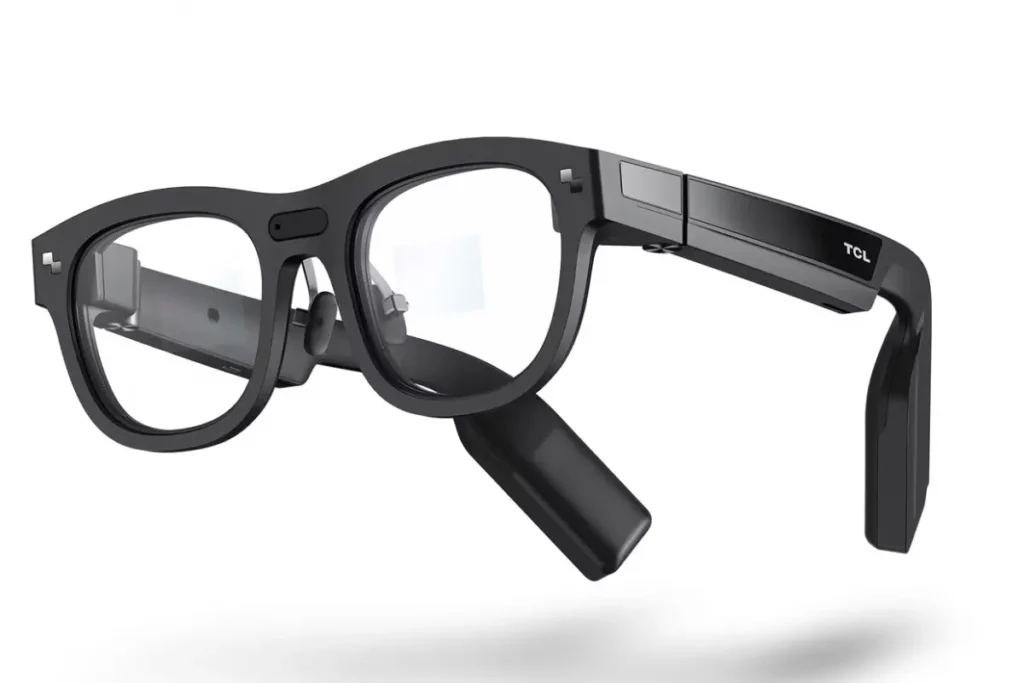
It’s the only pair that provides you with the proper AR display along with the camera and does not consist of a lens attached to the existing frame. The RayNeo X2 comes with the binocular full-color Micro-LED waveguide display. You would normally expect this feature on a much more expensive gadget, with the brightness of 1,500 nits, making it work outside. The real-time translation based on Microsoft Azure and the turn-by-turn navigation directly inside of your vision are really impressive features at the first use.
Speaking about its technical specifications, the 16MP camera is centered between the frames and is the highest resolution among all models considered here, having anti-shake stabilization for first-person shooting. However, despite being positioned as such, the video takes the landscape position and there are many reviews stating the incapability of the camera to focus on the objects held by you. Also, the picture itself is grainier than the one taken using the Meta glasses.
This is still early-stage tech and it shows. The battery is estimated at just 590mAh, which means that it can provide up to 2-5 hours of AR activity. It weighs approximately 119-120 grams, which is twice as heavy as Ray-Ban Meta glasses, not to mention the bulky frame that can be noticed even from a distance. The control system uses either a touchpad on the side of the temple or a smart ring provided together with it.
Pros
- Real binocular Micro-LED display, not just a camera bolted to a frame
- Highest resolution camera on this list at 16MP
- Strong outdoor brightness, up to 1,500 nits
- Impressive real-time translation and navigation overlay
- Standalone Snapdragon XR2 chip, doesn’t fully depend on your phone
Cons
- Short battery life
- Heavier and bulkier than every other pair on this list
- Frames are very bulky
- Footage is grainy with mixed exposure control
- Touchpad and ring controls feel clunky
- $499 price tag for early-stage software
Price$499
Best Budget: OhO Sunshine Edge Pro Smart AI Glasses with Camera 4K & Real-Time Translation#
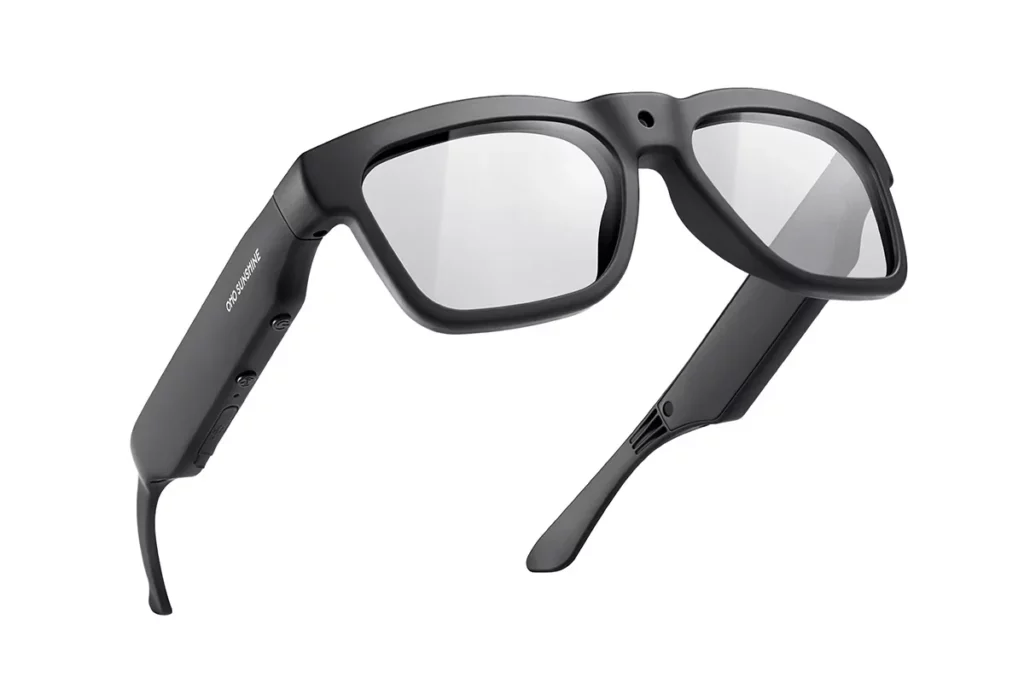
They resemble standard glasses in terms of appearance and build and that’s the whole point. This product comes with a straightforward way of shooting POV videos. The Edge Pro model offers 4K video resolution and is built out of TR90 material, pretty resistant to daily wear and tear.
You have AI translation features along with its affordable price tag and inconspicuous design. The app isn’t very advanced and battery life is only around 1.5-2 hours. But in case you want an affordable pair of smart glasses with camera, these are worth checking out.
Pros
- Looks and feels like normal sunglasses
- Genuinely affordable, often on discount
- 4K Edge Pro version uses durable TR90 material
- No learning curve, simple point-and-shoot use
- AI translations
Cons
- Basic companion app
- Battery life varies by model and isn’t class-leading
- Camera quality is noticeably behind the Meta and Rokid options
Price$199.99
Limitations to Keep in Mind#
A few things you should know before buying any of these products.
- Low-Light Performance– Smaller sensors don’t cope when the lighting gets poor. Even the best smart glasses with cameras can’t compete with modern smartphones in low light situations.
- Field of View is Limited- This makes it hard to frame pictures properly, sometimes requiring some getting used to.
- Privacy Issues– It’s natural that recording using eyewear creates privacy issues. Many devices come with indicator lights, but they’re not that bright.
- App Ecosystems– Nowadays Meta is a clear winner here by providing one of the best software experiences for its users. Other companies are catching up, though the quality of apps varies in different brands.
- Comfort– Weight is important. An additional couple of grams is not a lot at first glance, but noticeable after hours of wearing them.
Who Should Buy Camera-Enabled Smart Glasses#
These devices are most useful for:
- Content creators
- Travelers
- Tech enthusiasts
- People requiring hands-free recording
- People interested in AI visual assistance tools
The technology has become more practical than ever before in combination with AI technology.
Who Should Avoid Camera Smart Glasses#
These glasses are not suited for everyone. If you fall into one of these categories, then perhaps you should pass on getting the camera smart glasses:
- You rarely take photos or videos
- Privacy is very important to you
- Audio capabilities are all that you need
- You’re looking for a full AR or VR experience
Wrap Up#
The best smart glasses with camera technology have reached a level where they are no longer a gadget aimed at tech geeks and enthusiasts. They’ve become a tool that will actually help you to take pictures, get access to information and stay in contact without taking your mobile phone out every time.
This is certainly not without limitations, though. Photo quality is far from replacing what you can achieve on your smartphone, battery life is still a major concern when spending this amount and there are only certain areas where applications of AI are actually helpful. As the technology continues to improve, the smart move to make would be to buy the product that works best for you.
FAQs#
01Do smart glasses have cameras?
Some smart glasses do have in-built cameras for capturing photos or videos, but there are also those that do not have such features. Make sure you review the specs of each pair of smart glasses since not all of them have a camera.
02How long will smart glasses record?
Recording time varies by model and its battery. However, most camera-equipped smart glasses can capture up to a few minutes of video at one go, with total recording time from about 30-45 minutes to a few hours in a day.
03Can you tell if someone is recording you with smart glasses?
In most cases, yes. Camera-equipped smart glasses have either a LED flash that blinks whenever a photo is being taken or recording is being made, and even some sound when capturing photos or recording videos.
 RR
RRWritten by
Reetain, with a focus on emerging trends and immersive tech, covers smart wearables and evolving device categories. He explores how sensors, AI, and connectivity come together in modern wearables, helping readers understand how these technologies shape everyday digital experiences and the future of personal computing.
More from Reetain 66 storiesKeep readingmore from Smart Glasses
All storiesSmart GlassesBest Hands-Free Smart Glasses for Calls, Photos and Voice Assistants in 2026 Smart GlassesRayNeo iO Review: I Tested These Camera-Free AI Glasses for Everyday Use
 Smart GlassesRogbid VisionMax Launches With 20MP Sony Camera and Claimed 4K Video for $139.99
What’s inside
- 01Best Smart Glasses with Camera: Quick Picks1 min
- 02Comparison1 min
- 03What Are Camera-Enabled Smart Glasses?1 min
- 04Best Overall: Ray-Ban Meta Smart Glasses Gen 21 min
- 05Best for Sports and Outdoor Activities: Oakley Meta HSTN1 min
- 06Best Smart Glasses with Camera and Display: Meta Ray-Ban Display1 min
- 07Best Translation and AI Features: Rokid AI Glasses Style1 min
- 08Best AR Smart Glasses: TCL RayNeo X21 min
- 09Best Budget: OhO Sunshine Edge Pro Smart AI Glasses with Camera 4K & Real-Time Translation1 min
- 10Limitations to Keep in Mind1 min
- 11Who Should Buy Camera-Enabled Smart Glasses1 min
- 12Who Should Avoid Camera Smart Glasses1 min
- 13Wrap Up1 min
- 14FAQs1 min