

watchOS 27 landed with Apple Watch Audio Intelligence features and got buried under the noise of Readiness Score and Health Age. But this is a big deal because, for the longest time our Apple Watches have known about our health, activity, calendar and even where we are, but for the first time, the Apple Watch can listen.
Now I know we all were thinking one word when we heard about this feature- “creepy,” and we will get into that a little later. But this is more like understanding what’s going on in your surroundings. The techy side of me is actually a little excited to try out this feature because it makes me believe that my Apple Watch is finally becoming more than a wearable that only collects my data.
For years, it has been about counting steps, active calories, heart rate, sleep stages, blood oxygen and whatnot. While that is still true and the core of why most of us still stick to our watches, with Audio Intelligence, Apple has added a new layer that has nothing to do with monitoring my health.
But What Is Apple Watch Audio Intelligence?
© Apple
The new feature was launched on September 9 during the very same event that showcased Apple Watch Series 12 and Apple Watch Ultra 4, along with four features that all used the watch’s microphone to do something interesting.
Decode the Decor
The Smart Jewelry Revolution — a practical guide to wearable tech.
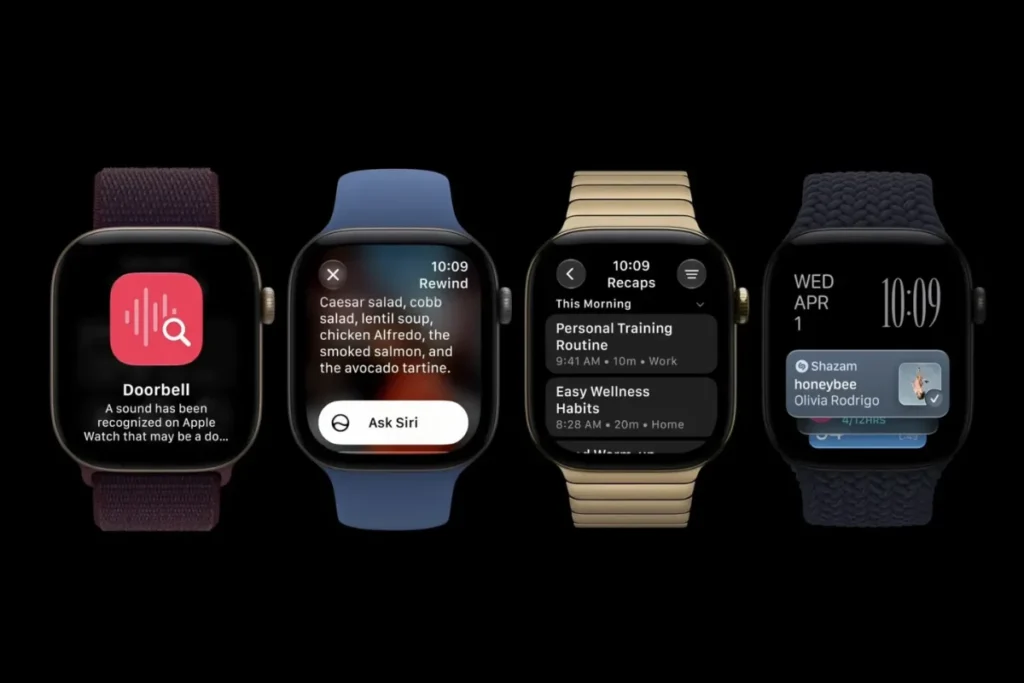
- Sound Recognition- It can recognize the sounds of sirens, alarms, doorbells and even crying babies, and buzzes your wrist whenever such a sound is heard, whether or not your iPhone is nearby. It’s aimed primarily at people who are deaf or have hearing impairments, although the rest of us would surely appreciate it too.
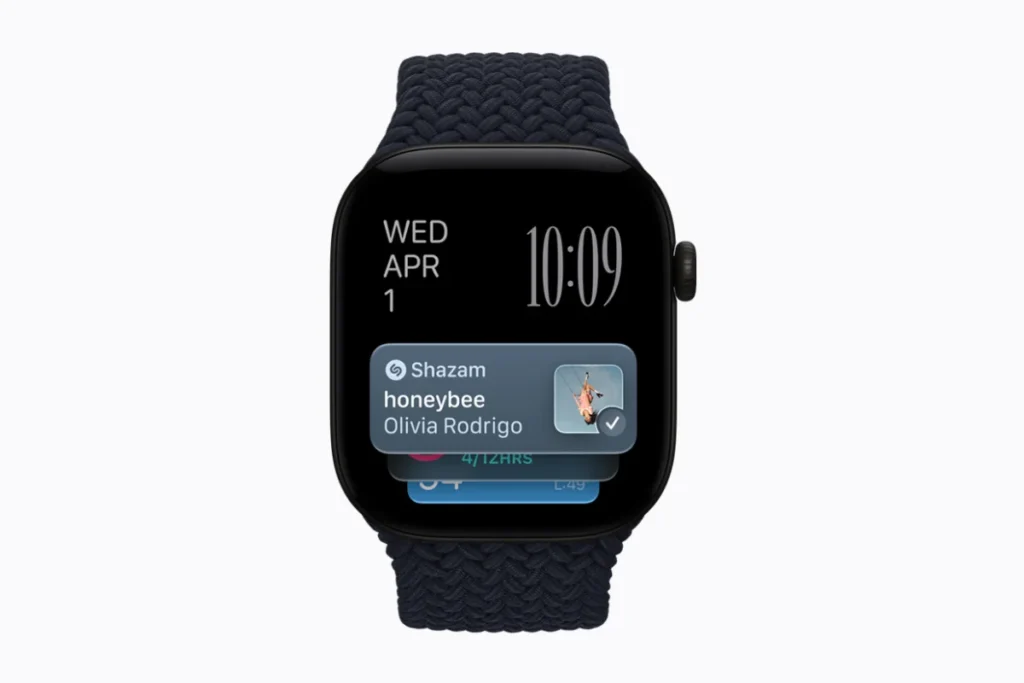
- Music Recognition with Shazam- As its name suggests, the feature can recognize music being played through a speaker and provide the title in your Smart Stack. Again, no iPhone needed.
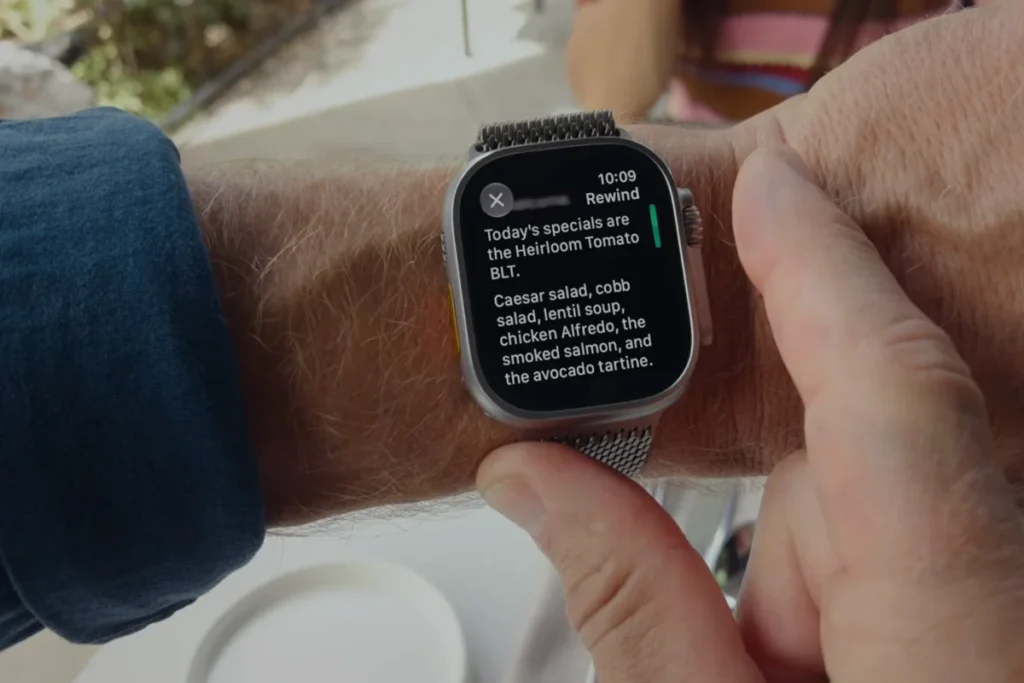
- Live Rewind: This is what everyone is talking about. Double-click on the Digital Crown and your Apple Watch gives you a transcript of everything that was said in the previous 15 seconds. If someone’s name was missed or a little information was not paid attention to, it all gets captured by Live Rewind. It does come with visible and audible alerts so you can be sure of people not recording without you knowing.
- Siri Recap: Speaking of Live Rewind, the Siri Recap is another similar feature which listens to all of your conversations during the day, such as a team meeting or a parent teacher conference, and creates a title, summary and some key takeaways for you through the Siri app. This feature actually operates in the background without you doing anything and it is also the one that raised the most eyebrows, which we will be discussing shortly.
Live Rewind and Siri Recap are both coming to the US in an English-only beta this year. Sound Recognition and Shazam are already active in Series 12 and Ultra 4 watches.
What You Actually Need to Use It
© Apple
This is where it gets a little complicated. Sound Recognition and Shazam require Apple Watch Series 12 or Ultra 4 along with an iPhone 11 or later (SE 2 and later) running iOS 27. Easy enough to access.
Then we have Live Rewind and Siri Recap, which need more. They both require a newer iPhone, iPhone 16 or later, as they are powered by Apple Intelligence. So, if you have an old phone, you will only be able to enjoy the features of your smartwatch that are currently live and none of those two features everybody is excited about.
The Apple Watch Audio Intelligence features are opt-in. So you won’t automatically be enrolled in these. Both Live Rewind and Siri Recap have their separate toggle switches in the Watch app.
How Apple Says It’s Keeping This Private
Apple is making a pretty serious privacy case here. The company published an 11-page document on privacy the very same day of the Apple Event 2026. The short version is that the audio information is processed within a Secure Exclave, which is a dedicated hardware-based isolated area in the new S11 chip and into iPhone 16 and later.
Apple claims that not watchOS, not the apps, not the user and not even Apple can read the raw audio information. The information sits in a space where it keeps getting overwritten so no file is created and nothing is sitting around to leak later.
For the Siri Recap specifically, the only information that gets transmitted off device is a reduced, non attributed version of the text that gets deleted as soon as the summarization process is over. The watch doesn’t attempt to identify or label any speakers either.
To be fair, Apple does give us some specifics here. The answers are enough to be verified individually rather than the companies that just bring out a new feature and say “trust us”.
The Question the Privacy Paper Doesn’t Really Answer
© Apple
The problem is that all of this architecture protects your data, not the person next to you who knows nothing about Siri Recap of your conversation to a summary that you will read later on.
With Live Rewind, there is a chime and an animation indicating that the feature has been activated. In contrast, Siri Recap does nothing of the kind. It works silently, on its own terms, according to the schedule Apple has planned. The advice they give is rather “be mindful of those around you”. This is good advice, but definitely not a safeguard.
Adam Schwartz, privacy litigation director of the Electronic Frontier Foundation, made exactly this point, stating that people should be able to have conversations free from being recorded.
Two of the four features mentioned here are pretty harmless. No one cares about a doorbell alert. The consent issue is actually about this particular feature silently running in the background and this is something that even 11 pages of the document could not justify.
Where This Fits Into Apple’s Bigger Plan
Look at the bigger picture here and Audio Intelligence becomes much more than just an additional feature. It is Apple’s groundwork for something much bigger. There is already an array of AirPods managing audio, iPhone managing the processing behind the audio and now there is Apple Watch managing the ambient awareness of what is going on around you, and all of this is based on Apple Intelligence.
This is the direction the entire industry is heading towards: wearables that do not need to be asked to do something, they just know everything that is going on around you.
Wrap Up
The point here isn’t that your Apple Watch can detect sound now. Microphones in wearable devices are nothing new. The truth is that Apple has made this leap from tracking our bodies to tracking the environment we find ourselves in and they’ve done it in an innovative way.
With new features such as Health Age, Readiness Score and new VO2 Max detection, Sound Recognition and Shazam are the low hanging fruit no one will ever question. But Siri Recap is a feature I sure am keeping my eye on.
FAQs
Decode the Decor
The Smart Jewelry Revolution
A practical guide to wearable tech's future — delivered straight to your inbox.
Author
