 Smart GlassesBest Hands-Free Smart Glasses for Calls, Photos and Voice Assistants in 2026
VITURE Luma Pro: Is It Still Worth $499 in 2026?
Imagine you're waiting at an airport with a few hours to spare. Instead of staring at a small screen, you put on a pair of XR glasses and suddenly your favorite movie or game feels like it's playing on a giant private display. That's the kind of experience that has made XR display glasses so exciting in recent years.
Independently tested. We never accept payment for reviews.How we test
What’s inside13 sections · 13 min read
- 01Specifications1 min
- 02Display Quality Is Still Luma Pro’s Strongest Argument2 min
- 03Fit, IPD and Myopia Matter More Than the Spec Sheet Suggests1 min
- 04SpaceWalker, 3DoF and Multi-Screen: What You Actually Get1 min
- 05Gaming Capability2 min
- 06Productivity and Virtual Monitors1 min
- 07Audio and Entertainment1 min
- 08There Is No Built-In Battery And That Matters1 min
- 09Price and Availability1 min
- 10Who Should Buy VITURE Luma Pro?1 min
- 11Who Should Skip VITURE Luma Pro?1 min
- 12Wrap Up1 min
- 13FAQs1 min
Imagine you’re waiting at an airport with a few hours to spare. Instead of staring at a small screen, you put on a pair of XR glasses and suddenly your favorite movie or game feels like it’s playing on a giant private display. That’s the kind of experience that has made XR display glasses so exciting in recent years.
Among the latest options, the VITURE Luma Pro has caught the attention of gamers, travelers and tech enthusiasts alike. It promises a premium viewing experience in a lightweight design, but in 2026, good hardware alone isn’t enough.
The real question isn’t whether the VITURE Luma Pro is capable, it’s whether it’s still worth buying at $499 when newer options are available. Let’s take a closer look and see where it shines, where it falls short and who it’s actually made for.
Specifications#
| Specification | VITURE Luma Pro |
|---|---|
| Display | Dual Sony Micro-OLED |
| Resolution | 1920 × 1200 per eye (1200p) |
| Refresh Rate | Up to 120Hz |
| Field of View (FOV) | 52° diagonal |
| Peak Perceived Brightness | 1000 nits |
| Contrast & Color | 100,000: 1 contrast ratio, 108% sRGB |
| Lens Dimming | Electrochromic film (0.5% to 40% light transmission) |
| Frame Weight | 79g (Regular) / 81g (Large) |
| IPD Sizing Options | Regular (64 ± 6mm) and Large (68 ± 6mm) |
| Myopia Adjustment | Built-in dials up to -4.0D |
| Audio System | HARMAN AudioEFX spatial speakers |
| Spatial Tracking (3DoF) | Software-based via SpaceWalker app & internal magnetometer |
| Power Source | Powered directly via host USB-C device |
| Price | $499 USD |
Display Quality Is Still Luma Pro’s Strongest Argument#
© Viture
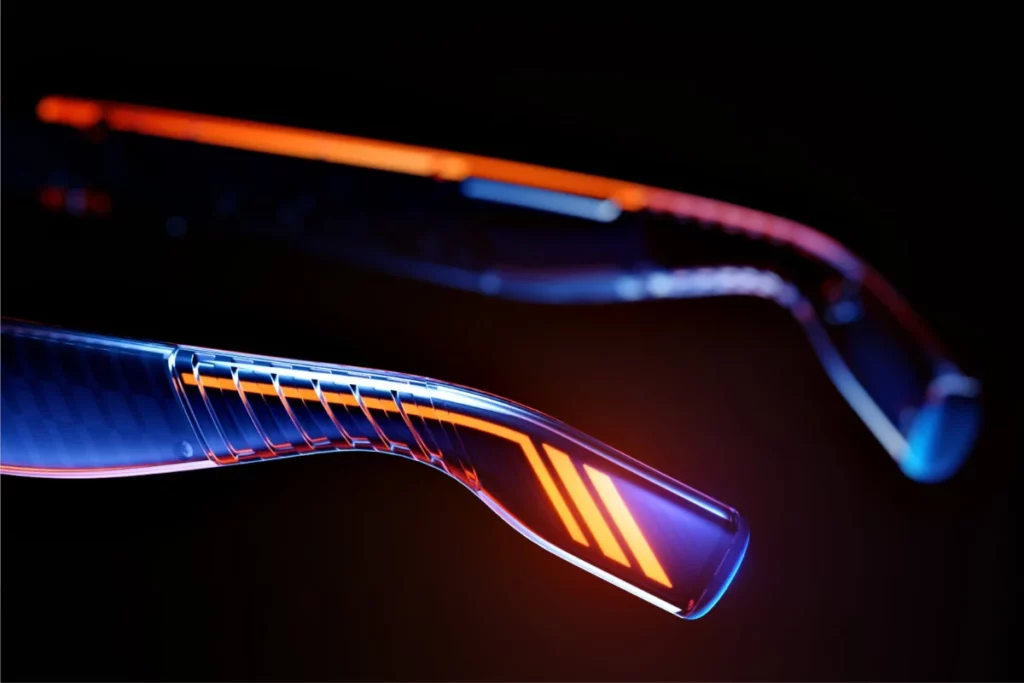
The display on the VITURE Luma Pro is easily its standout feature, serving as the main reason to consider these glasses. At its core, the headset uses twin Sony Micro-OLED panels that project a virtual 152-inch screen viewed from about four meters away. Because these tiny displays sit close to your eyes behind refined Birdbath optics, watching movies or playing games feels like sitting in your own private cinema.
Building directly on that cinema-like feeling, the panels deliver a native 1920 × 1200 resolution per eye in a 16:10 aspect ratio. That extra height gives game menus, documents and even web pages a bit more vertical breathing room than standard 1080p screens. To make that extra room look truly lifelike, the screen boasts a contrast ratio above 100,000:1 alongside 108% sRGB color coverage. As a result of this deep color range, dark scenes appear truly black while bright colors pop with energy. You can even cycle through 5 built-in color presets: True Color, Vivid, Film, Warm and Cool, to match whatever content you are watching.
Along with rich colors, fast motion stays remarkably smooth thanks to a 120Hz refresh rate. Peak perceived brightness reaches up to 1000 nits across 9 adjustment levels, which easily cuts through indoor room lighting. When indoor light isn’t enough and you step into a bright room, a single button press activates the electrochromic lenses. In just 0.1 seconds, these lenses darken from 40% down to 0.5% transmittance, blocking out external light without needing physical plastic shades.
Beyond ambient light control, the optics deliver a wider 52° field of view compared to older models while maintaining edge-to-edge sharpness. Underneath the surface, internal engineering improvements have virtually eliminated visual artifacts like gradient color banding and electrical ripple lines that affected earlier generations. Because these hardware tweaks refine the entire image, text on screen remains sharp and clean from center to edge, making small UI elements easy to read without straining your eyes.
If you’re curious about how VITURE’s earlier generation compares, you can also check out our VITURE Pro XR coverage to see what has changed between the two models.
Fit, IPD and Myopia Matter More Than the Spec Sheet Suggests#
© Viture
A gorgeous display is useless if edge blur makes reading impossible or if the frame sits uncomfortably on your face. The VITURE Luma Pro solves this by designing its optical sweet spot around your natural eye spacing, known as Interpupillary Distance (IPD). Because mismatched IPD causes prism distortion and eye fatigue, the glasses come in two frame sizes that accommodate a broad 58mm to 74mm overall span:
- Regular Model: Optimized for an average target IPD of 64mm (with a ±6mm tolerance range).
- Large Model: Optimized for a wider target IPD of 68mm (with a ±6mm tolerance range).
Measuring your IPD beforehand helps you, that your pupils align precisely with the optical center of the Birdbath lenses for corner-to-corner clarity.
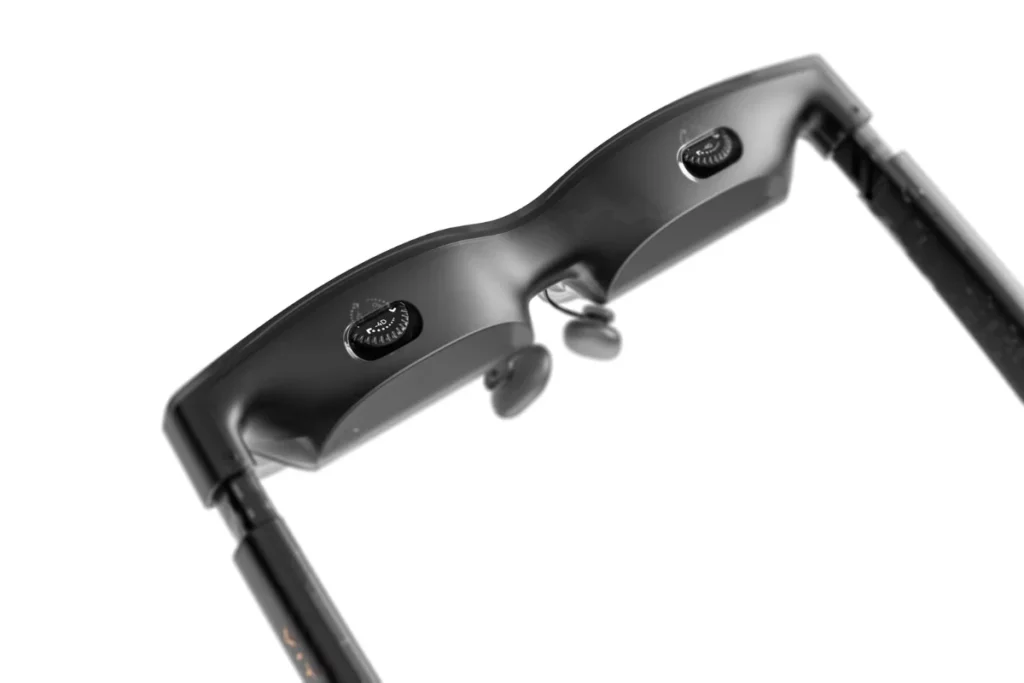
Achieving that clear view also depends on tailoring the focus to your vision, which is why the top of the frame houses independent stepless diopter dials. These rotary controls let you dial in physical focal adjustments from 0.0D down to -4.0D for each eye individually, allowing most nearsighted users to skip wearing contact lenses or clunky glasses underneath. While some general marketing across the wider Luma family mentions higher ranges, the Luma Pro’s dedicated technical spec confirms diopter support up to -4.0D.
© Viture
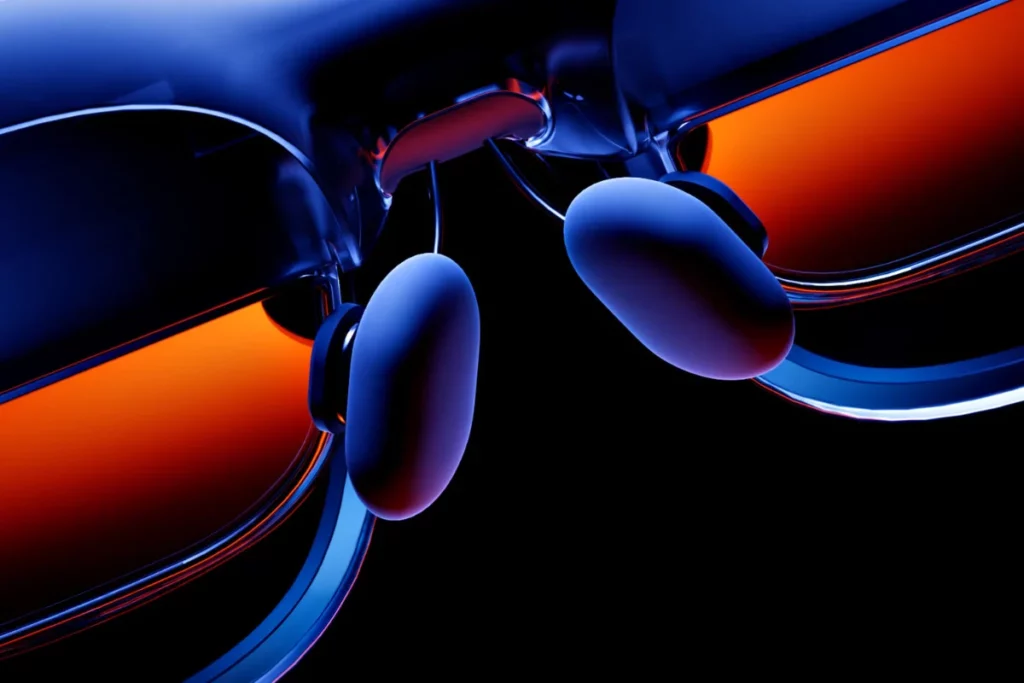
If your prescription exceeds -4.0D or requires astigmatism (cylinder) correction, the diopter dials can simply be left at 0.0D while you snap in an optional magnetic prescription lens frame. To support those optical adjustments physically, the package includes three interchangeable, multi-height nose pads and 3-position tilt-adjustable temple hinges. These mechanical adjustments let you set the exact eye-relief distance and vertical viewing angle, locking the virtual screen squarely in the center of your field of view without pinching your nose or ears during long sessions.
SpaceWalker, 3DoF and Multi-Screen: What You Actually Get#
Understanding how spatial positioning works on the VITURE Luma Pro helps set realistic expectations for your everyday workflow. While simple plug-and-play connections mirror whatever is on your host device, unlocking full spatial tracking requires pairing the glasses with VITURE’s dedicated SpaceWalker companion app across supported Windows, macOS, Android, or iOS devices.
Inside the SpaceWalker software ecosystem, the glasses leverage 3 degrees of freedom (3DoF) to anchor virtual displays directly in your physical environment. This setup allows you to turn your head naturally without the virtual screens following your gaze, transforming a single wearable monitor into an adaptable workspace with several core display modes:
- Fixed Virtual Display (3DoF): Pins a single virtual display to a set coordinate in space, letting you look away toward your physical keyboard or surroundings without losing your place.
- Multi-Screen Productivity: Spawns up to three virtual displays side by side on Windows and macOS, allowing you to organize distinct desktop windows across a wider spatial canvas.
- Ultrawide Mode: Stretches a single workspace into a seamless ultrawide layout, giving complex timelines, editing suites and spreadsheets room to expand.
- Immersive 3D Playback: Utilizes real-time conversion algorithms and native stereoscopic rendering to split video into dedicated left and right eye channels for 3D content.
Powering this software experience is an internal 9-axis IMU paired with an electronic magnetometer built directly into the frame. As you move, SpaceWalker processes the magnetometer’s yaw data and applies software-level drift-correction algorithms to keep the virtual windows from slowly sliding out of alignment over extended sessions.
Because that tracking pipeline relies on the host device’s processor running the SpaceWalker background app, the Luma Pro functions differently from standalone headsets that feature on-board hardware co-processors. Without the app active, such as during a direct connection to a gaming handheld or standard console, the glasses operate in direct DisplayPort mirror mode, where the display stays fixed directly in front of your eyes as you move.
Gaming Capability#
Gaming is one of the primary reasons people invest in the VITURE Luma Pro, but how smoothly your setup works depends entirely on the video output capabilities of your source hardware.
To achieve instant plug-and-play operation, your device must support USB-C DisplayPort Alternate Mode (DP Alt Mode). When connected through the included magnetic pogo-pin cable, the glasses immediately handshake with the host device to pull high-bandwidth DisplayPort audio and video signals alongside 5V/0.5A-0.8A operating power, projecting your gameplay without requiring any third-party drivers or software layers:
- Handheld PC Gaming: Connects natively to the Valve Steam Deck, ASUS ROG Ally and Lenovo Legion Go, letting you output 1200p at up to 120Hz for low-latency, fluid motion in fast-paced titles. Looking for a different approach to portable display glasses? Check out our X by XREAL A01 guide, which covers one of XREAL’s newer options and how it compares with VITURE’s lineup.
- Smartphones & Tablets: Works instantly with iPhone 15/16 series, iPad Pro/Air models with USB-C and Samsung Galaxy flagships (which can automatically launch Samsung DeX for an immersive desktop gaming UI).
- Laptops & Desktops: Hooks directly into MacBooks, Windows ultrabooks and dedicated GPUs via any Thunderbolt 3/4, USB4 or DP-enabled USB-C port.
While modern handheld PCs and smartphones deliver native DP Alt Mode output through a single cable, Nintendo consoles operate on different proprietary hardware constraints. If you’re also considering XR glasses from another ecosystem, our XREAL vs VITURE comparison breaks down how the two brands differ in gaming compatibility, software features, comfort and overall value.
Because the original Nintendo Switch and Nintendo Switch 2 require active HDMI to DisplayPort conversion alongside dedicated power negotiation to trigger external video output, you cannot simply plug them into the glasses with USB-C. To game on Nintendo hardware, you must route the connection through dedicated accessories like the VITURE Mobile Dock Mini or Pro Mobile Dock. These docks supply the necessary power delivery handshakes to unlock the console’s docked TV mode, convert the video signal in real time and simultaneously power the glasses for uninterrupted playtime. If gaming is your main priority, you can also explore our roundup of the best smart glasses for gaming to compare the VITURE Luma Pro with other gaming-focused XR glasses.
Productivity and Virtual Monitors#
Using the VITURE Luma Pro as a portable workspace is an appealing alternative to bulky travel monitors, but understanding its optical boundaries is key to setting up an efficient day to day workflow.
When operating as a single mirrored or extended desktop, the glasses function as a razor-sharp private display. The 1920 × 1200 resolution outputs an effective 44 Pixels Per Degree (PPD) across its 16:10 frame, ensuring that fine spreadsheet figures, command-line interfaces and small code syntax remain crisp without chromatic fringing around the letters. Because this single virtual screen fills the majority of your central vision, pairing it with the electrochromic lens dimming creates an isolated, distraction-free environment for focused writing, spreadsheets and remote tasks in coffee shops or during flights.
Expanding that single screen into a broader multi-monitor setup requires launching SpaceWalker on macOS or Windows, which introduces both expanded capability and physical field-of-view considerations:
- Triple-Display Canvas: SpaceWalker renders up to three independent virtual displays simultaneously, allowing you to position reference materials, communication tools and primary windows side by side.
- Optical FOV Boundaries: Because the glasses feature a physical 52° diagonal field of view, your central line of sight cannot display all 3 full-width monitors at once. You must pan your head naturally to look left or right at your auxiliary windows, treating the setup like sitting in front of a wide physical workstation.
- Hardware & Processing Overhead: Generating multiple low-latency virtual desktops requires sustained GPU rendering and background sensor processing from your laptop, which can increase host battery draw during demanding multitasking sessions.
While this software-anchored multi-window environment serves general office workflows, writing and video timeline editing nicely, users who require rock-solid, hardware-level spatial stabilization without host software dependencies may find dedicated spatial-computing headsets like the VITURE Beast or Luma Ultra more suitable for stationary, all-day multi-screen rigs.
Audio and Entertainment#
Visuals are only half of the portable theater experience, sound quality plays an equally vital role in immersing you in movies and games.
To deliver clear sound without requiring separate earbuds, the VITURE Luma Pro integrates open-ear micro-speakers directly into both temple arms. VITURE partnered with HARMAN AudioEFX to design an acoustic profile that optimizes high-frequency vocal clarity and broadens the virtual stereo soundstage. The frame utilizes downward-firing acoustic ports that direct audio waves toward your ear canals, producing an engaging spatial audio effect while using phase-cancellation tuning to minimize outward sound leakage up to 30 decibels in quiet spaces.
Alongside standard stereo listening, the audio processing works hand in hand with SpaceWalker to deliver immersive 3D spatial soundscapes, adjusting channel positioning as you move your head.
However, because open-air micro-drivers must balance physical size with power constraints, there are natural acoustic limitations to keep in mind:
- Frequency Range Constraints: While mid-range dialogue and upper frequencies sound crisp and legible, ultra-low bass frequencies lack the punch and sub-bass resonance of dedicated headphones.
- Ambient Noise Infiltration: In loud environments like airplanes, trains or bustling transit stations, open-ear acoustic ports let outside chatter and engine hum blend into your media.
- Volume Thresholds: Pushing the volume to maximum in noisy areas can introduce minor harmonic distortion and increase acoustic bleed to nearby people.
For quiet home use or relaxed hotel streaming, the built-in HARMAN-tuned system provides plenty of clarity for casual entertainment. When traveling through noisy environments, pairing your host device with active noise-canceling (ANC) wireless earbuds ensures complete audio isolation without compromising the stunning visuals.
There Is No Built-In Battery And That Matters#
© Viture
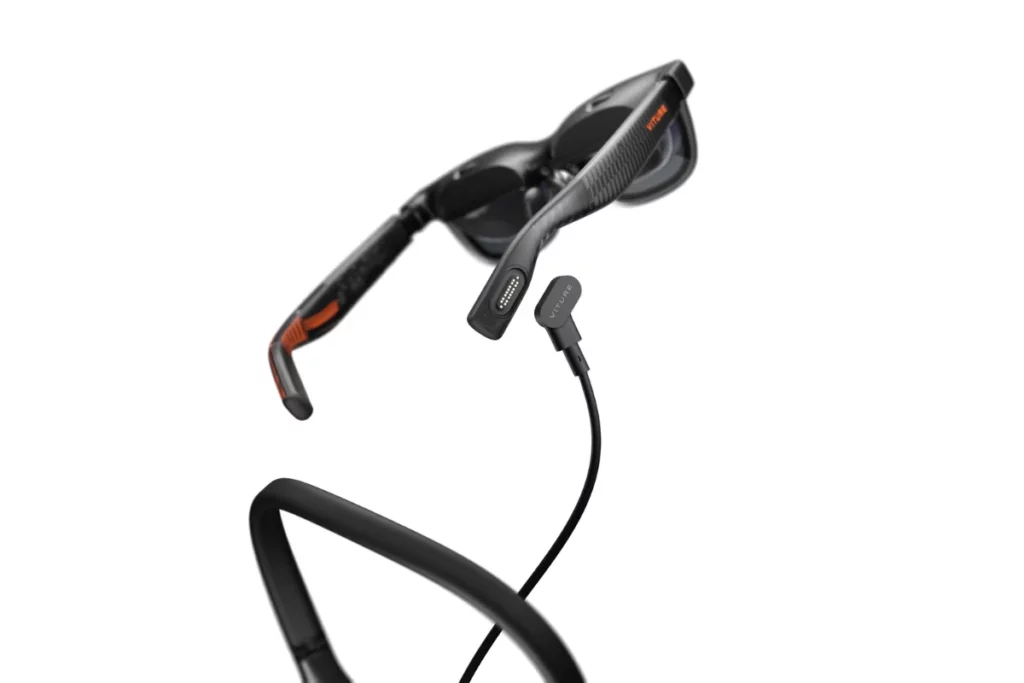
A crucial engineering detail to understand before buying the VITURE Luma Pro is that the frame contains zero internal battery cells. Skipping a built-in battery keeps the glasses lightweight and prevents heat buildup against your face, but it also means the headset relies entirely on drawing operational power from your connected host device through its USB-C DisplayPort connection.
Under typical usage, driving the dual Sony Micro-OLED displays, the electrochromic dimming film and the HARMAN-tuned spatial speakers requires a continuous draw of roughly 2.5W to 3.5W (operating at 5V / 0.5A–0.7A). How that power draw impacts your portable runtime depends directly on the host device you plug into:
- Handheld PC Consoles: On devices like the Steam Deck or ROG Ally, the 2.5W–3.5W draw roughly matches or slightly exceeds the power consumption of their built-in LCD/OLED panels, resulting in a comparable battery life of around 1.5 to 3.5 hours depending on game intensity.
- Smartphones & Tablets: Streaming a full-length, two-hour movie off a modern 4,500mAh–5,000mAh smartphone typically drains about 15% to 25% of the phone’s battery capacity.
Because extended gaming sessions and long flights will steadily deplete your host device’s charge, power management accessories become essential. Pairing the glasses with the official VITURE USB-C Charge and Play Adapter or the VITURE Pro Mobile Dock enables USB Power Delivery (PD) pass-through charging, allowing you to feed external power to your phone or console while gaming uninterrupted on the big screen.
Price and Availability#
The VITURE Luma Pro XR glasses are priced at $499 USD, which can be purchased from the official store and Amazon.
Who Should Buy VITURE Luma Pro?#
The VITURE Luma Pro is a good choice if you:
- Want a sharp 1200p Micro-OLED display with a smooth 120Hz refresh rate for gaming, movies and everyday use.
- Prefer a slightly wider 52° field of view for a more immersive viewing experience.
- Like the convenience of electrochromic lenses, which let you dim the outside world for better immersion.
- Need built-in myopia adjustment (up to -4.0D) to reduce your dependence on prescription inserts.
- Want a better fit with the option to choose between Regular and Large sizes based on your IPD.
- Frequently use devices like the Steam Deck, ROG Ally, compatible laptops or USB-C smartphones.
Who Should Skip VITURE Luma Pro?#
You should skip the VITURE Luma Pro if you:
- Want the best value for your money, as the VITURE Pro 2 offers many modern features at a much lower price.
- Need more stable hardware-level spatial display features, where the VITURE Beast or XREAL One Pro are stronger choices.
- Are looking for true 6DoF tracking, since the VITURE Luma Ultra is better suited for that experience.
- Expect a standalone XR device, as the glasses must be connected to a compatible phone, PC, handheld or accessory.
- Want built-in cameras or AI-powered smart glasses features.
- Have a prescription beyond the supported -4.0D myopia adjustment or require more complex vision correction.
If you’re open to alternatives outside the VITURE ecosystem, our XREAL 1S coverage looks at another XR display glasses option worth considering.
Wrap Up#
The VITURE Luma Pro is still a capable pair of XR display glasses with a sharp display, smooth 120Hz visuals, comfortable fit options and useful features like electrochromic lenses and built-in myopia adjustment. It has everything you need for gaming, entertainment and portable productivity.
The only real challenge in 2026 is its price. With the VITURE Pro 2 offering excellent value at a much lower price and the VITURE Beast adding more advanced spatial features for only a little extra, the VITURE Luma Pro makes the most sense for buyers who specifically prefer its design and feature mix. If that’s you, it’s still a smart and enjoyable choice.
Still exploring your options? Take a look at our list of the best AR glasses to see how the VITURE Luma Pro compares with the latest models available.
FAQs#
01Does the VITURE Luma Pro have a built-in battery?
No, the VITURE Luma Pro has no internal battery. Instead, the VITURE Luma Pro draws 2.5W–3.5W of power directly from your connected device via USB-C.
02Can I adjust the focus on the VITURE Luma Pro without glasses?
Yes, the VITURE Luma Pro includes independent diopter dials on the frame. These dials let nearsighted users adjust the focus from 0.0D down to -4.0D per eye without extra inserts.
 RR
RRWritten by
Reetain, with a focus on emerging trends and immersive tech, covers smart wearables and evolving device categories. He explores how sensors, AI, and connectivity come together in modern wearables, helping readers understand how these technologies shape everyday digital experiences and the future of personal computing.
More from Reetain 66 storiesKeep readingmore from Smart Glasses
All storiesSmart GlassesBest Hands-Free Smart Glasses for Calls, Photos and Voice Assistants in 2026 Smart GlassesRayNeo iO Review: I Tested These Camera-Free AI Glasses for Everyday Use
 Smart GlassesRogbid VisionMax Launches With 20MP Sony Camera and Claimed 4K Video for $139.99
What’s inside
- 01Specifications1 min
- 02Display Quality Is Still Luma Pro’s Strongest Argument2 min
- 03Fit, IPD and Myopia Matter More Than the Spec Sheet Suggests1 min
- 04SpaceWalker, 3DoF and Multi-Screen: What You Actually Get1 min
- 05Gaming Capability2 min
- 06Productivity and Virtual Monitors1 min
- 07Audio and Entertainment1 min
- 08There Is No Built-In Battery And That Matters1 min
- 09Price and Availability1 min
- 10Who Should Buy VITURE Luma Pro?1 min
- 11Who Should Skip VITURE Luma Pro?1 min
- 12Wrap Up1 min
- 13FAQs1 min