

If you’re someone who is looking to jump into the world of wearables, you would for sure have heard three names over and over again– the WHOOP band, the Oura Ring, and, of course, the Apple Watch.
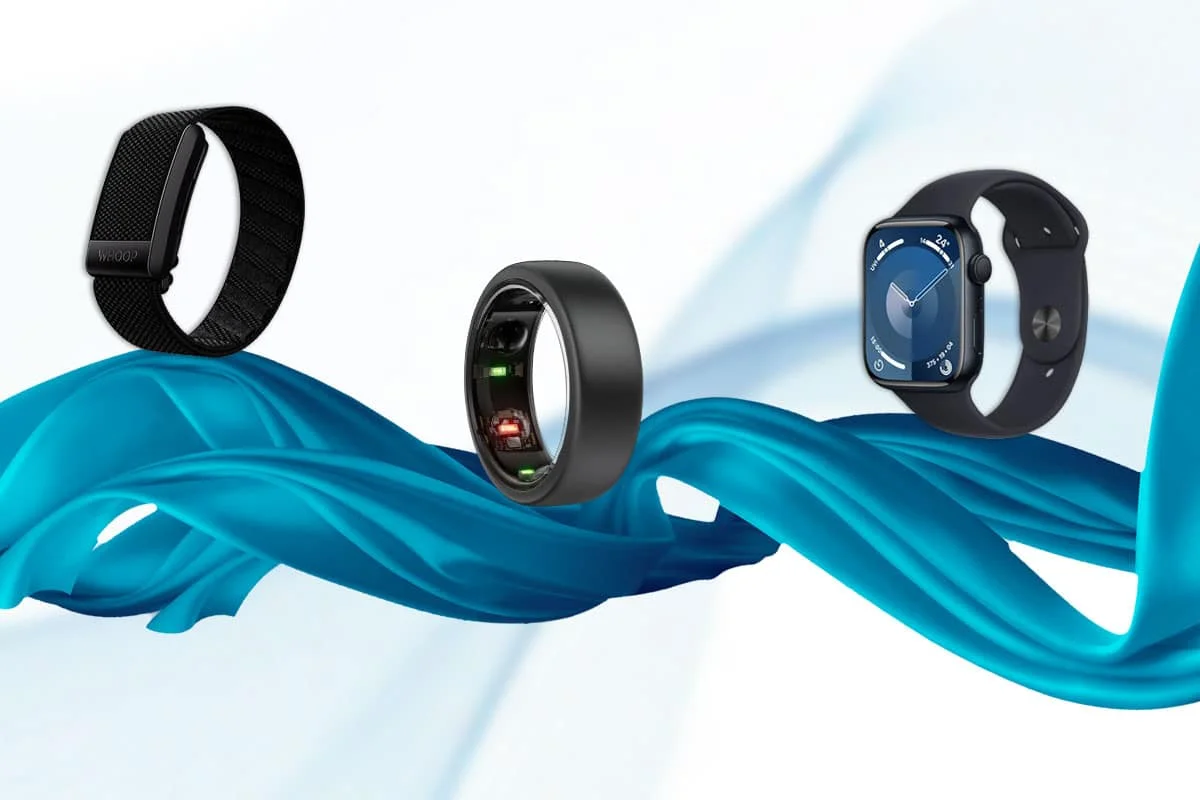
Some of these have been on my wrist and fingers for years, while others have recently joined the stack. After putting these through various tests, I’ve got the scoop on WHOOP vs Oura vs Apple Watch and which one you should be spending your $$$ on. You can thank me later!
Specifications
| Specifications | Apple Watch Series 11 | Oura Ring 5 | WHOOP 5.0 |
|---|---|---|---|
| Current model | Series 11 | Ring 5 | 5.0 (One and Peak tiers) |
| Form factor | Wrist, screen | Ring, screenless | Wrist band, screenless |
| Price | From $399 | $399–$499 | Bundled into membership |
| Mandatory subscription | No | Yes, $5.99/mo or $69.99/yr | Yes, $199–$359/yr |
| Battery | Up to 24 hours | 6–9 days | 14+ days |
| Screen | Yes, always-on OLED | None | None |
| GPS | Built in | None | None |
| Real-time workout data | Strongest of the three | Limited | Strong, especially on the bicep |
| Sleep tracking | Sleep Score, stages, apnea notifications | Deep, passive, longest-running feature set | Sleep Need and Sleep Performance |
| Recovery/readiness | Training Load and Vitals | Readiness Score | Recovery Score, tied to Strain |
| Heart health | ECG, hypertension alerts, irregular rhythm | HRV, Cardiovascular Age, Health Radar | HR, HRV, recovery metrics |
| Compatibility | iPhone only | iOS and Android | iOS and Android |
| Best for | Active iPhone users who want one device that does it all | Passive sleep and recovery tracking, discreet wear | Athletes who train around recovery data |
| Biggest limitation | Daily charging | No live workout screen, mandatory subscription | No screen, mandatory subscription |
My First Impressions
Being a user of the Apple Watch for ages, I can easily say that I love it. But, since I cannot stand wearing a watch to bed, I picked up the Oura Ring for sleep tracking. A few months later, I got fascinated with the WHOOP band, so I threw that into the mix, too, because why stop at two?
Here are my first impressions of all of these wearables–
Decode the Decor
The Smart Jewelry Revolution — a practical guide to wearable tech.
WHOOP
- Comfortable to wear throughout the day, but makes itself known at night.
- The app is a tad hard to navigate on the first go, with a load of information that can sometimes be daunting.
Oura Ring
- Very pretty and dainty without looking like a tech gadget on my arm.
- App is so easy to navigate, with scores to give a quick glance at my metrics.
- Extremely comfortable to wear throughout the day and night, even in the shower.
Apple Watch
- Customized straps make me never get bored of the watch.
- Great to wear at the gym and tracks all the metrics I need, including steps throughout the day.
- All metrics available on my wrist live during workouts.
- Not the most ideal to wear to bed in order to track sleep.
- Effortless to navigate, thanks to the Apple ecosystem.
WHOOP vs Oura vs Apple Watch: Features
| Feature | WHOOP 5.0 | Oura Ring 5 | Apple Watch Series 11 |
|---|---|---|---|
| Sleep tracking | ✓ | ✓ | ✓ |
| Sleep stages | ✓ | ✓ | ✓ |
| Sleep Score | Sleep Performance | ✓ | ✓ |
| Sleep Need | ✓ | – | – |
| Recovery / Readiness | Recovery | Readiness | – |
| Strain / Training Load | Strain | Activity Score | Training Load |
| Heart rate | ✓ | ✓ | ✓ |
| HRV | ✓ | ✓ | ✓ |
| Resting heart rate | ✓ | ✓ | ✓ |
| Stress tracking | Stress Monitor | Daytime Stress, Resilience | Vitals |
| Temperature tracking | ✓ | ✓ | ✓ |
| Blood oxygen | ✓ | ✓ | ✓ (availability varies by model, region and regulatory status) |
| ECG | – | – | ✓ |
| High/low heart-rate alerts | ✓ | – | ✓ |
| Irregular rhythm notifications | – | – | ✓ |
| Sleep apnea notifications | – | – | ✓ |
| Hypertension notifications | – | – | ✓ |
| VO2 Max | ✓ | Cardio Capacity | ✓ |
| Steps | ✓ | ✓ | ✓ |
| Activity tracking | ✓ | ✓ | ✓ |
| Automatic workout detection | ✓ | ✓ | ✓ |
| Live workout metrics | Limited | Limited | ✓ |
| GPS | Connected GPS | – | ✓ |
| Strength training | Strength Trainer | ✓ | ✓ |
| Women’s health | ✓ | ✓ | ✓ |
| Fertile window / ovulation insights | ✓ | ✓ | ✓ |
| Cardiovascular health | ✓ | ✓ | ✓ |
| Health trends | ✓ | ✓ | ✓ |
| Health alerts | Limited | Health Radar | ✓ |
| Smartwatch features | – | – | ✓ |
| Notifications | – | – | ✓ |
| Calls and texts | – | – | ✓ |
| Music controls | – | – | ✓ |
| Best for | Recovery and training | Sleep and wellness | Fitness and smartwatch features |
Design and Comfort
The WHOOP, commonly known as the WHOOP band, is a small square device that is worn on the wrist with a band. The cool thing about this device is that it has a lot of customization options available so you won’t get bored of wearing one strap on your wrist forever. I got the black one to test out.
It is pretty comfortable to wear, given the option of various materials for the bands available. It’s not as annoying with the notifications as my Apple Watch, but it’s also not as comfortable as the Oura Ring to sleep in.
Additionally, the WHOOP has a clothing line that is designed to hold the device in case you don’t want to wear it as a band on your wrist. But, since I won’t be wearing gym clothes all day, every day, I prefer wearing it as a band.
The Oura Ring 5, as the name suggests, is a ring with sensors on the inside to measure various health metrics. I have the Silver color, which is so easy to style and blends easily with my outfits. Given the placement and the size of the Oura Ring, it is the best out of the three for wearing to bed. The Ring 5, is also the smallest smart ring on the market being almost 40% slimmer than the Ring 4.
Ah, the Apple Watch. Bought it for the style, stayed for the impeccable features that make it a key part of the Apple ecosystem. I upgraded to the Apple Watch Series 11, which we will be comparing today.
The sheer variety of straps available officially, as well as in the depths of Amazon, makes this very easy to style and lets me choose the material I’m most comfortable with. Although comfortable to wear throughout the day, I cannot stand wearing a watch to bed. But that’s a personal preference, so you do you, girl!
WHOOP: 4/5
Oura Ring: 5/5
Apple Watch: 3.5/5
Battery Life
I’m the queen of letting my devices die before I find the charger and plug them in. So, if I’m using a device for tracking my health metrics, I definitely need it to have an ample amount of charge before I need to plug it in again.
In terms of battery life, the WHOOP has seriously upgraded their battery life game with 14+ days on a single charge. Additionally, the WHOOP has a battery that clips on, allowing me to wear it while it charges, so that I never lose track of my metrics.
The Oura Ring 5 lasts 6-9 days before I need to top it off, which is great, provided I never take it off. Like, apart from when I need to charge it, of course.
Then comes my Apple Watch. As much as I love it, if I’m not testing it against other wearables, it’s almost always out of battery.
The Series 11 has upgarded its battery life to up to 24 hours and the way I normally use my Apple Watch, it can go 3 days without needing a charge. But if I use it to track my sleep as well, which is what I did while pitting it against the other two wearables, I need to charge it every morning.
WHOOP: 5/5
Oura Ring: 4.5/5
Apple Watch: 3/5
Sleep Tracking


If there’s one reason I can point out that convinced me to buy a wearable, it is sleep tracking. It is because for the years I’ve had my Apple Watch, I never once wore it to track my sleep at night, deliberately, of course.
The WHOOP band stands out in terms of one feature– the sleep debt. It’s surprising how useful this feature has been. It calculates how much sleep I’ve fallen behind on throughout the week and determines the ideal amount of sleep I need based on my current metrics.
The app also prompts me every morning with a survey about how I slept the night before- if I had caffeine or alcohol before bed and stuff like that. The answers, combined with my heart rate data, reveal my sleep performance percentage, which is essentially the amount of sleep I got vs. the amount of sleep I need. This is similar to Oura’s sleep score.
I also like the Sleep Coach feature of the WHOOP, wherein it tells me the ideal time for me to go to bed if I can’t catch up on my sleep debt with naps during the day. While this feature is missing from my Apple Watch, it still isn’t enough of a dealbreaker for me not to consider Apple for sleep tracking.
While all three devices mostly give similar metrics, the Oura gives a sleep score (0-100), which gives me a crown whenever it is >85. This score helps me understand the quality of sleep I’ve had at a single glance, even without diving into the measurements.
The sleep metrics are also pretty accurate to how I feel, especially the time of sleep and waking up. Barring a couple of times where the Oura detected sleep when I was fully awake, this device has been my go-to for sleep tracking.
Apart from tracking my total sleep and sleep stages almost perfectly, the nap detection is a little off on the Apple Watch. It also doesn’t detect sleep stages during naps so it all displays as one big block of merging colours. Apart from that, the metrics are very close to how I felt my sleep to be.
It gives me my sleep stages, total time of sleep, a pretty accurate time of sleep and waking up, and a few more parameters related to heart rate and breathing. It can also detect signs of sleep apnea through “breathing disturbances” using its built-in accelerometer.
One thing I loved about wearing my Apple Watch to bed was the Wake Up alarm, which vibrates in a rhythmic tone, waking me up ever so gently, unlike the alarm on my phone, which blares like a foghorn that jerks me out of sleep. The same goes for my WHOOP band with its haptic alarm.
But is it enough to convert me to a person who wears a smartwatch to bed? Ahh, no. Sorry, Apple. As much as I am a loyal user, the bands and watches are not my personal preference.
Performance-wise, all three devices hold their own, but for me, comfort is key, which is why Oura wins the sleep-tracking battle.
WHOOP: 4/5
Oura Ring: 5/5
Apple Watch: 3.5/5
Activity Tracking

Okay, my Apple Watch may have received a lower rating from me in terms of comfort while wearing it to bed, but this is where it truly shines- think Serena Williams at Wimbledon. I’ve been using my Apple Watch to track my workouts for so long that nothing has come close.
I can track my workouts automatically without fail and manually enter a variety of workouts. Probably the largest library of workouts I’ve seen. From details such as active and total calories, avg. Heart Rate, workout time, average pace, route and more. The activity rings closing is what gives me the most satisfaction.
I can set the goals for each ring – move, stand and exercise, as per my own preference. I usually set them to a slightly higher limit than I know I can achieve in order to push myself. This is what gives me the satisfaction of being truly productive during the day.
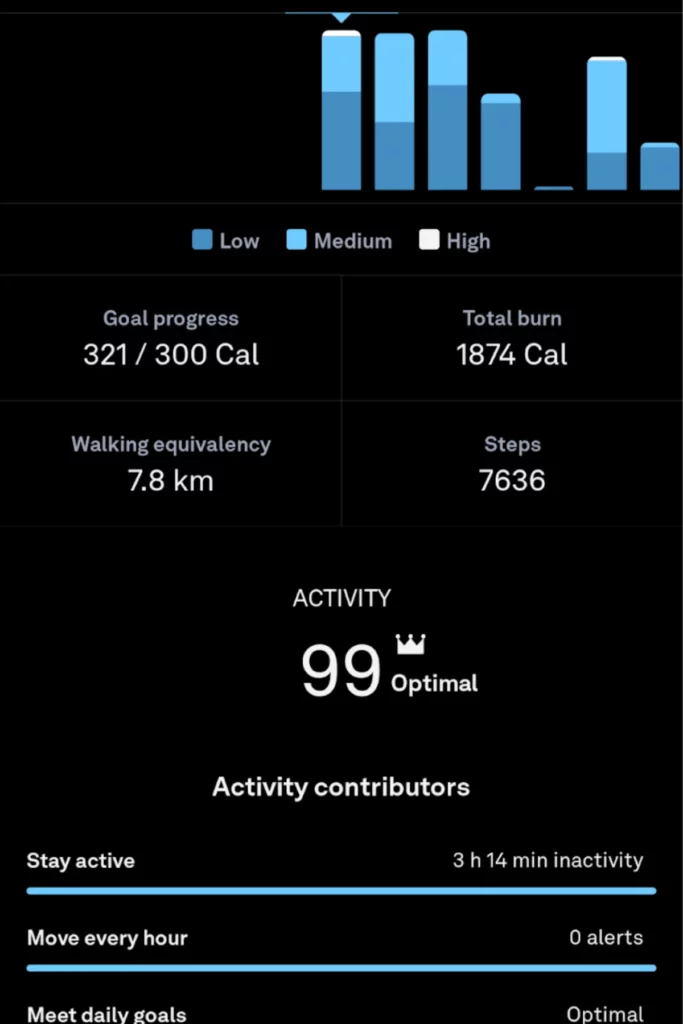
This is also true for the Oura Ring, wherein I can change certain goals but not the standing goal. It does, however, just like my Apple Watch, give me reminders to stand up and move around (an embarrassing amount of times) if I have been inactive and sitting in a spot for too long.
The edge Oura has over my watch, or my WHOOP band, is that I don’t need to take it off at all. So, therefore, I feel it never misses my steps. Although it overcalculates my steps because of the hand movement, it is the easiest to wear 24×7.
Look, the Oura Ring is a great sleep-tracking device, even calculating steps, activity and health metrics throughout the day, but it is not a fitness tracker. I often take off the Oura Ring at the gym because weightlifting is not comfortable with a chunky ring on my finger.
For yoga, Pilates and walking/running, Oura is great. It tracks distance, route and total calories burned. For strength training, not only is it uncomfortable, I didn’t find it very accurate with heart rate when there’s a lot of movement involved. The watch always recognizes my activities accurately, but the Oura Ring, while mostly accurate at recognizing activities, has recorded my anxiety and breakdown as a workout (I don’t blame it, though).
As for the WHOOP band, I figured since it has been a favorite amongst so many athletes, it must be onto something. So I kept my excitement on and went to the gym with the WHOOP band on my wrist.
Automatic tracking is better than the Oura Ring on the WHOOP, but Apple still takes the cake with the Apple Watch. The metrics calculated on the WHOOP are still great, at par with the Apple Watch, solidifying its reputation as an athlete’s favorite.
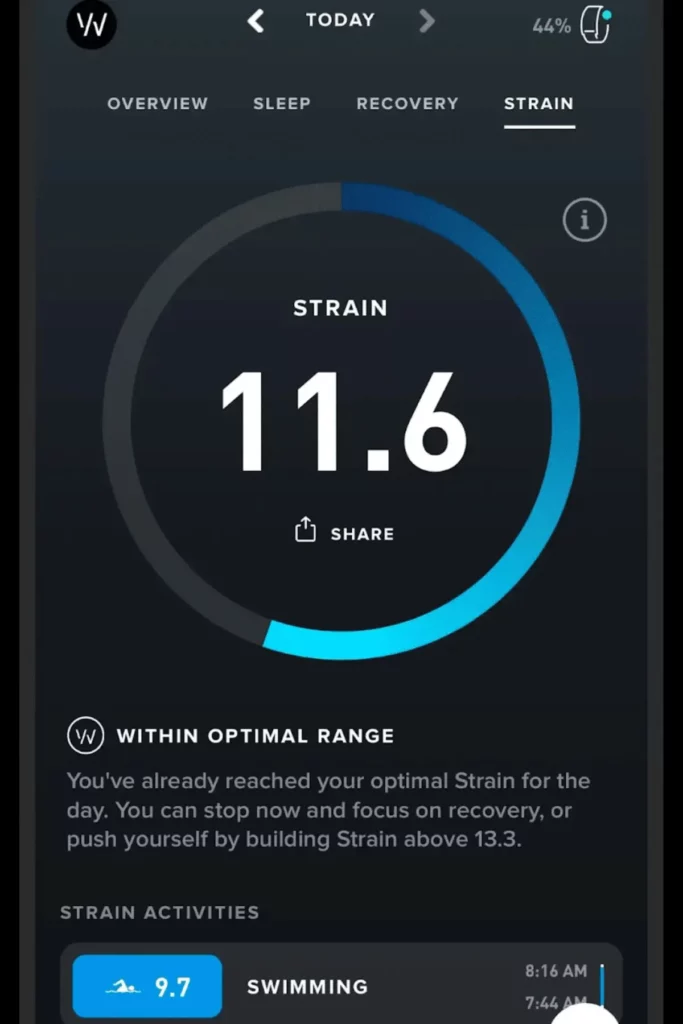
There is one more feature of the WHOOP that really caught my attention– the Strain. Essentially, the amount of stress I’m putting my body through. WHOOP categorizes these as –
- 0 – 9 – Light
- 10 – 13 – Moderate
- 14 – 17 – High
- 18 – 21 – All Out
This score can be a combination of workouts and activities. WHOOP also combines activities into a daily strain score at the end of the day. It’s a great screenless option for a health and fitness tracker.
The WHOOP also integrates directly with any other fitness apps, such as Strava, MyFitnessPal, Nike Run Club, etc.
The ideal combo for me is Oura for sleep tracking and WHOOP for activity and working out.
WHOOP: 5/5
Oura Ring: 3.5/5
Apple Watch: 5/5
Cycle Tracking

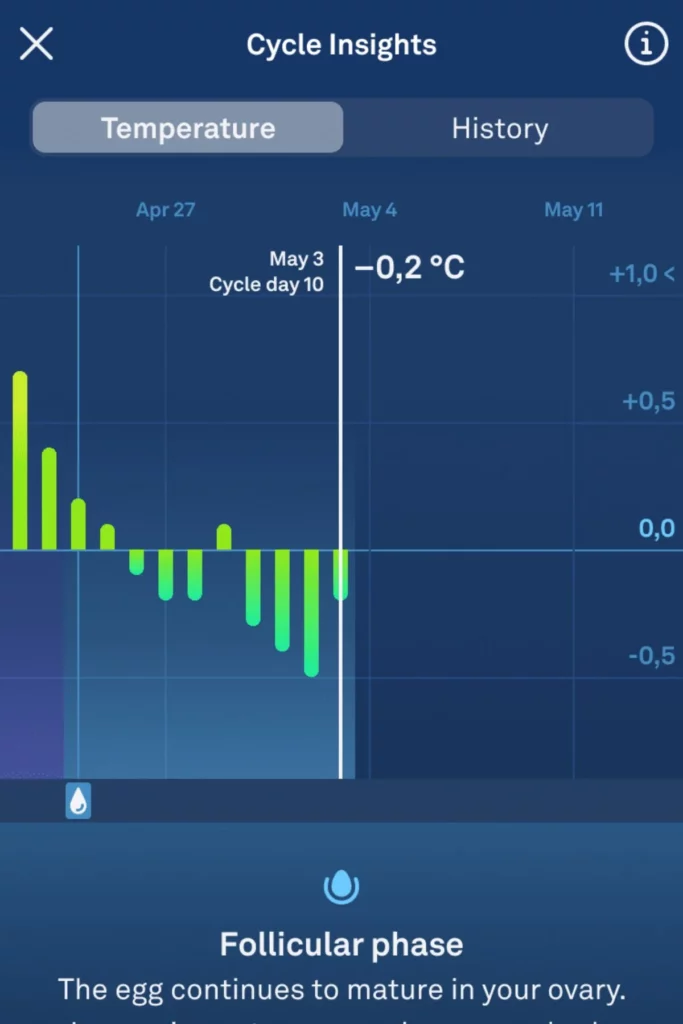

All of these three devices measure and predict my period, some better than others. The Apple Watch takes temperature readings from my wrist and notices the ever-so-slight changes that predict my period dates and ovulation.
Of course, I have to log the dates in manually, along with any symptoms. The app now predicts my menstrual phases. To be honest, the cycle tracking on the Apple Watch is pretty basic and they don’t advise their predictions to be used for medical purposes either.
The Oura Ring, on the other hand, notes my temperature reading over the night and uses these changes to predict menstrual phases, period dates, and ovulation dates. Obviously, I have to log my period manually, but the predictions on my Oura Ring are scary accurate.
They also partnered with Natural Cycles, to take temperature readings every morning, the minute I wake up. For people trying to dodge pregnancies without the use of hormonal birth control or the complete opposite, trying to conceive, this is a pretty dope feature.
Smart rings in general are great for fertility tracking with the Oura Ring being the best in my humble opinion.
The WHOOP also has a cycle tracking feature, which works the same way as the Oura and the Apple Watch do, with a journal to log various symptoms and behaviors. They too, recently partnered with Natural Cycles which is a big move for WHOOP since previously I had always found the app to be more focused on fitness and activity data.
The cycle tracking feature on the WHOOP band has felt half-baked. More like it was thrown in after the product was done developing, just to be in the race with its competition. Sadly, that used to reflect but with this recent integration with NC, I’m hoping that would change.
The Oura Ring is hands down my go-to for period tracking.
WHOOP: 3.5/5
Oura Ring: 5/5
Apple Watch: 4/5
Additional Features
- The Apple Watch, being a device with a screen and functioning as a mini phone on my wrist, has many more features that I can’t compare to these wearables. The on-spot blood oxygen check, ECG, AFib detection, notifications, and reminders for taking my supplements and medicines are a few. It also allows me to find my phone, a feature I shamelessly use (and abuse) all the time.
- The WHOOP offers me an option to create teams with my friends and family who have the band and keep track of our progress in a (not so) subtle way. I also get a month’s subscription free for every referral I give.
- The Oura Ring focuses on sleep and recovery and gives me a Readiness Score every morning, just like the Recovery Score on WHOOP. This allows me to set the tone for my day and squeeze in a quick HIIT session, along with my workout, if I’m feeling up for it. Oura also picks up on potential sickness; luckily, I haven’t had the chance to experience it yet.
Heart Health and Safety
The Apple Watch has the highest number of safety features of the three. These include the ECG, high and low heart rate alerts, irregular rhythm notifications, sleep apnea notifications and hypertension notifications, which need at least 30 days wear time for calibration purposes. Fall Detection and emergency services depend on the specific device type used.
Oura is equipped with resting heart rate, HRV, Cardiovascular Age, Cardio Capacity and the Health Radar function, which is meant to detect wellness trends and not acute events.
WHOOP, on the other hand, has heart rate, HRV and the recovery metrics as its basic features of the 5.0 hardware devices. The ECG and blood pressure features associated with WHOOP are available through the WHOOP MG sensor, which is a separate purchase from the basic 5.0 hardware included with WHOOP One and Peak.
Apps, Insights, and Data Overload
The WHOOP app is very dense, designed for those who would like to analyze graphs of strain, recovery breakdowns and coaching suggestions on a daily basis.
The Oura app is more relaxed, focusing on recovery and long-term health trends as opposed to numbers.
While the Apple ecosystem breaks everything down into two apps– Health and Fitness. The interface itself is less sophisticated than both competitors’ dashboards but is way more advanced in terms of device capabilities.
It should be stated explicitly that more data is not necessarily the better option. In case you are one of those people who checks their recovery score three times a day and let it set your emotional state, then the data-intensive platform such as WHOOP will become your enemy. Choose the density of the app according to the way you want to interact with your data.
Compatibility and Ecosystem
The Apple Watch will only work with an iPhone, period, and will require a fairly up-to-date iPhone with a relatively recent version of iOS to take advantage of all the Series 11’s capabilities. If you use an Android phone, your choice is already made for you and the Apple Watch is not even in the running. Here are some Apple Watch alternatives for iPhone.
The Oura ring is compatible with both iOS and Android, and new versions of the Oura ring have the ability to interface with Apple Health through iOS for any users who wish to incorporate that information into the Apple ecosystem. Here are some Oura Ring alternatives if you are looking.
WHOOP is also available for both iOS and Android devices, though the minimum version requirement is something you should check before purchasing the device. If the subscription is a problem, here are WHOOP alternatives.
If you use Android, your choices are further narrowed down to WHOOP and Oura, leaving the Apple Watch completely out of the question.
Price and Availability
That’s where things get really exciting.
Starting from $399 in the United States, the Apple Watch Series 11 does not require any obligatory subscription for the built-in health and fitness applications.
The Oura Ring 5 also starts at $399 for certain colors and has higher prices for some other colors, but you can avail deals and discounts. Oura Membership is available for $69.99 yearly or at $5.99 monthly in the US and has the first month free for all new users who purchase a ring.
In the case of WHOOP, the pricing model is different since it requires a WHOOP membership. WHOOP One is priced at $199 yearly and has WHOOP 5.0. WHOOP Peak is priced at $239 yearly.
Three-year baseline
| Product | Approx. required cost over 3 years |
|---|---|
| Apple Watch Series 11 | $399 |
| WHOOP One | $597 |
| Oura Ring 5 + 3 annual memberships | $608.97 |
| WHOOP Peak | $717 |
These are the base costs and do not include any taxes, extra equipment, mobile service plans and additional services.
Yes, the Apple Watch does cost significantly less when taking into consideration the basic hardware cost over time.
This is not necessarily a bad deal, as Oura and WHOOP offer both the hardware, the software and insights. The question is whether it’s worth it to pay each year for the service, especially if you are not using the insight services.
Final Verdict
Ok, this is a tricky one. I think all devices are pretty great on their own and would make for a great investment, depending on the personal goals you have. If you’re looking for a sleep and wellness tracker, Oura is a great choice overall. It has decent step tracking and excellent sleep and cycle tracking.
Ideally, if you have the budget, I prefer the Oura Ring for tracking every metric, day to night, and the Apple Watch during the day, especially for workouts.
What makes WHOOP take the third place for me, though, is that if I need a separate tracker for my “activity”, it should at least have a damn good step calculator. Because, knowing myself, I’m not training every day.
But if you only have the budget to invest in one, the Oura ring is great for focusing on sleep and general health. Go for the Apple Watch if you want to focus more on activity and workouts. And if you don’t mind wearing a watch to bed, you get the best of both worlds.
FAQs
Decode the Decor
The Smart Jewelry Revolution
A practical guide to wearable tech's future — delivered straight to your inbox.
Author

Thank you so much for the informative breakdown lased with subtle humour which made it a delight to read.
I currently have a watch and had Oura FOMO and you have given me the pro’s and cons to consider.
Thanks
Thank you, Tshepiso! I’m glad you enjoyed reading it.